


You've just reached your office when that familiar, sinking feeling hits: did you actually lock the front door this morning? For many homeowners, installing a wifi digital lock singapore is the end of that daily anxiety. We understand the frustration of fumbling for keys with heavy groceries or worrying about how to let a part-time cleaner in while you're away. You want a home that's secure, but you also need it to be convenient and simple to manage.
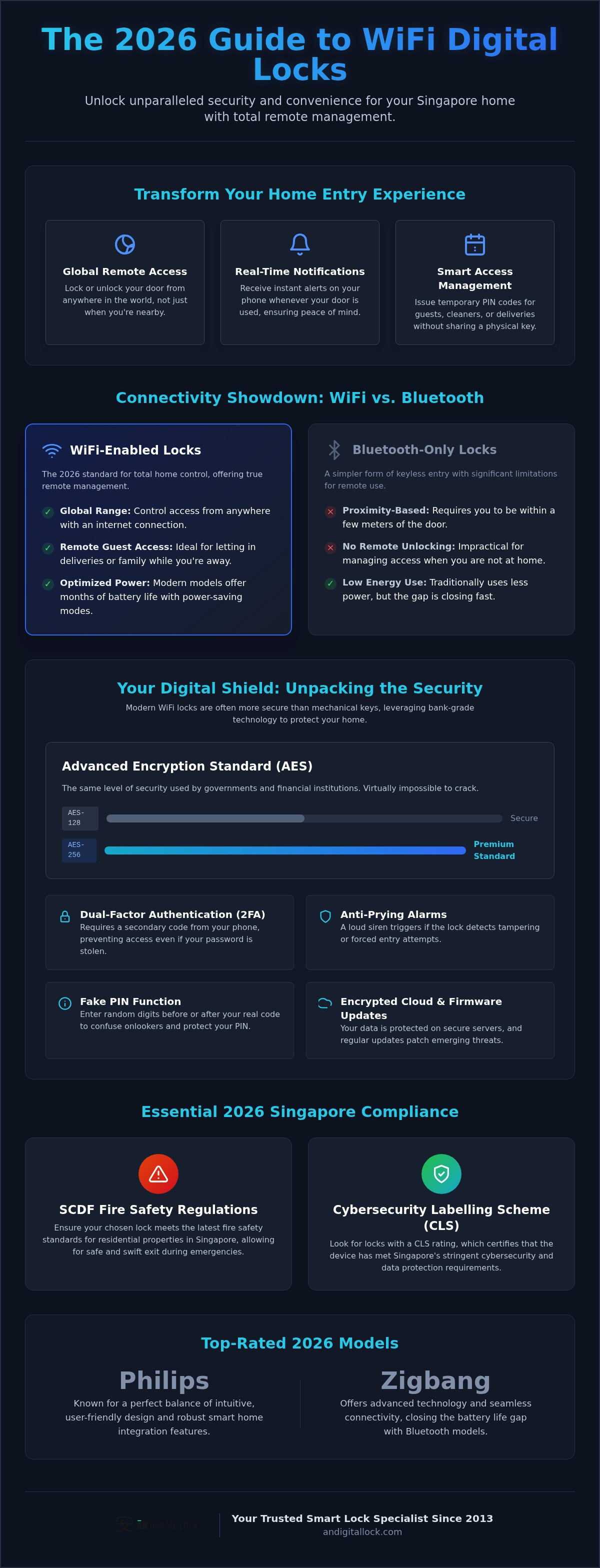
In this complete 2026 guide, you'll discover how WiFi-enabled technology provides unparalleled remote access and peace of mind. We'll show you how to get real-time notifications on your phone and manage your home's entry from anywhere in the world. We also cover essential 2026 updates, including SCDF fire safety standards and the latest Cybersecurity Labelling Scheme requirements. From the newest Philips and Zigbang models to seamless smart home integration, you'll learn everything needed to choose a lock that protects your family while simplifying your life.
Key Takeaways
- Master the difference between simple keyless entry and full remote management to choose the right smart home hub for your needs.
- Discover how modern encryption standards like AES-256 keep your home safe from digital threats and unauthorized access.
- Optimize your home network setup to ensure your wifi digital lock singapore maintains a stable connection through thick concrete walls.
- Identify top-rated 2026 models from Philips and Zigbang that offer the best balance of intuitive design and smart home integration.
- Verify that your chosen lock complies with the latest SCDF fire safety regulations and Singapore’s Cybersecurity Labelling Scheme.
What is a WiFi Digital Lock and Why is it Essential in 2026?
A wifi digital lock singapore is a sophisticated security device that connects directly to your home network or via a dedicated gateway. While early digital locks focused solely on keyless entry, the 2026 standard has shifted toward total remote management. This technology transforms your front door from a passive barrier into an active participant in your smart home ecosystem. You no longer just unlock a door; you manage access, monitor security, and receive live updates from anywhere with an internet connection.
In the modern Singaporean household, convenience and security are non-negotiable. Whether you live in a new BTO flat or a refurbished condo, a WiFi-enabled lock provides a level of control that traditional locks cannot match. It integrates with other smart devices to create a frictionless living experience. This shift represents the evolution of home protection where physical security meets digital intelligence.
WiFi vs. Bluetooth: Understanding the Difference
Bluetooth locks rely on short-range proximity. You must be within a few meters of the door for the app to communicate with the lock. This limitation makes them impractical for many modern needs. WiFi locks are superior for remote guest access because they allow you to grant entry to a delivery person or a family member while you're still at your office or even traveling abroad.
Battery management is another critical factor. Bluetooth is known for low energy consumption, but 2026 technology from brands like Philips and Zigbang has closed the gap. Modern WiFi locks use optimized power-saving modes that keep the device operational for months on a single set of batteries or a charge. You get the benefit of global connectivity without the constant worry of a dead battery.
The Core Components of a WiFi Lock System
A complete system consists of three main elements that work together to secure your home. Understanding these helps you choose the right setup for your HDB or private property.
- The Lock Hardware: You can choose from Mortise styles that replace your entire handle set, Deadbolts for additional security, or Rim locks which are popular for metal gates.
- The WiFi Bridge or Gateway: Some models connect directly to your router, while others use a small bridge plugged into a nearby outlet. This bridge acts as a translator between your home network and the lock's internal radio.
- The Mobile App: This is your central hub. Use it to issue temporary PIN codes, check access logs, and receive instant alerts when the door is opened.
AN Digital Lock has specialized in these systems since 2013. We ensure that every component is installed correctly so your smart home remains secure and responsive. Professional installation is vital to ensure the hardware aligns perfectly with your door frame, preventing mechanical strain on the motor.
Is a WiFi Digital Lock Secure? Encryption and Safety Standards
Many homeowners worry that connecting a lock to the internet invites hackers. This is largely a myth when dealing with reputable brands. Today's systems use bank-grade encryption to ensure your data stays private. When you install a wifi digital lock singapore, you're leveraging technology that's often more secure than a standard mechanical key which can be easily picked or duplicated.
The digital backbone of these locks relies on Advanced Encryption Standard (AES) protocols. While AES-128 is highly secure, many premium models now utilize AES-256 bit encryption. This is the same level of security used by government agencies and financial institutions globally. It's virtually impossible to crack through brute force, providing a robust digital shield for your home.
Security also extends to how you interact with the device. Most modern apps utilize dual-factor authentication (2FA). Even if someone discovers your password, they can't gain entry without a secondary verification code sent to your registered mobile device. Physical security features complement these digital layers. Anti-prying alarms will trigger a loud siren if the lock detects forced entry, while the "Fake PIN" function allows you to enter random digits before or after your actual code to foil anyone watching over your shoulder.
Data Privacy and Cloud Security
Brands like Philips and Zigbang prioritize data integrity by hosting their services on encrypted cloud servers. Every command sent from your phone to the door uses unique, encrypted tokens to prevent signal interception or "replay attacks" where a hacker tries to mimic your unlock command. Regular firmware updates are essential; they provide the latest security patches to keep your system ahead of emerging threats. You can explore our range of certified smart locks to find a model that meets Singapore's highest cybersecurity standards.
Emergency Access and Fail-Safes
A common concern is what happens during a power outage or if your internet goes down. Your wifi digital lock singapore remains fully functional for local entry. Fingerprint scanners, PIN pads, and RFID readers do not require an active internet connection to operate. If the batteries eventually run out, you can use a 9V battery at the external jump-start point to provide temporary power. Every lock also comes with mechanical override keys as a final fail-safe. For maximum security while you're inside, the "Internal Force Lock" or "Privacy Mode" button can be activated to disable all external electronic access until you're ready to leave.
Key Features to Look for in a WiFi Digital Lock
Choosing a wifi digital lock singapore requires looking beyond basic entry methods. In 2026, the value of a smart lock lies in its software capabilities and how it simplifies your daily routine. Remote management features turn your smartphone into a command center for your front door, providing control that was previously impossible. You're no longer just buying a lock; you're investing in a sophisticated guest management system.
A high-quality system should offer several core software-driven features that cater to the busy Singaporean lifestyle:
- Remote Unlocking: Grant access to family members or delivery personnel directly from your office. It's the ultimate solution for those unexpected moments when you can't be home.
- Real-Time Notifications: Receive instant alerts on your phone the moment your child reaches home or if the door is left ajar. This provides immediate peace of mind for working parents.
- Activity Logs: Review detailed digital records of exactly who entered your home and at what time. This transparency is vital for monitoring home security and verifying service visits.
- One-Time or Duration PINs: Create temporary codes for part-time cleaners or renovation contractors. These codes can be set to expire automatically, ensuring your home remains secure after the job is done.
Advanced Access Methods Beyond WiFi
While internet connectivity is vital, the physical interaction with the lock must be seamless. Biometric fingerprint scanners are the fastest entry method, with modern sensors achieving 0.5-second scans. For elderly family members who may have faded fingerprints, RFID cards and tags offer a reliable and familiar alternative. Additionally, ensure your lock integrates with smart home ecosystems like Google Home, Alexa, or Apple HomeKit to enable voice commands and automated routines that fit your lifestyle.
Hardware Durability and Aesthetics
The physical build of your wifi digital lock singapore must withstand the local climate and heavy daily use. Push-pull handles are increasingly popular for their ergonomic "one-motion" entry, while traditional lever handles remain a classic choice for many homes. Look for premium materials like high-grade zinc alloy and tempered glass to ensure longevity. In Singapore, HDB corridors are often exposed to wind-driven rain, so choosing a model with proven weather resistance is essential to prevent internal electronic damage.
Installation Guide: WiFi Stability in Singapore Homes
Setting up a wifi digital lock singapore requires more than just a screwdriver. You need to ensure your home network actually reaches your front door. Singaporean homes, especially HDB flats, are built with thick reinforced concrete. These walls are notorious for blocking wireless signals. If your router is in the living room or a bedroom, the signal reaching your main door might be too weak for reliable remote operation. You should test your signal strength at the door using your smartphone before finalizing your purchase.
Door requirements also vary significantly between HDB units and private condos. Mortise depth and clearance are critical factors. Some older doors may not have the internal space for a modern smart mortise, while newer BTO doors are often designed with these upgrades in mind. Choosing a lock that doesn't fit your door's physical specifications can lead to mechanical failure or even damage to your door frame.
Identifying Your Door and Gate Type
Before buying, you must understand your door's anatomy. Different properties have different standards. For example, you should check for mortise lock compatibility to see if the internal mechanism fits your door's thickness. You also need to measure the clearance between your main door and the metal gate. If the distance is too narrow, certain push-pull handles might collide. Remember that HDB main doors must be fire-rated. You must ensure your chosen lock is certified to maintain that fire rating, as non-compliant locks can void your home insurance.
Optimizing WiFi Connectivity
If you find your signal is weak, don't worry. Most WiFi locks use a dedicated bridge to bridge the gap. Plug this bridge into an outlet that has a clear line of sight to both the lock and the router. For larger condos or executive flats, a Mesh WiFi system is often the best solution. It creates a unified network that blankets your entire home, including the entrance. This eliminates the "dead zones" that cause connectivity drops and delayed notifications on your phone.
While DIY might seem tempting, it's rarely worth the risk. Digital locks require precise alignment to function correctly. If the mortise is off by even a few millimeters, the motor will work harder and drain your batteries faster. Professional installers from AN Digital Lock have over 10 years of experience with Singaporean door types. We ensure the installation is perfect, which is often a requirement to keep your manufacturer's warranty valid. Contact our expert team today to ensure your smart home stays secure and functional.
Top WiFi Digital Lock Brands at AN Digital Lock
Choosing the right brand for your wifi digital lock singapore is about more than just aesthetics; it's about trusting the technology that protects your family. We stock a curated selection of world-class manufacturers who lead the industry in 2026. Each brand offers unique strengths, from seamless app interfaces to robust mechanical engineering. You aren't just buying a gadget. You're investing in a reliable security hub for your home.
- Philips EasyKey Series: These locks are the pioneers of intuitive design. The WiFi models offer a streamlined user experience, allowing you to manage multiple entry points from a single, polished app. They're ideal for those who prioritize ease of use.
- Zigbang (formerly Samsung): Often considered the gold standard, Zigbang locks provide the most advanced smart home integration. They're perfect for homeowners who want their lock to communicate effortlessly with other smart devices in a unified ecosystem.
- Solity: If you value high performance and sleek Korean design, Solity is an excellent choice. Their locks are known for incredibly fast biometric recognition and durable hardware that complements modern Singaporean interiors.
- Hafele: This brand brings German engineering to the digital age. Hafele locks are built for longevity, combining heavy-duty physical security with reliable smart connectivity that stands the test of time.
Why Choose AN Digital Lock?
Since our establishment in 2013, we've focused on becoming the premier digital lock singapore specialist. With over a decade of hands-on experience, we understand the specific needs of local homeowners. We don't just sell hardware. We provide comprehensive security solutions. This includes specialized hdb main door and lock bundle sets designed to offer maximum value and protection. Our team provides dedicated after-sales support and technical assistance to ensure your smart home stays running smoothly long after the initial installation.
Selecting Your Perfect Lock Bundle
For many Singaporeans, the most effective setup is a bundle that synchronizes your main door and metal gate. Matching your door lock singapore with a compatible gate lock allows for a "one-tap" entry experience. You can customize access methods for different family members, such as fingerprints for adults and RFID tags for the elderly. This tailored approach ensures everyone feels safe and comfortable using the system. Don't settle for a generic setup when you can have a professional, integrated solution. Browse our full range of WiFi digital locks today!
Upgrade Your Home Security for the Future
The transition to a wifi digital lock singapore is no longer just about losing your physical keys. It's about gaining complete control over your home's entry points from anywhere in the world. By choosing a system with bank-grade AES-256 encryption and ensuring stable network connectivity, you're building a foundation of safety that traditional locks simply can't provide. Whether you're managing access for guests or checking if your children arrived home safely, the convenience of real-time notifications and remote unlocking is life-changing.
Since 2013, AN Digital Lock has helped thousands of homeowners navigate the smart home journey with over 10 years of specialized expertise. As an authorized dealer for premium brands like Philips, Zigbang, and Solity, we provide more than just hardware. Every purchase includes professional installation to ensure your lock fits perfectly on your HDB or condo door. Don't wait for a security scare to upgrade your protection. Secure your home with the best WiFi digital locks from AN Digital Lock today and enjoy the peace of mind you deserve.
Frequently Asked Questions
Can I unlock my WiFi digital lock if I am overseas?
Yes, you can unlock your door from anywhere in the world. Remote unlocking is the primary benefit of a wifi digital lock singapore, allowing you to grant entry to family or couriers while you are traveling. Most apps also provide a real-time log so you can confirm exactly when the door was opened. This level of control is what makes WiFi models superior to proximity-based Bluetooth locks that require you to be nearby.
What happens to my WiFi lock during a power outage or internet failure?
Your lock will continue to function perfectly for local entry even if your home internet goes down. Methods like fingerprint scanning, PIN codes, and RFID cards don't require a network connection to operate. While you'll lose remote management features and real-time notifications until the connection is restored, your physical security remains intact. Every lock also includes a mechanical override key as a final fail-safe for complete peace of mind during emergency situations.
Do WiFi digital locks drain the battery faster than non-smart locks?
WiFi connectivity does consume more power than Bluetooth; however, modern 2026 hardware is highly optimized for energy efficiency. Most premium models from brands like Philips or Zigbang typically last between 10 to 12 months on a single set of batteries. Your mobile app will send low-battery alerts well in advance. If the batteries do run flat, you can use a 9V battery at the external jump-start point to provide temporary power for entry.
Is it possible for someone to hack into my WiFi digital lock?
While no digital device is entirely immune to risks, hacking a wifi digital lock singapore from a reputable brand is extremely difficult. These locks utilize bank-grade AES-128 or AES-256 bit encryption and dual-factor authentication to protect your data. This is the same security level used by financial institutions. Regular firmware updates provided by the manufacturer further harden the system against emerging threats, making it far more secure than traditional locks that are vulnerable to picking.
Can I still use a physical key with a WiFi-enabled smart lock?
Yes, every digital lock we sell includes a set of mechanical override keys. These keys are designed as a manual backup in case of total electronic failure or if you forget to change the batteries. We recommend keeping one spare key at a trusted location, such as your office or a relative's home. While you likely won't need them for daily use, having a physical backup ensures you're never locked out of your own home.
How do I manage guest access with a WiFi digital lock app?
Managing guests is simple through the lock's central mobile app. You can issue one-time PIN codes for delivery drivers or duration-based codes for part-time cleaners and renovation contractors. These codes automatically expire after the scheduled time, so you don't have to worry about changing your master PIN. You can also receive instant notifications the moment a guest uses their code, allowing you to track exactly who enters your property and when.
Do I need a special router for my WiFi digital lock to work?
You don't need a specialized router, but a stable 2.4GHz or 5GHz connection is necessary for remote features. Because Singaporean homes often have thick concrete walls, we recommend placing your router or a WiFi mesh node near the front door. If the signal is weak, many systems use a dedicated WiFi bridge that plugs into a nearby wall outlet. This ensures a consistent connection for real-time alerts and remote unlocking commands without draining the battery.
Is professional installation required for WiFi digital locks in Singapore?
Professional installation is highly recommended to ensure your lock functions correctly and your warranty remains valid. Precise alignment of the mortise and strike plate is critical; even a minor misalignment can cause the motor to strain and fail prematurely. Our team at AN Digital Lock has over 10 years of experience with HDB and condo doors. We handle the technical setup, including the WiFi bridge configuration, so your system is secure and responsive from day one.