


A Wi-Fi digital lock can help you stay connected to your Singapore home while you’re overseas, but its app features depend on the model and connection. Wi-Fi digital lock notifications while overseas may alert you when someone uses an access code or the battery is low. Depending on the model, you may also be able to lock or unlock the door remotely and review access times.
It’s natural to want reassurance that your door is secure and to know when someone arrives. These features can help, but they depend on an internet connection. If the lock goes offline, remote controls and live alerts may pause until it reconnects, while local entry methods may still work.
This guide explains what you may be able to control remotely, which alerts and entry-log details to expect, and how Wi-Fi or a hub affects the connection. You’ll also learn what happens during an outage, so you know what the app can and can’t tell you while you’re away.
Key Takeaways
- Remote locking, unlocking and live activity updates depend on the lock’s app setup and a working connection.
- Learn which alerts can help you notice guest access or a low battery while you’re away.
- Compare built-in Wi-Fi with a separate hub, including how signal strength and battery use can affect the setup.
- See how entry logs record access and why individual PINs make it easier to distinguish users.
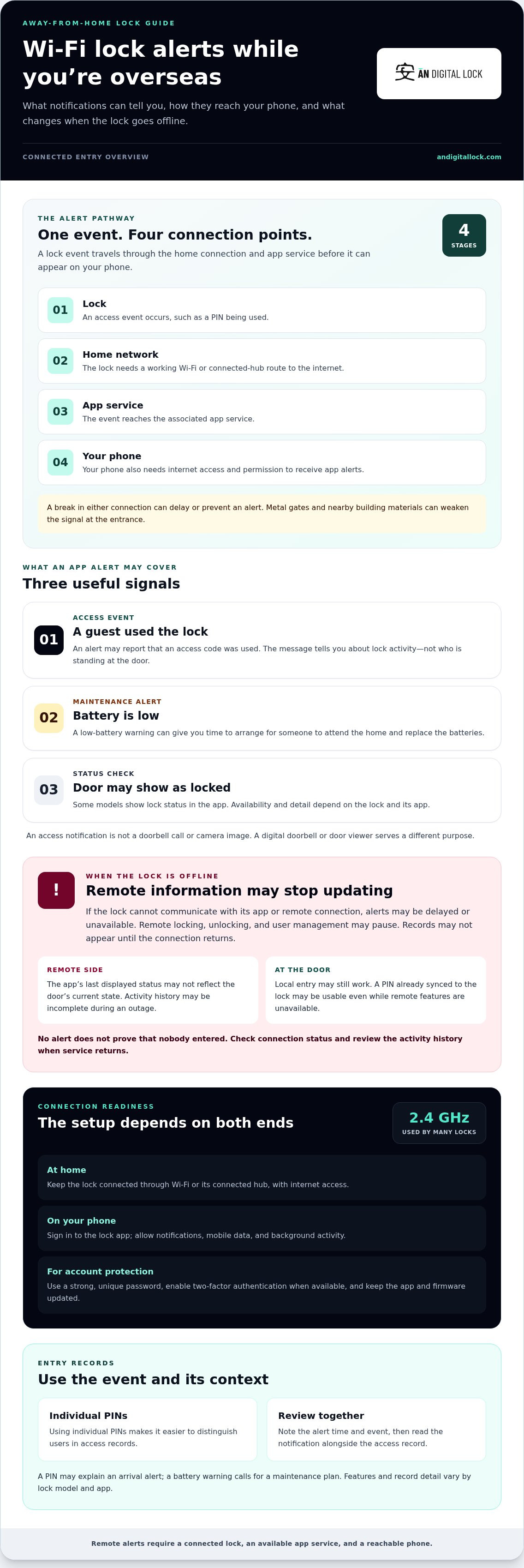
- Understand how an access event travels from the lock to your phone, and what can interrupt that notification.
Can I unlock my door from overseas?
Yes, some smart locks let you lock or unlock a door through a mobile app while overseas. Remote control depends on the lock model, its app, and an active Wi-Fi or hub connection. For homeowners comparing wifi digital lock notifications while overseas, remote controls are only one part of the setup.
Remote Locking and Unlocking
Remote locking and unlocking means sending a command from your phone to a connected smart lock. It matters when plans change while you’re away. For example, if a family member arrives at your Singapore home, you may be able to unlock the door in the app, then lock it again after they enter. The app may also show whether the door is locked, depending on the model.
Which digital lock brands in Singapore support overseas notifications, and how do they compare? Features vary by model and app, so compare support for remote access, entry alerts, and activity records rather than relying on a brand name alone.
Local and App-Based Access
Local access happens at the door; app-based access uses a network connection to send commands remotely. Depending on the lock, someone at home may use a PIN, fingerprint, card, or mechanical key. These methods don’t depend on your phone being nearby. Knowing the difference helps you plan for entry if your phone or home connection becomes unavailable.
A guest might use an existing access code at the keypad while you check the lock in the app. A mechanical key can provide another local entry method if the lock supports one. Remote unlocking can help with unexpected access, but it requires the lock to be online.
Offline Status and Activity Records
Offline status means the lock can’t communicate with its app or remote connection at that time. App notifications may be delayed or unavailable, and remote access records may not appear until the connection returns. Remote unlocking and user management may also pause. The app’s last displayed status may not reflect the door’s current state.
Someone may still enter locally with an access code already synced to the lock. If the app reports an outage, treat its activity history as potentially incomplete until the connection resumes. This distinction matters when you rely on wifi digital lock notifications while overseas to understand recent entry.
Connection, App Settings, and Costs
Overseas alerts require the lock’s Wi-Fi or connected hub to reach the internet, and your phone must also have internet access. Many smart locks use 2.4 GHz Wi-Fi. Enable app notifications and mobile data, and allow background activity so alerts can arrive when the app isn’t open.
What internet connection and smartphone app settings are needed to receive lock notifications overseas? Keep the lock connected, sign in to its app, and allow notifications and mobile data on your phone. What are the mobile data, cloud subscription, or roaming costs for remote lock alerts? Mobile data or roaming charges depend on your carrier and plan; cloud subscription costs depend on the lock’s service arrangement.
How secure are digital lock apps and overseas access notifications? Use a strong, unique password, enable two-factor authentication when available, and keep the app and firmware updated. These steps help protect your account.
WiFi lock notifications and low-battery alerts
Wi-Fi alerts can help you monitor arrivals and battery status while you’re away. The key distinction is between an alert about an event and a live view of the door: a notification reports lock activity, but doesn’t show who is standing there.
Lock and Battery Notifications
Lock notifications are app messages about events, such as a guest arriving or an access code being used. A low-battery alert gives you time to arrange for someone to attend the home and replace the batteries. Together, these messages help you monitor activity and maintenance without treating every alert as proof of a security problem.
For example, a guest may enter using a PIN while you’re overseas, and the connected lock may send an app notification. A fingerprint may be another local entry method, but the notification’s detail depends on the lock and app. Read the alert and access record together before deciding what happened.
- Guest arrival: An access event can tell you the lock was used.
- Low battery: A warning can prompt you to plan battery replacement.
- Door status: An app may show whether the lock is locked, if that model supports status checks.
A notification is not the same as a doorbell call or a camera image. If you need to see a visitor, a digital doorbell or door viewer serves a different purpose from an access alert. Keep a physical key or another supported local entry method available to a trusted person, especially if batteries need attention.
How Wi-Fi Delivers Alerts
A connected lock sends an event through its internet connection to the associated app, which can then deliver a smartphone notification while you’re overseas. Reliable wifi digital lock notifications while overseas depend on the lock remaining connected and your phone being able to receive app alerts. If either connection fails, a message may be delayed or unavailable.
Think of the route as lock, home network, app service, then phone. A metal gate or nearby building materials can weaken the signal reaching a lock at the entrance. This matters when the router and entrance are separated by walls or a gate. A smart-home setup only helps if the lock maintains its connection.
When you receive an alert, note its time and the event described. A guest’s PIN use may explain an arrival message; a battery warning calls for a maintenance plan. If alerts stop, the absence of a message doesn’t prove that nobody entered. Check the app’s connection status and activity history when service returns.
To compare connected-entry options, explore home access features alongside the alert functions you need.
Built-in Wi-Fi versus a Wi-Fi hub
Wi-Fi digital locks connect to the internet either directly or through a separate hub. This affects installation, signal reliability, and battery use, all relevant when you want remote access.
Built-in Wi-Fi
With built-in Wi-Fi, the lock connects directly to your home network. There’s no separate hub to power or position, which can make setup more straightforward. The trade-off is battery demand: built-in Wi-Fi can use more battery than a separate hub. Consider this when comparing models, especially if overseas alerts and remote controls matter to you.
Network compatibility matters. Many smart locks use 2.4 GHz Wi-Fi, while some may not support a 5 GHz-only network. A dedicated 2.4 GHz network can make setup easier. If your router combines bands through Smart Connect or band steering, it may still manage the connection automatically.
Using a Wi-Fi hub
A hub gives the lock a separate route to the home network. It needs power and must sit close enough to the lock for a stable connection. This can help when the router is far from the entrance, but the hub’s position and connection become part of the setup. A powered hub is another physical device to place and maintain.
For example, if a lock sits at a metal gate, the gate, lock body, and surrounding building materials can obstruct Wi-Fi signals. A carefully positioned hub or mesh Wi-Fi point may improve reception. A mesh system can also cause instability if it moves the lock between nodes or connects it to a more distant node.
When comparing the two approaches, weigh three practical factors:
- Signal at the entrance: A strong router signal can suit direct Wi-Fi; a hub needs a stable connection near the lock.
- Battery use: Built-in Wi-Fi can place greater demand on the lock battery than a separate hub.
- Network compatibility: Many locks use 2.4 GHz. A 20 MHz channel width and channels 1, 6, or 11 can be useful troubleshooting starting points.
Security settings also affect connectivity. Some locks don’t support WPA3-only networks and may need WPA2 or a compatible mixed mode. Changing a router, password, or network settings can disconnect the lock, causing remote functions to pause temporarily. Local physical entry methods can still operate during a connection problem.
For overseas use, choose the arrangement that delivers a stable signal at the door, not simply the one with fewer devices. Test the lock’s connection from its installed position before travelling. A connected status and working app alerts indicate that the setup is ready for remote use.
Entry logs and identifying users
An entry log records lock activity, often including the time an access method was used. While overseas, you can review this history after an alert or when checking the app. The record helps establish when the lock was used, but doesn’t necessarily identify who entered.
Identification depends on how access is assigned. If everyone in the household shares one PIN, the log can show that the PIN was used, but not who entered. Giving each resident a separate code makes the record more meaningful. For example, a household can assign distinct codes to family members and a temporary code to a visitor.
Fingerprint access can identify a registered user when the lock’s records associate that method with a profile. The exact detail shown depends on the lock and its app. A log may record the time of access without displaying a person’s name, so don’t treat every timestamp as confirmed identity. Consider who has each code when interpreting an unfamiliar entry.
- Shared PIN: The event may show code use, not the individual user.
- Separate PINs: Individual codes can make household access easier to distinguish.
- Visitor access: A temporary code helps separate a visitor’s entry from residents’ usual access.
- Offline activity: Remote records may be unavailable while the lock is offline, then update when its connection returns.
A practical review starts with the event time, the method used, and the people assigned that method. If a visitor’s code was active for a planned delivery, an entry at that time may match the arrangement. If several people use the same credential, the log can’t determine who used it. Access history supports review; it isn’t a live view of who is inside.
Room rentals need particular care. In Singapore, entry logs are tenants’ personal data and should be collected and kept only as reasonably needed under the PDPA. A landlord or household manager should consider why the record is needed and avoid keeping access history beyond that purpose. Separate tenant codes can make records easier to interpret, but the log still needs sensible handling.
A router or internet interruption can also affect what you see remotely. If the lock can’t sync, the app’s activity history may be delayed or unavailable. When service returns, review the records alongside your household’s access arrangements. This is more useful than assuming an unexplained timestamp identifies a particular visitor.
How do Wi-Fi digital locks send notifications when the owner is overseas?
A Wi-Fi lock sends an access event through its internet connection to the associated app. The app then delivers a smartphone notification, such as an alert that an access code was used. To receive wifi digital lock notifications while overseas, both the lock and your phone need working internet connections.
Picture a family member entering your home with a PIN. The lock registers the event, its Wi-Fi connection carries the update, and the app displays the alert on your phone. The message reports lock activity, not a camera view or proof of who entered. An access log may provide the recorded time for context.
Each part of that route has a separate role:
- Lock: Registers an event, such as a code being used.
- Home connection: Sends the event through Wi-Fi or a connected hub.
- App service: Processes the lock’s update for your account.
- Phone: Receives the app notification over its internet connection.
This route explains why an overseas phone needs more than roaming alone. The lock still needs a connection at home, and the phone needs internet access where you are. If you travel between Singapore and another country, your phone’s Wi-Fi or mobile data carries app messages. Your mobile carrier’s plan determines any data or roaming charges.
App settings also matter. Sign in to the lock’s account before travelling, allow notifications, and make sure the app can use mobile data. If notifications are disabled in your phone settings, for example, an access event may reach the app without appearing as a phone alert. A test event at home helps confirm the notification route before you leave.
A lost connection interrupts the chain. If the router loses internet service or the lock disconnects from Wi-Fi, live alerts and remote activity updates can pause. Local keypad access may continue, but the app might not show an event immediately. Once the connection returns, check the app’s status and activity history rather than assuming a missing alert means the door wasn’t used.
For a separate event, such as a visitor ringing the entrance, a digital doorbell serves a different role from a lock notification. Choose the alert type that matches what you want to monitor. Explore digital door locks for connected entry options.
AN Digital Lock: Digital Door Locks
AN Digital Lock offers Digital Door Locks for homeowners looking for a more convenient way to manage entry. Use the points in this guide to decide which functions matter most: remote locking, app alerts, access records, or local entry methods. Then consider the lock’s connection requirements alongside your home’s Wi-Fi coverage and entrance layout.
For a Singapore home, the door and any metal gate can affect where a lock sits and how reliably it connects. A suitable choice should fit the entrance as well as your everyday access needs. If you’re ready to explore digital door lock options for your home, contact AN Digital Lock.
Make Your Home-Access Setup Work for You
Before your next trip, decide who should have access, what you want to monitor, and how you’ll respond if a connection or battery alert needs attention. Planning for wifi digital lock notifications while overseas is also a chance to think about the entrance as a whole, including how the door and gate suit your home and daily routines.
AN Digital Lock offers Digital Door Locks, Wooden Doors, and Metal Gates for Singapore homeowners planning their entrance setup. Whether you’re choosing a lock for an existing door or considering a coordinated door-and-gate change, focus on the access experience you want at home and while away. A well-considered setup can make coming and going feel simpler, while giving you a clearer plan for remote monitoring.
Take the next step at a pace that suits your plans. Contact AN Digital Lock today to explore options for your home entrance. Your next trip can start with a setup that feels considered and convenient.
Frequently Asked Questions
What can I do with a Wi-Fi smart lock?
A Wi-Fi smart lock can let you manage selected entry functions through its app, depending on the model. For example, you may be able to lock the door remotely after a visitor leaves, review access activity, or adjust access for someone expected at home. Before relying on a function, distinguish app controls from keypad or fingerprint access at the door. Remote options and available alerts vary by lock and connected setup.
Do I need a hub or extra hardware for the Wi-Fi lock?
Not always. Some lock models connect to Wi-Fi directly, while others use a separate hub to communicate with the home network. A hub needs power and a suitable position near the lock. If the entrance has weak reception, its placement can affect reliability. Before choosing a setup, consider the router’s location, the lock’s connection method, and whether another powered device suits your home.
Do Smart Locks Need WiFi to Work?
No. Wi-Fi is generally needed for remote app functions, not every local unlocking method. Someone at the door may still use an enabled PIN, fingerprint, or card when the internet connection is unavailable. For example, a household member can enter with a code already stored on the lock. Remote commands, live app updates, and activity syncing rely on the lock reconnecting.
Do entry logs really show who came in?
Entry logs can show a recorded access time and, depending on the system, the method or credential used. They don’t necessarily prove who entered. If two residents share one PIN, either person could use it. Separate codes make activity easier to interpret, but a timestamp records lock use, not independent confirmation of someone’s identity.
Does the lock still work if the WiFi drops?
Local entry methods may continue working during a Wi-Fi interruption, provided the lock has power and the relevant credentials are already stored. For instance, a synced PIN may still unlock the door at the keypad. The outage affects remote functions: you may not be able to send app commands or see current activity. After service returns, check the app for updated status and records.
Is app control worth it, or should I skip WiFi?
App control is useful if you want to manage access or check lock activity while away. If you mostly enter by fingerprint and rarely need remote functions, Wi-Fi may be less important to your routine. Some customers report fingerprint entry covers 95 per cent of daily life. Consider how often you host visitors, arrange deliveries, or need to review access before deciding which features matter.
Does a Wi-Fi digital lock need a gateway or hub for remote notifications?
That depends on the lock’s connection design. A model with built-in Wi-Fi connects directly to the home network; another may need a gateway or hub to relay activity. A hub needs power and must be close enough to the lock for a stable connection. Check the model’s setup instructions to understand which hardware it uses and where to place it.
Can Singapore digital locks send real-time alerts for unlocking, failed attempts, and low battery?
Some connected locks can send app notifications when an access code is used, and some provide low-battery warnings. Treat failed-attempt alerts as a separate feature, and rely on them only if the specific lock and app list them. For overseas alerts, keep the lock’s home connection and your phone’s internet access available, with app notifications enabled on your smartphone.