


The most advanced access method isn’t automatically the best choice. When modernising your home entrance with smart locks, choose fingerprint, PIN, card, face or palm-vein access to suit the people who use the door and how they come and go. Door and gate compatibility matters just as much as the lock’s features.
It’s natural to focus first on convenience: fingerprint entry means fewer keys to carry, while a PIN can make access easier for household members and visitors. But a lock is only a practical fit if it suits your entrance and feels straightforward for everyone who needs to use it.
This guide compares the five access types, explains what affects long-term value and shows which door and gate details to consider before choosing. You’ll also find practical ways to manage visitor access and a simple decision guide to help you narrow down the options for your Singapore home.
Key Takeaways
- Match the access method to who uses the entrance most, and consider a separate way in if a reader or keypad isn’t convenient for everyone.
- For visitors and service appointments, use temporary or individual access codes where available instead of sharing one permanent PIN.
- Before choosing a lock, compare its requirements with your door’s thickness, backset, orientation and existing boreholes.
- Check that an outdoor gate lock suits both outdoor exposure and the gate material, and address alignment problems before installation.
- Build lasting convenience with simple upkeep: test each access method, replace batteries promptly and review access codes when household arrangements change.
Choosing fingerprint, PIN, card, face or palm-vein access
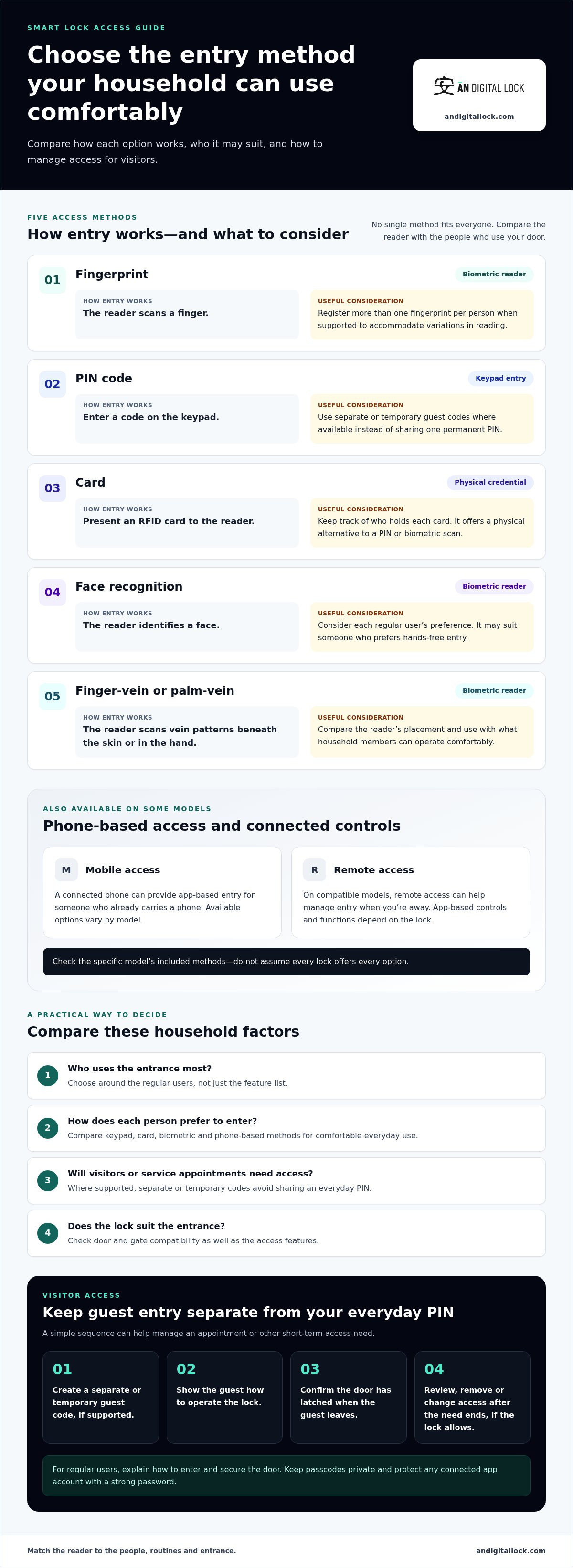
Choose an entry method around who uses the door, how they enter and whether visitors need access. Fingerprint, PIN, card, facial recognition and vein-based readers offer different ways to avoid carrying a house key.
Fingerprint, Face and Finger-Vein Access
A fingerprint lock reads a person’s finger, while facial recognition identifies a face and finger-vein access scans patterns beneath the skin. Palm-vein readers use vein patterns in the hand, so they differ from both fingerprint and face-based entry. These biometric methods reduce reliance on remembering a code or carrying a card, but household members may prefer different readers.
For regular users, register more than one fingerprint per person when the lock allows it. This can help accommodate variations in fingerprint reading. Facial recognition may suit someone who prefers hands-free entry, while a finger-vein or palm-vein reader offers a different biometric approach. Compare the reader each household member can use comfortably at the door.
PIN Codes and Temporary Guest Access
A PIN lock opens with a code entered on a keypad, so users don’t need a card or biometric scan. Short access codes can let guests enter without sharing a physical key. If visitors or service appointments are common, avoid giving everyone the same permanent PIN. Use separate or temporary codes when the lock supports them, then review access after a visitor’s needs end.
PIN access can suit a household with mixed preferences, such as one person using a fingerprint and another entering a code. Keep passcodes private and protect any connected app account with a strong password. Show each household member how to enter the code and secure the door afterward.
RFID cards provide a physical alternative: a household member presents the card to the reader instead of entering a PIN or using a biometric scan. Mobile access can suit someone who already carries a phone and wants app-based control. Available options vary by model, so compare the specific access methods rather than assuming every lock includes them.
Remote access can help manage entry when you’re away from home, while temporary codes can give a visitor access without sharing your everyday PIN. For example, create a guest code for an appointment, then remove or change it afterward if the lock allows. Auto-lock can secure the door after entry on applicable models. Show guests how to operate the lock and confirm the door has latched when they leave.
| Access option | How entry works | Useful consideration |
|---|---|---|
| Fingerprint | Reader scans a finger | Register additional fingers when supported |
| PIN | Code entered on keypad | Use separate guest codes where available |
| Card | Card presented to reader | Keep track of who holds each card |
| Face | Reader scans a face | Consider each regular user’s preference |
| Finger or palm vein | Reader scans vein patterns | Compare the reader’s placement and use |
Choose an access method your household members can use easily, then consider how to manage visitor access.
What’s the best overall smart lock?
The best smart lock balances convenient entry with security features you’ll use. For a Singapore home, compare access methods, connected functions, physical security and the lock’s total cost.
Keypads, Fingerprints and Digital Passes
A keypad works without a phone or biometric scan, while a fingerprint reader lets a registered person unlock the door with a finger. Some PIN keypads accept codes of up to 20 digits. Digital passes use a connected phone for entry, which can suit residents who already carry one and prefer not to manage a separate card.
Choose based on who needs access and how they prefer to enter. A household might use fingerprints for residents and keypad codes for visitors. App-based access adds remote control on compatible models, but depends on the lock’s functions and a suitable phone. Compare the methods available on each model instead of assuming one lock includes every option.
Digital and Smart Lock Functions
A digital lock uses electronic access methods; a connected smart lock may add app-based controls. Depending on its functions, it can provide real-time details about home-entry activity and let you update access settings when household schedules change. These tools offer more visibility than a lock used only with a key or keypad.
Before choosing, check for a mechanical key override or emergency power option. These provide an alternative if electronic entry becomes unavailable. Also compare the physical security grade: ANSI/BHMA Grade 1 is the strongest grade, while Grade 3 is the most basic security grade. A feature-rich app doesn’t replace suitable physical security.
Digital lock prices in Singapore depend on the lock’s functions, access methods and installation requirements. A model with connected app control and several entry methods may differ in cost from a simpler keypad lock. Door and gate compatibility also affects the work needed, so compare the complete configuration rather than choosing by feature count alone.
For a like-for-like comparison, list the access methods you’ll use, whether remote controls matter, and which override options are available. Then compare physical security grades and connected functions across models. For example, a household that wants entry records may prioritise a compatible app, while a household seeking straightforward keypad access may value a simpler setup.
After installation, test each access method and show household members how to lock the door and use the backup option. For ongoing care, replace batteries when warnings appear and use the type recommended by the manufacturer. A digital door lock can suit households looking to combine keyless entry with everyday convenience.
Why Smart Locks Add Long-Term Value to Homes?
For an HDB flat, condominium or landed home, long-term value starts with a lock that suits the entrance. Door material, existing hardware, household routines and connected features all affect daily usefulness.
Which smart locks work with Apple Home, Google Home, Alexa, or Matter in Singapore? A lock works with those ecosystems only when it explicitly supports the relevant platform or standard. Match the lock’s stated compatibility to the system already used at home.
Are smart locks suitable for HDB flat doors and fire-rated entrance doors? A smart lock must fit the particular door, and installation must preserve the door’s required performance. For a fire-rated entrance, consider the door and lock together, not the lock alone.
Do smart locks need to comply with fire safety or building requirements? Fire-rated doors and shared residential buildings may have requirements that affect suitable hardware and installation. Include those requirements when selecting and fitting a lock.
For an HDB flat, check the main door and any metal gate as separate surfaces. A lock designed for the door may not suit the gate’s material or clearance. In a condominium, identify whether the entrance is a private unit door or part of a shared building arrangement. Landed homes may have a front door and an outdoor gate, each needing suitable hardware.
Some smart locks can connect with alarms and lighting, allowing compatible devices to respond when someone enters. For example, a compatible setup could trigger a lighting scene after authorised entry. The lock, alarm and lighting system must support the connection you plan to use. A standalone lock provides keyless access but won’t create linked responses by itself.
Installation affects long-term use as much as the feature list. Before selecting a digital lock, check the door thickness, lock position and existing cutouts. Measure door-to-gate and gate-handle clearance, too, as these are essential for confirming fit. Inspect the frame and door condition. The right option depends on the entrance’s existing hardware and the lock’s dimensions.
Use this practical sequence to assess an entrance:
- Identify whether the lock will go on a wooden door, metal gate or another entrance.
- Measure the door and compare its existing cutouts and lock orientation with the model’s requirements.
- Check the frame and door alignment before installation.
- Match connected features to the household’s existing Apple Home, Google Home, Alexa or Matter setup.
- For a fire-rated door or shared building, include applicable requirements in the installation plan.
Keeping a compatible lock useful over time means planning for the whole entrance. A HDB main door, condominium entry and landed-home gate can call for different hardware, installation and smart-home connections. For homeowners looking at overall entryway privacy and ambiance, pairing secure access with custom window coverings from specialists such as Axent Shutters Blinds & Shades LLC can help complete the space.
Durability and feature updates
Smart-lock upkeep includes battery care, clean readers, software updates and access-code reviews. Follow the model’s battery guidance and respond promptly to low-battery warnings. Warranty coverage and support depend on the specific lock and its stated terms.
For maintenance, use a soft, dry cloth on fingerprint readers and keypads. Don’t spray liquid directly onto the lock or use harsh cleaners. Replace batteries with the type recommended by the manufacturer. Don’t mix old and new batteries, or combine different battery brands in one lock.
Battery use can change with how often the lock operates and which connected functions are active. Check the battery indicator and keep the model’s recommended replacement type available. After replacing batteries, test each access method and confirm the door locks correctly. Teach household members how to respond if a low-battery warning appears while someone is away.
Connected locks need attention beyond the physical hardware. Install manufacturer updates when available, then review access codes periodically. A tenant change, renovation or change in household staff is a practical prompt to remove outdated access and issue new codes where needed. Keep app account passwords strong, too.
- After installation: test every access method and show household members how to operate and lock the door.
- When a warning appears: replace the batteries promptly with the recommended type.
- During routine cleaning: wipe the keypad or reader with a soft, dry cloth.
- After household changes: review active codes and remove access that’s no longer needed.
- When updates appear: install manufacturer updates for an app-connected lock.
For warranty coverage, read the lock’s written terms before purchase. Check the coverage period, what parts or faults are covered and any maintenance conditions. Keep proof of purchase and installation details with the model information. This makes it easier to understand coverage and describe a fault accurately.
Support needs depend on the problem. For app or code issues, consult the lock’s instructions and keep its model details handy. For a physical fault, note what happens: whether the latch catches, the handle feels loose or the keypad doesn’t respond. Clear details can help distinguish a settings issue from a door or hardware problem.
Plan for entry if the batteries run low or electronic access stops working. Know the lock’s backup method, such as a mechanical key override or emergency power option, and show household members how it works. A quick practice before a warning appears makes the backup easier to use when needed.
Checking door and gate compatibility
A smart lock must fit the entrance’s physical dimensions and condition, not just match your preferred access method. Check the door and gate separately, and measure door-to-gate and gate-handle clearance before choosing hardware.
Start with the door. Identify its material and measure its thickness, then note the lock’s backset, orientation and existing boreholes. Backset means the distance from the door edge to the centre of the lock opening. These details help determine whether a digital deadbolt can use the existing cutouts or needs different preparation.
Next, inspect the frame and door movement. A latch that catches, a loose-feeling handle or a door that needs a hard push to lock can point to alignment problems. Address these issues early. A new lock may not operate smoothly if the door and frame already resist closing or latching.
For a home with a separate metal gate, treat it as a second compatibility check. Confirm that the gate lock suits the gate material and its exposure. Check the gate’s thickness, latch position and mounting space against the lock’s requirements. Measure the door-to-gate and gate-handle clearance before purchase, as these are necessary to assess fit.
Use this checklist before selecting a model:
- Record the door type, material and thickness.
- Note the backset, lock orientation and existing boreholes or cutouts.
- Inspect the frame and test whether the door closes and latches without force.
- For a gate, match the lock to its material and outdoor exposure.
- Compare the measurements and mounting arrangement with the lock’s specifications.
These checks also help you assess whether a lock suits the existing layout. If its dimensions or orientation differ from the current hardware, installation may require changes to the door. Compare the actual entrance with the lock’s physical requirements, not just the number of access methods it offers.
Consider the whole entry route, too. For example, a household may use a digital lock on the main door and a separate outdoor-rated lock on its gate. Check that each door opens freely after fitting and that the latch engages without pushing or lifting. Test the handle and locking action from both sides, then try each installed access method.
Compatibility isn’t a cosmetic detail. Correct fit helps the latch move as intended, while a misaligned door can interfere with locking. In Singapore homes with both a main door and gate, assess each one independently before choosing a lock. That simple step can prevent a feature-rich model from becoming an awkward fit.
Ready to plan a lock around your entrance dimensions and gate material? Plan a compatible entrance upgrade.
AN Digital Lock: Digital Door Locks
AN Digital Lock offers Digital Door Locks for homeowners comparing access methods and planning an entrance upgrade. If your door or gate also needs attention, Wooden Doors and Metal Gates are available as complementary entrance products. Considering these parts together can help you plan around your home’s actual layout rather than choosing a lock in isolation.
Before deciding, note your door type, existing lock position and preferred ways to enter. If your home has both a main door and gate, assess each separately and measure the required clearances. This gives you a clearer starting point for choosing a suitable combination of entrance products.
For help exploring options for your home entrance, visit AN Digital Lock online.
Make Your Entrance Plan Work for Everyday Life
Before choosing a lock, write a short entrance brief for your household. Note who uses the door, what would make coming home easier and which changes might matter later. This turns a broad upgrade into a practical decision, guided by your daily routine rather than a feature list.
If you’re modernising your home entrance with smart locks, think about how the entrance should serve your household as it changes. New household members, renovations or different visitor routines can shift what feels convenient. For homeowners planning broader property updates alongside entryway security, specialists such as WDC Services illustrate how modernising essential living spaces enhances day-to-day convenience. Prioritise the improvement that would remove the most friction now, while leaving room to adjust access arrangements later.
AN Digital Lock offers Digital Door Locks, Wooden Doors and Metal Gates for homeowners planning an entrance update. Use your brief to start a focused conversation about the setup that suits your home. Contact AN Digital Lock to discuss your entrance plans. A clear starting point can make your next home upgrade feel straightforward and considered.
Frequently Asked Questions
So How To Choose?
Choose a lock by matching household routines, preferred entry methods and entrance fit, then prioritise the feature you’ll use most. When modernising your home entrance with smart locks, start by listing who needs access and whether visitors need separate credentials. Check door thickness and measure door-to-gate and gate-handle clearance. Then consider backup entry and maintenance. A practical choice fits your entrance and daily habits, rather than simply offering the longest feature list.
What’s a Digital Lock?
A digital lock secures a door using electronic access, such as a PIN, fingerprint or RFID card, instead of relying only on a conventional key. Some models also connect to a mobile app, while others operate without app control. Access methods vary by model. Before buying, check which credentials it accepts and whether it includes a mechanical key override, so you understand both everyday entry and backup access.
What smart lock types are suitable for HDB flats and private homes in Singapore?
Suitable options depend on the entrance surface and the lock’s physical fit, not only whether the home is an HDB flat, condominium or landed property. A main door lock and a separate metal gate lock may need different designs. Compare a lock intended for a wooden door with one designed for a metal gate. Check door thickness and mounting layout, and measure door-to-gate and gate-handle clearance before choosing.
What are the best smart locks for Singapore home entrances in 2026?
There isn’t one best lock for every Singapore entrance; choose by fit, access needs and preferred backup method. Confirm the model supports the credentials your household wants, then check its door or gate compatibility. Available model examples include Zigbang SHP-P52, SOLITY GP-6000BK, Hafele PP8100 and Igloohome Mortise Touch. Treat model names as starting points for comparison, not a substitute for checking the actual entrance.
How much do smart locks cost in Singapore, including installation?
The total depends on the lock model, included access features, door preparation and whether separate gate hardware is needed. For AN Digital Lock purchases, standard delivery and installation are included unless the product page, quotation or promotion states otherwise. Installation typically takes 1-4 hours. Optional items or extra work can affect the final amount, so compare the complete configuration and its stated inclusions rather than the lock alone.
How do smart locks compare by fingerprint, PIN, card, app, and mechanical key access?
Fingerprint entry avoids carrying a credential, while PIN entry relies on remembering a code. An RFID card provides a physical token; app access uses a compatible phone and connected lock. A mechanical key offers a separate backup method on models that include one. Think about what each household member can use reliably. For example, a resident who doesn’t use a smartphone may prefer a keypad or card option.
How do I choose a smart lock compatible with my existing door and gate?
Measure the door thickness and check the lock’s required mounting dimensions before selecting a model. Compatible door thickness is approximately 35 mm-60 mm. For a gated entrance, measure door-to-gate clearance and gate-handle clearance before purchase. Also note the lock orientation and existing cutouts. These measurements help identify whether the hardware fits the current setup or needs a different configuration.
How is a smart lock installed and set up in Singapore?
Installation involves fitting the lock to the door, setting up its supported access methods and testing operation. A typical installation takes 1-4 hours. In buildings with drilling limits, schedule work within management rules: no drilling after 5 pm on weekdays, after 12 pm on Saturdays, or on Sundays and public holidays. After fitting, test each credential and show household members how to lock the door and use its backup method.