


That cheap battery pack from the discount aisle could be the silent killer of your premium smart lock investment. Most homeowners in Singapore share the same anxiety about being locked out or finding their expensive electronics ruined by acid leakage. It's a valid concern because choosing the wrong power source can void your warranty and leave your home vulnerable. If you're asking what type of batteries for digital lock hardware is safest, you're already one step ahead of most.
We believe your home security should be effortless and reliable. This 2026 guide provides the definitive answer on why premium alkaline brands like Energizer and Panasonic are your best defense against failure in our tropical climate. You'll learn how to maintain lock health for 8 to 10 months, why you must avoid rechargeable options, and the simple steps to jumpstart your lock using a 9V battery or USB-C power bank if the power ever hits zero. Get ready to secure your home with total confidence.
Key Takeaways
- Protect your investment by learning why 1.5V alkaline batteries are the universal standard for maintaining manufacturer warranties.
- Identify what type of batteries for digital lock hardware prevent corrosive leaks in Singapore's high humidity.
- Compare top-tier brands like Energizer Max and Panasonic Evolta to find the best high-density power source for heavy-traffic HDB doors.
- Establish a proactive 8-month maintenance schedule and discover emergency backup methods like 9V jumpstarting or USB-C power.
- See how AN Digital Lock provides expert guidance for leading brands like Zigbang and Philips to ensure long-term lock health.
Why Choosing the Right Battery for Your Digital Lock Matters
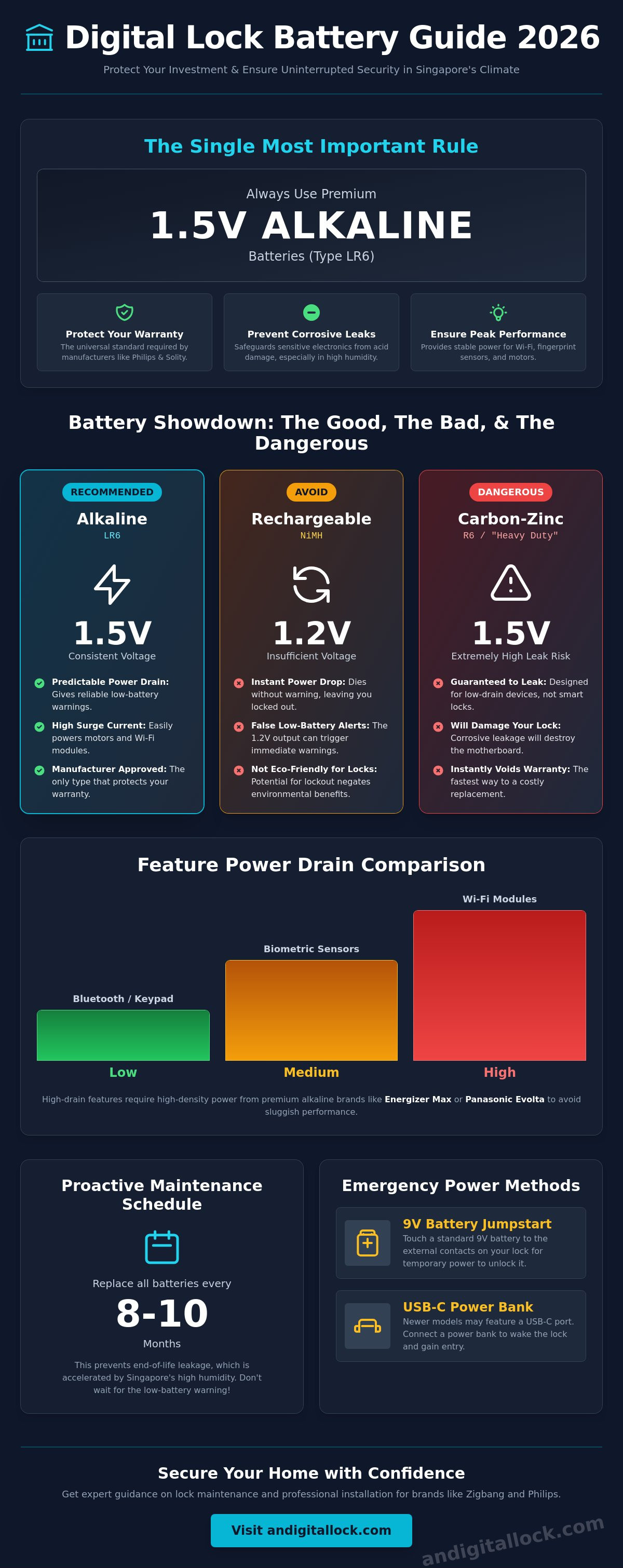
The battery is the heartbeat of your smart home security. It doesn't just sit there; it powers the mechanical motor that retracts the bolt, the biometric sensors that read your fingerprint, and the Wi-Fi modules that keep you connected. Many Singapore homeowners fall into a 'set and forget' trap. They assume any AA cell from a convenience store will do. This mistake is costly. Choosing the wrong power source can immediately void manufacturer warranties from major brands like Philips or Solity.
Think about the financial risk involved. You might spend $600 or more on a high-end digital lock for your HDB flat. Saving a few dollars on a generic battery pack is a gamble that rarely pays off. If that cheap battery fails, you aren't just buying a new pack. You're likely replacing the entire electronic lock assembly. Understanding what type of batteries for digital lock systems are required is the only way to ensure your home remains a sanctuary. Proactive maintenance beats reactive repairs every time.
The Hidden Danger: Battery Leakage and Corrosion
When Alkaline batteries reach the end of their life, the chemical reaction inside can cause the casing to rupture. This releases potassium hydroxide, a corrosive agent that eats through metal and plastic. In a digital lock, this liquid travels directly into the motherboard and sensitive electronics. High humidity in Singapore accelerates the oxidation of battery contacts, turning a small leak into a total hardware failure within days. We recommend a strict replacement schedule to prevent this silent destruction of your investment.
Powering Modern Features: Wi-Fi vs. Bluetooth vs. Fingerprint
Modern locks are sophisticated, power-hungry devices. Knowing what type of batteries for digital lock models with advanced features is essential for daily performance. Different access methods drain energy at different rates:
- Wi-Fi Modules: These require a high, stable current for constant cloud connectivity and remote unlocking via smartphone apps.
- Biometric Sensors: 3D facial recognition and palm vein scanning need consistent voltage to ensure fast, accurate reads every time you arrive home.
- Bluetooth and Keypads: While these use less power, they still rely on the battery's ability to provide a sudden burst of energy to the motor during the physical unlocking process.
Low-quality batteries often suffer from sudden voltage drops. This leads to sluggish performance, failed fingerprint scans, or the lock becoming unresponsive even when the battery indicator shows some life remaining. Consistent power delivery is non-negotiable for 2026-era smart home technology.
Alkaline vs. Lithium: Understanding the Best Power Source
Choosing what type of batteries for digital lock systems starts with a look at the technical label. For nearly 90% of smart locks in Singapore, the 1.5V Alkaline battery is the undisputed standard. Manufacturers like Zigbang and Solity design their circuitry specifically for the steady voltage decline of Alkaline cells. This predictable decline allows the lock's internal sensors to accurately trigger low-battery warnings before the unit dies completely. When you shop for replacements, always look for the "LR6" code on the packaging. This is the international designation for AA Alkaline cells.
You must avoid "Carbon-Zinc" batteries at all costs. Often sold as "Heavy Duty" or discount packs, these are labeled as "R6" instead of "LR6." They are designed for low-drain devices like wall clocks or TV remotes. In a digital lock, they lack the surge current required to move a heavy motor. They also have a much higher risk of leaking when they are under the stress of powering a Wi-Fi module. Using Carbon-Zinc cells is the fastest way to damage your lock's motherboard and void your warranty.
Why You Should Avoid Rechargeable Batteries
Rechargeable NiMH batteries are a poor choice for home security. While they're eco-friendly, they output only 1.2V per cell. Most digital locks require a consistent 1.5V to operate sensors and motors reliably. Because the voltage is lower from the start, your lock may trigger a "low battery" alarm immediately after you insert freshly charged cells. Even worse, rechargeables have a flat discharge curve. They hold their voltage until they are almost empty, then drop to zero instantly. This means your lock won't have enough time to warn you before it shuts down entirely.
When to Use Lithium Batteries (The 2026 Exception)
In 2026, we're seeing a shift where some high-performance smart locks now explicitly support 1.5V Lithium cells. These are typically Wi-Fi enabled models that ping the cloud frequently. Lithium cells handle high-drain spikes better than Alkaline and have a 20-year shelf life. However, you must verify your lock's compatibility first. Check your user manual or the battery compartment for a "Lithium Compatible" stamp. If you're considering an upgrade, exploring premium digital door locks designed for modern power standards ensures your home stays secure without the guesswork of battery maintenance.
Before you install Lithium cells, use this quick checklist:
- Confirm the lock supports 1.5V Lithium (not 3.7V).
- Ensure the lock has a specific setting for Lithium discharge curves.
- Check that all batteries in the set are from the same manufacturing batch.
Top Battery Brands for Digital Locks in Singapore (2026)
Selecting the right brand is just as critical as choosing the correct chemistry. In the Singapore market, three names consistently lead the pack for reliability and safety. If you are wondering what type of batteries for digital lock units provide the best protection for your HDB main door, start with Energizer Max. It is widely considered the industry gold standard. Their PowerSeal technology ensures the battery won't leak for up to two years even after it is fully depleted. This is a vital safety net for homeowners who might forget their replacement schedule.
Panasonic Evolta is another top-tier contender. These batteries are engineered for high-density power delivery. They are particularly effective for heavy-traffic HDB main doors where the lock motor engages dozens of times daily. For those using Duracell Optimum, be mindful of the battery compartment size. Some digital locks have very tight tolerances. Duracell cells occasionally feature a slightly thicker wrap that can make them difficult to remove from certain Solity or Kaadas models. Always test the fit before forcing the battery cover shut.
Local availability makes these brands easy to source. You can find fresh stock at major supermarkets like FairPrice or specialized retailers like AN Digital Lock. Buying from high-turnover stores ensures you get the maximum shelf life possible. Always check the "Best Before" date printed on the side of the cell. A battery manufactured recently will always outperform one that has been sitting in a warehouse for three years.
The 'Leak-Shield' Factor in Tropical Climates
Singapore's average humidity often exceeds 80%. This moisture accelerates the oxidation process on battery terminals. Brands like Energizer offer specific "no-leak" guarantees that are essential for protecting your electronics. If a battery leaks and damages your lock, these manufacturers sometimes offer repair or replacement coverage for the device itself. For more detailed advice on maintaining your hardware in our climate, check our digital lock Singapore guide for professional maintenance tips.
Avoiding Counterfeit Batteries in Online Marketplaces
The rise of unverified e-commerce listings has flooded the market with fake batteries. These counterfeits are a primary cause of lock failure. They often look identical to premium brands but weigh significantly less. Look closely at the printing quality. Fakes often have blurry text or misaligned logos. The terminal shapes may also appear rough or uneven. Stick to reputable local hardware stores or authorized distributors to ensure you are getting genuine 1.5V power. When considering what type of batteries for digital lock security are best, saving two dollars on a bulk online pack isn't worth the risk of a $800 repair bill.
Battery Maintenance and Emergency Access Strategies
Maintaining your smart lock is simple, but consistency is key to avoiding a lockout. Follow the Golden Rule: always replace all batteries simultaneously. Never mix old and new cells. When you mix them, the older battery drains faster and may cause the newer one to leak as it tries to compensate for the voltage imbalance. Even if your lock hasn't triggered an alarm yet, establish a recurring 8-month replacement schedule. This proactive approach prevents the headache of a dead lock during a busy morning or late at night.
Humidity often leads to minor oxidation on the battery terminals. If you see a white or green powdery substance, remove the batteries immediately. You can safely clean the contacts using a cotton swab dipped in a tiny amount of white vinegar or lemon juice. Dry the area completely before inserting fresh, high-quality alkaline cells. Knowing what type of batteries for digital lock hardware requires is only half the battle; keeping the environment clean ensures the power flows smoothly.
The 9V Emergency Jumpstart: A Step-by-Step Guide
If your batteries die completely while you're outside, don't panic. Most digital locks feature two external metal contacts. These are usually located at the bottom of the front panel or hidden behind a small rubber flap. Buy a standard 9V alkaline battery from any convenience store. Hold the battery terminals firmly against the lock's external contacts. This provides temporary power to the keypad or fingerprint sensor. While maintaining the connection, enter your PIN or scan your finger to unlock the door. Once inside, replace the internal batteries immediately.
Using Power Banks for USB-C Emergency Entry
Many 2026 models have phased out 9V contacts in favor of USB-C ports. This is common if you own a modern mortise lock or a high-end biometric handle. Simply plug a portable power bank into the port using a standard cable. The lock will initialize within seconds, allowing you to use your usual access method. Carrying a small power bank in your bag is a smart backup strategy for any tech-savvy homeowner. If you're ready to upgrade to a system with these modern conveniences, explore our latest digital lock bundles for your home today.
Professional Support and Smart Lock Care at AN Digital Lock
Choosing the right hardware is only the first step toward a secure home. Since 2013, AN Digital Lock has helped Singapore homeowners protect their properties with expert advice and professional installation. When customers ask us what type of batteries for digital lock systems are most reliable, we provide answers tailored to their specific model and lifestyle. Our team doesn't just sell products; we provide comprehensive service that spans the entire lifespan of your lock, from the initial consultation to long-term maintenance support.
We understand that modern HDB and condo living requires seamless technology. That's why our HDB main door and gate bundles include more than just hardware. Our technicians provide hands-on education during every installation. We show you exactly where the battery compartment is, how to identify the low-battery warning signal, and where to find the emergency power terminals. This commitment to service ensures you never feel stranded or confused by your smart home tech.
Brand-Specific Battery Requirements
Different manufacturers have unique power management profiles. Zigbang and Samsung models are particularly sensitive to battery quality. They require high-grade alkaline cells to ensure the motorized deadbolt operates smoothly every time. Philips digital locks utilize high-performance power management systems that benefit from the consistent output of Energizer Max or Panasonic Evolta cells. For Solity and Hafele locks, we typically recommend a set of 4 to 8 AA batteries with a strict 8-month replacement cycle to maintain peak sensor accuracy. Using the wrong cells in these precision machines can lead to sluggish response times or connectivity drops.
Final Checklist for a Secure Home
Maintaining your home security shouldn't be a guessing game. By following a proactive replacement strategy, you eliminate the risk of being locked out or damaging your electronics. Remember these final steps for total peace of mind:
- Replace all batteries every 8 months, even if the low-battery alarm hasn't sounded.
- Always use 1.5V Alkaline "LR6" batteries from reputable local retailers.
- Never mix different brands or old and new cells in the same compartment.
- Keep a 9V battery or a USB-C power bank in your vehicle or bag for emergencies.
If you're still unsure about what type of batteries for digital lock hardware you need, or if you're experiencing power-related malfunctions, our support team is ready to assist. We invite you to visit our showrooms for a hands-on maintenance demo where you can see the latest tech in action. Ready to upgrade your home security? Explore our latest digital lock bundles for your BTO or Condo and enjoy the perfect blend of safety and convenience.
Keep Your Smart Home Powered and Protected
Choosing high-quality 1.5V alkaline batteries is the easiest way to protect your digital lock from corrosive damage. Remember to replace your cells every 8 months and always keep a 9V battery or power bank handy for unexpected emergencies. Knowing what type of batteries for digital lock systems are required ensures your hardware operates smoothly and your warranty remains valid. These small habits prevent costly repairs and keep your family safe around the clock.
Since 2013, AN Digital Lock has served as Singapore's trusted expert in entrance security. We're an authorized dealer for global leaders like Zigbang, Philips, and Solity. With over 10,000+ happy Singaporean homeowners secured, we have the experience to guide you through every stage of smart lock ownership. Don't wait for a low-battery alarm to think about your security. Secure your home with 2026's top-rated digital locks at AN Digital Lock today. Your journey to a safer, more refined home experience starts with a single smart choice.
Frequently Asked Questions
Can I use rechargeable batteries in my digital door lock?
You should not use rechargeable batteries in your digital lock. Most NiMH rechargeables only provide 1.2V, which is lower than the 1.5V required by modern smart locks. This insufficient voltage often triggers false low-battery alarms or prevents the motor from fully engaging. Stick to premium alkaline cells to ensure your lock has the consistent power it needs to stay secure.
How long do batteries usually last in a digital lock?
Batteries in a standard digital lock typically last between 8 to 12 months. This duration depends on how frequently you enter your home and whether your lock uses high-drain features like Wi-Fi or biometric sensors. We recommend a proactive replacement every 8 months to stay ahead of potential failures. High-traffic households may need to change them even sooner to ensure reliability.
What happens if the battery in my digital lock dies completely?
If your batteries die completely, the lock will remain in its last state, which is usually locked. You won't be able to use the keypad or fingerprint sensor until you provide external power. Most models allow for emergency entry using a 9V battery or a USB-C power bank. Most locks also include a mechanical override key for these exact scenarios, so keep one in your bag.
Is it okay to mix different brands of batteries in one lock?
Never mix different brands or old and new batteries in your lock. Mixing cells creates an imbalance in voltage and internal resistance. This causes the stronger battery to overwork, which often leads to chemical leakage and permanent damage to the lock's motherboard. Always replace the entire set with fresh batteries from the same manufacturing batch to protect your investment and maintain your warranty.
Why does my digital lock beep even after I changed the batteries?
Persistent beeping after a battery change often indicates poor contact or low-quality cells. Ensure you are using 1.5V alkaline batteries rather than heavy-duty carbon-zinc versions. Check the battery terminals for white oxidation and clean them with a dry cloth. If the beeping continues, you may need to perform a system reset as outlined in your user manual to clear the low-voltage warning memory.
Where are the emergency 9V battery contact points located?
Emergency 9V contact points are usually found on the underside of the external lock body. Some models hide these terminals behind a small sliding panel or a rubber flap near the mechanical keyhole. Simply press a 9V battery against these points to power the interface. If you're unsure what type of batteries for digital lock emergency ports require, a standard 9V alkaline cell is the universal choice.
Should I use Lithium or Alkaline batteries for my smart lock?
Alkaline batteries are the standard choice when deciding what type of batteries for digital lock systems to use. They provide the steady voltage drop required for accurate low-battery warnings. Lithium batteries should only be used if your specific lock manual explicitly supports them. For most HDB and condo installations, premium alkaline cells like Energizer Max offer the best balance of performance and leak protection.
Does Singapore's humidity affect how often I should change batteries?
Yes, Singapore's high humidity significantly impacts battery health. Moisture in the air accelerates the oxidation of metal contacts and increases the risk of alkaline leakage. This is why we advise a strict 8-month replacement cycle rather than waiting for the low-battery alarm. Proactive care is essential to prevent humidity-related corrosion from ruining your expensive smart lock investment and ensuring your home remains accessible.