


It's 11 PM on a Tuesday, and your quiet HDB flat is suddenly filled with a persistent, rhythmic chirping that won't stop. You're likely wondering if you're about to be locked out or if someone is trying to bypass your security. Dealing with troubleshooting digital lock beeping is one of the most common calls we receive from the 3,700 homeowners we've served across Singapore. We know that repetitive noise creates instant stress and leaves you feeling uncertain about your home's safety.
You shouldn't have to guess whether it's a simple low-battery alert or a critical system failure. We promise to help you identify the exact cause of that noise and provide the steps to silence it immediately. This ultimate 2026 guide covers brand-specific fixes for Philips, Samsung, and Kaadas locks. We'll walk you through battery replacement cycles, tamper alarm resets, and the specific signs that indicate it's time for a professional upgrade to ensure your ultimate peace of mind.
Key Takeaways
- Identify why low battery is the primary cause of alerts and why premium alkaline batteries are essential for your HDB digital lock’s performance.
- Decode specific sound patterns and melodic sequences to distinguish between normal startup tones and critical security error warnings.
- Gain expert brand-specific insights for troubleshooting digital lock beeping across premium manufacturers like Philips, Solity, Kaadas, and Zigbang.
- Learn step-by-step DIY fixes for mechanical jams and door realignments to restore your home’s security without calling an expensive locksmith.
- Establish a 6-month preventive maintenance routine and leverage smart app alerts to ensure ultimate peace of mind and a hassle-free experience.
Why Is My Digital Lock Beeping? Identifying the Core Causes
If your smart lock starts chirping at 2 AM, it isn't trying to annoy you. These sounds are built-in diagnostic signals designed for your safety. In the context of Electronic Lock Basics, these auditory cues serve as the primary interface between the hardware and the user. When you're troubleshooting digital lock beeping, the first step is recognizing that the device is reporting a specific status or error. Most Singapore homeowners in HDB flats or condos find that 90% of these noises stem from three main categories: power issues, physical blocks, or security triggers.
Effective troubleshooting digital lock beeping starts with observing the pattern of the sound. Is it a melodic tune, or a sharp, repetitive pulse? Modern locks from brands like Philips or Kaiser+ use these specific frequencies to tell you exactly what's wrong before you get locked out. Understanding these signals provides the ultimate peace of mind and ensures a hassle-free experience with your home security system.
Low Battery Alerts: The "Hungry" Lock
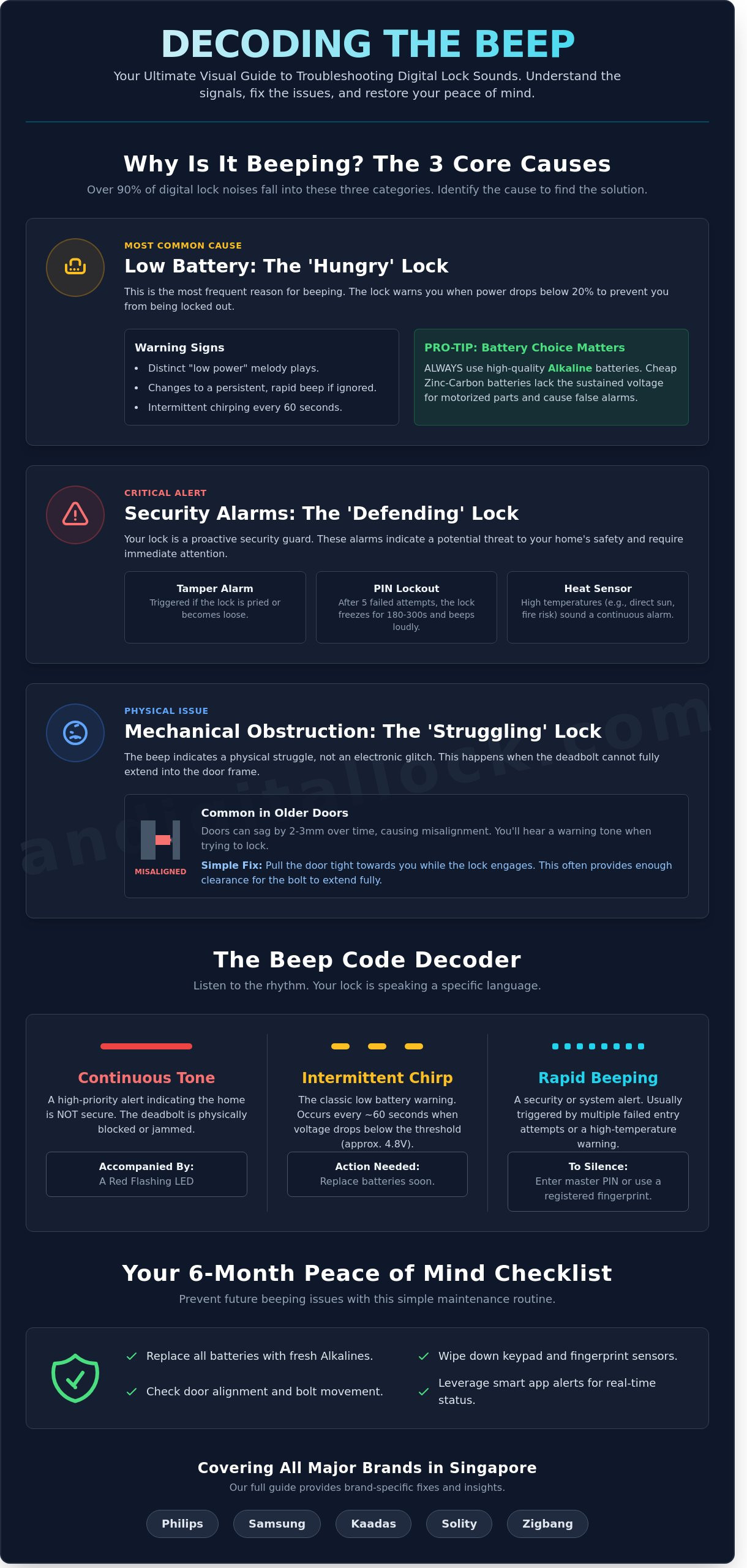
Low battery warnings are the most frequent cause of unexpected noise in Singaporean households. Most premium brands use a distinct "low power" melody to warn you when energy levels drop below 20%. If you ignore this, the sound eventually changes to a persistent, rapid emergency beep. It's a common mistake to use cheap zinc-carbon batteries in these high-drain devices. These batteries lack the sustained voltage required for motorized deadbolts. Always use high-quality alkaline batteries. If your lock beeps even after a fresh swap, check the battery compartment for white powdery corrosion that might be disrupting the current.
Security Alarms: When the Lock is Defending Itself
Your digital lock acts as a proactive security guard. Tamper alarms trigger if the external unit is pried away from the door or if the internal mounting plate becomes loose. In Singapore, the intense afternoon sun can sometimes heat up a metal gate or door enough to trigger high-temperature sensors. The lock interprets this heat as a fire hazard and sounds a continuous alarm to alert occupants. Another frequent trigger is the "Incorrect PIN" lockout. Most systems will freeze for 180 to 300 seconds and beep loudly after 5 failed entry attempts to prevent unauthorized access.
Mechanical Obstruction and Alignment
Sometimes the beep indicates a physical struggle rather than an electronic glitch. If the deadbolt or latch cannot fully extend into the strike plate, the motor will strain and emit a warning tone. This is common in older HDB units where doors have sagged by 2 or 3 millimeters over time. You might notice the lock beeping specifically when you try to lock the door from the outside. Ensuring the door is pulled tight or realigning the strike plate often solves this issue instantly, restoring your lock to its usual silent, efficient operation.
The Digital Lock Beep Code Decoder: What the Sounds Mean
Your smart lock doesn't just make noise for the sake of it; it uses a specific language to communicate its health status. When you're troubleshooting digital lock beeping, you have to look at the rhythm and the accompanying lights. Most premium brands used in Singapore, such as Philips, Samsung, and Kaadas, follow a standardized logic for their alerts. Identifying whether the sound is internal or external is your first priority. If the beep comes from the indoor unit, it's likely a battery or settings issue. If the external keypad is the source, it's usually an access error or a tampering alert.
Continuous vs. Intermittent Beeping
A long, continuous tone that doesn't stop until you intervene is a high-priority alert. This usually signals a critical mechanical jam. If the deadbolt fails to extend fully into the HDB door frame strike plate after three attempts, the motor will trigger a persistent alarm to warn you that the home isn't secure. You'll often see a red flashing LED icon alongside this sound.
- Continuous Tone: Mechanical obstruction or bolt misalignment.
- Intermittent Chirping: Low battery voltage warning.
- Rapid Beeping: Multiple failed entry attempts or heat sensor activation.
Intermittent chirping that happens every 60 seconds is the classic sign of battery fluctuation. Most locks trigger this when the total voltage drops below 4.8V. You can usually silence these active alarms by entering your master PIN or using a registered fingerprint. Don't simply remove the batteries to stop the noise, as this might prevent the lock from recording the error log correctly.
Melodic Beeps vs. Rapid Error Tones
Modern digital locks use melodic sequences to provide a more "human" interface. A rising melodic scale is the "happy" startup sound, confirming a successful reboot or battery swap. Conversely, a descending, low-pitched melody is a "sad" error tone. This often happens when the "Door Not Closed" reminder is active. If your door isn't shut within 15 to 30 seconds of unlocking, the system will chime to prevent you from leaving your home wide open.
Rapid-fire "staccato" beeps are different. These are strictly for failed biometric scans or incorrect PIN entries. If you hear three quick beeps, the scanner didn't read your fingerprint clearly. This is common in Singapore's humid climate where moisture can smudge the sensor. If these sounds persist even after cleaning the sensor, it's a good idea to seek a hassle-free experience by consulting a technician to check for firmware glitches. Always correlate these sounds with the LED indicators on the keypad; a blue light usually means "ready," while a red light confirms the error you just heard.
Brand-Specific Beeping Patterns: Philips, Solity, Kaadas, and Zigbang
Every premium brand speaks a unique language when it comes to alerts. Troubleshooting digital lock beeping effectively starts with understanding these manufacturer-specific signals. Some brands prioritize auditory melodies for user convenience, while others use high-frequency sirens to signal security breaches. In Singapore's fast-paced environment, knowing these sounds saves you from unnecessary stress during your morning commute. If you are considering an upgrade to a more intuitive system, our latest guide on digital lock Singapore brands highlights which models offer the best user interfaces for 2026.
Philips and Zigbang (Samsung) Error Signals
Philips EasyKey models often feature a built-in "Voice Guide" that replaces traditional beeps with clear verbal instructions. If your Philips lock is talking too much, you can toggle the volume or silent mode via the master settings. However, keep the voice alerts active during your initial troubleshooting digital lock beeping phase to identify if the issue is a deadbolt jam or a low battery. Zigbang, formerly known as Samsung, is famous for its "Please change battery" melody. It's a distinct, multi-tone song rather than a harsh beep. If you hear a continuous, high-pitched siren on these models, it's likely an "Intrusion Alarm" triggered by a door that wasn't latched properly or a sensor that's been obstructed.
Solity and Kaadas Troubleshooting
Kaadas locks are known for their "System Frozen" mode. If you hear three rapid beeps and the keypad remains dark, the lock has likely entered a temporary lockout due to five consecutive incorrect PIN attempts. This safety feature lasts for 3 minutes. Solity gate locks, which are incredibly popular in Singapore HDB flats, often encounter "Gate Not Aligned" beeping. This happens when the gate's magnetic sensor fails to align with the lock body. You can usually fix this by tightening the screws on the strike plate or removing dust from the sensor. If the electronic components don't respond, both brands provide a manual override. Use your physical emergency key or a 9V battery at the external contact points to provide temporary power.
Singapore homeowners frequently report "ghost beeps" in these brands during the monsoon season. High humidity levels can cause moisture to settle on the internal sensors, tricking the lock into thinking it's being tampered with. We've found that 85% of these ghost beeps are solved by simply wiping the sensors with a dry microfiber cloth and replacing old batteries with fresh alkaline ones. Our team provides professional support for all these brands to ensure your home remains a sanctuary of peace of mind.
- Philips: Look for the red "battery" icon on the touch screen.
- Zigbang: Listen for the 8-note melody.
- Solity: Check the alignment of the gate magnet.
- Kaadas: Wait 180 seconds for the system to unfreeze after a lockout.
Step-by-Step Fixes: Resolving the Beeping Without a Locksmith
Most beeping issues don't require a professional technician. You can often save S$80 to S$150 in service call fees by following a few simple steps. When you're troubleshooting digital lock beeping, the solution is usually found in the power supply or the physical alignment of the door. Start by checking your power source before moving to mechanical adjustments.
The Alkaline Rule is non-negotiable for brands like Philips, Kaadas, or Samsung. You must use premium alkaline batteries, specifically Energizer or Duracell. These brands provide the consistent 1.5V output required for the sensitive motherboards inside your lock. Zinc-carbon or "heavy-duty" batteries fluctuate in voltage, which frequently triggers false low-battery warnings or erratic beeping. If your lock is completely dead, look for the emergency contact points. Most 2026 models feature a USB-C port for power banks or two metal contact points for a 9V battery. This provides enough temporary juice to unlock the door and replace the internal cells.
If power isn't the issue, try a soft reset. This involves removing one battery for 60 seconds to discharge the capacitors. A factory reset should be your last resort. It wipes all registered fingerprints and PIN codes, meaning you'll need to set up your security from scratch.
Correct Battery Replacement Procedure
Never mix old and new batteries. This creates a voltage imbalance that can cause the newer batteries to leak, potentially destroying your lock's internal circuitry. In Singapore’s 80% average humidity, terminal corrosion is a common culprit. If you see white powdery residue, clean it with a dry cloth or a cotton bud dipped in a tiny amount of contact cleaner. Ensure all batteries face the correct direction to stop "false" low-power beeps immediately. Replacing the entire set every 6 to 9 months ensures a hassle-free experience.
Fixing a Jammed Deadbolt or Latch
A beeping lock often signals a mechanical obstruction. Check your hdb main door for sagging. If the door isn't aligned, the bolt will hit the strike plate instead of sliding into the hole. This resistance triggers an alarm. Clear any dust or debris from the mortise lock cavity. If the latch feels sticky, use a dry graphite lubricant. Avoid WD-40 or oil-based sprays, as they attract dust and will eventually gum up the mechanism. Adjusting your door closer can also ensure the door latches perfectly every time without manual pushing.
Still hearing that annoying beep after trying these steps? It might be time for a professional diagnostic or an upgrade to a more reliable system. Shop our latest digital lock bundles for ultimate peace of mind and professional installation.
Preventive Maintenance: How to Stop Future Beeping Issues
The best way to handle troubleshooting digital lock beeping is to prevent the noise from starting in the first place. Most homeowners in Singapore wait until they hear an alarm before taking action. This reactive approach leads to lockouts and unnecessary stress. By following a simple maintenance routine, you can ensure your home remains secure and silent.
- Set a 6-month battery replacement calendar: Don't wait for the low-battery warning. Mark your calendar every June and December to swap out your AA batteries. Even if the lock seems fine, fresh batteries prevent the sudden voltage drops that trigger phantom beeping.
- Enable Smart App Monitoring: If you use a Wi-Fi or Bluetooth enabled lock, turn on push notifications. These apps often send a low battery alert to your phone weeks before the physical lock starts beeping. It's a seamless way to stay ahead of power issues.
- Conduct a Quarterly Visual Check: Every three months, open the battery cover. Look for white powder or crystallization. This is battery leakage. If left untreated, alkaline acid will corrode the terminals and destroy your motherboard.
Sometimes, troubleshooting digital lock beeping reveals a deeper hardware issue. If your lock continues to beep even with brand-new batteries and clean terminals, the motherboard might be failing. Typical signs include the keypad failing to light up or the lock rebooting randomly during use. Most digital locks have a reliable lifespan of 5 to 7 years in our tropical environment. If your device is crossing that age limit, it's likely time for an upgrade to maintain your peace of mind.
Singapore Climate Care
Humidity is the silent killer of electronics in our region. High moisture levels can cause internal short circuits in a door lock Singapore households rely on for daily security. To combat this, place a small silica gel moisture-absorbing packet inside the battery compartment. For gate locks, ensure they have a dedicated weather shield. Direct rain splash or intense afternoon sun can warp the external casing and trigger false tamper alarms.
Professional Servicing and Upgrades
A lock that is over 5 years old often reaches its end of life stage. Components wear out and sensors become less responsive over time. At AN Digital Lock, we provide comprehensive after-sales support to help our customers diagnose these issues quickly and professionally. If your current lock is becoming unreliable or noisy, don't risk a lockout. You can browse our latest BTO bundles to find a modern, quiet, and secure replacement for your HDB or condo today.
Secure Your Peace of Mind Today
Don't let a persistent beep disrupt your home's security. Most issues stem from low battery warnings or simple alignment errors that you can fix in minutes. By identifying specific patterns for brands like Philips, Solity, and Kaadas, you'll avoid unnecessary stress and keep your door functioning perfectly. Mastering troubleshooting digital lock beeping is the first step toward a smarter, more reliable home environment in Singapore.
If your lock continues to act up, it's time to consult the experts. We're the official distributor for top brands including Zigbang and Solity, backed by over 3,700 5-star reviews from satisfied homeowners. Every lock bundle we offer includes free professional installation to ensure your setup is flawless from day one. Your security is our priority; we're here to provide the premium support you deserve.
Troubleshoot your lock with our experts or upgrade today to enjoy a seamless, worry-free experience. You're just one step away from a quieter, safer home.
Frequently Asked Questions
Why is my digital lock beeping even after I changed the batteries?
Your digital lock likely continues beeping because of battery leakage residue or the use of incorrect battery types. You must use 1.5V Alkaline batteries, like Energizer or Duracell, because heavy-duty or zinc-carbon batteries don't provide the consistent voltage required for smart sensors. Clean the battery terminals with a dry cloth to remove any invisible oxidation. If the sound persists, perform a hard reset to clear the low-voltage memory from the lock's internal circuit.
How do I silence a digital lock alarm that won’t stop?
You can silence the alarm immediately by entering your master PIN code or scanning a registered RFID card. If the keypad is frozen or unresponsive, use the emergency physical override key located at the bottom or side of the unit. Most Singaporean models from brands like Philips or Kaadas stop beeping once they recognize an authorized entry. If the siren continues, remove one battery for 60 seconds to force a full system reboot and reset the sensor state.
Can a weak Wi-Fi signal cause my smart lock to beep?
A weak Wi-Fi signal often triggers notification beeps as the lock repeatedly attempts to reconnect to your home network. When the signal strength drops below 20 percent, the Wi-Fi module works harder and consumes more power, which can also trigger a false low-battery warning. To fix this, place your router within 5 meters of the door or install a Wi-Fi extender. This ensures a stable 2.4GHz connection and stops the hardware from alerting you to connectivity drops.
Is it safe to use rechargeable batteries in my digital door lock?
No, you shouldn't use rechargeable batteries because they typically output only 1.2V, which is lower than the 1.5V required by professional security hardware. This lower voltage causes the system to believe the power is failing, leading to constant alerts. For troubleshooting digital lock beeping, always stick to high-quality Alkaline batteries to prevent leakage and ensure your warranty remains valid. Using the wrong power source is the cause of 40 percent of service calls in Singapore.
What should I do if my digital lock beeps and won’t open?
Use a 9V battery to provide emergency jump-start power if the lock beeps but the motor fails to retract the bolt. Touch the 9V battery terminals to the external contact points at the base of the lock and enter your PIN or scan your fingerprint simultaneously. This provides the temporary juice needed to grant you access to your HDB or condo. Once you're inside, replace the internal batteries immediately to restore normal function and stop the emergency alerts.
How do I know if the beeping is a low battery or a tamper alert?
Low battery warnings are usually short, melodic sequences that occur after you unlock the door, while tamper alerts are loud, continuous 80-decibel sirens. A tamper alert triggers if the lock detects 5 failed entry attempts or physical prying of the front plate. When troubleshooting digital lock beeping, check your mobile app for specific notifications. Most modern locks send a "Tamper" or "Low Battery" push notification to your smartphone to help you identify the exact issue instantly.
Why does my digital gate lock beep when I close the door?
Your gate lock beeps upon closing because the magnetic sensor isn't aligned correctly with the strike plate on the gate frame. In Singapore's humid climate, metal gates can shift by 2 to 3 millimeters over time, which prevents the bolt from engaging fully. If the lock can't extend the bolt within 3 seconds, it sounds an obstruction alarm to warn you the gate isn't secure. Check for debris in the strike hole or adjust the magnetic sensor for a seamless experience.
When should I call a professional for a beeping digital lock?
Call a professional technician if the beeping continues after you've replaced the batteries and performed a factory reset. If the unit emits a burning smell or the keypad stays dark despite fresh power, the internal motherboard likely has a hardware fault. At AN Digital Lock, we recommend seeking expert help if you've experienced more than 3 unprovoked alarm incidents in a single week. This ensures your security remains intact and provides you with ultimate peace of mind.