


A smart lock may not be the right answer if a child isn’t ready to follow entry and emergency routines independently. It can make coming home easier, but it can’t replace a family’s decision about whether a child is prepared to stay alone. The right smart lock features for kids home alone support a safety plan, but they don’t make that decision for you.
It’s understandable to want a simple way for your child to get inside and let you know they’ve arrived. This article explains when a smart lock may not suit your family, then looks at how individual access codes, keypad protections, auto-lock settings and arrival check-ins can help. You’ll also learn why children need clear instructions about visitors and emergencies, and how these features can support a safety plan without replacing readiness.
Key Takeaways
- Decide whether your child is ready to stay home alone before relying on a lock. Practise clear arrival and emergency routines together.
- Consider a separate access code for your child instead of a physical key, and set expectations about keeping the code private.
- Learn what keypad protections and auto-lock settings can do, including why the door must close properly for locking to work as intended.
- Set an arrival check-in plan around your child’s usual routine, with a clear next step if they don’t check in.
- Keep emergency contacts easy to find and practise what your child should do if something unexpected happens.
1. When isn’t a smart lock the right answer?
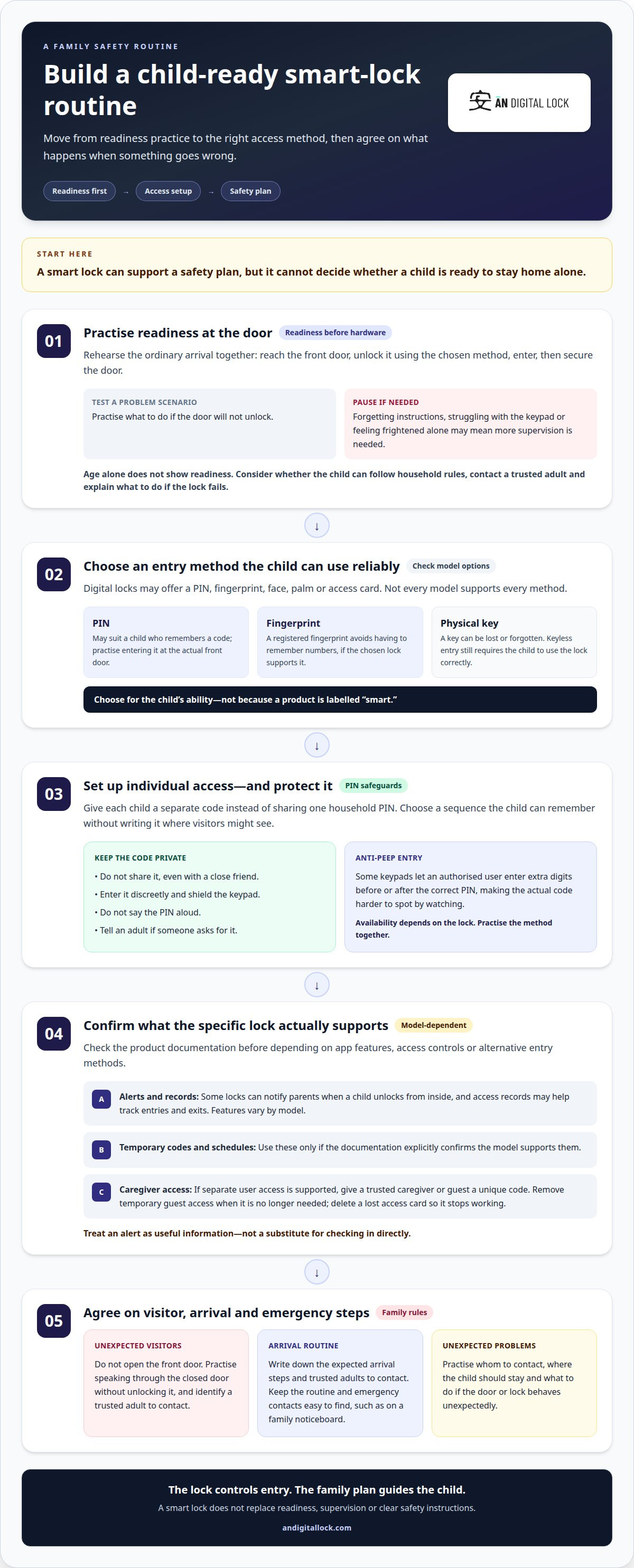
A smart lock isn’t the right answer when a child can’t follow the arrival routine or respond calmly to an unexpected situation. Before relying on keyless entry, practise the steps together: reach the front door, unlock it using the chosen method, enter, then secure the door. A child who forgets instructions, struggles with the keypad or feels frightened alone may need more supervision instead.
Age can inform the decision, but it can’t show readiness on its own. Consider whether your child can follow household rules, contact a trusted adult and explain what to do if the lock doesn’t work. Practise an ordinary arrival and a problem scenario, such as finding that the door won’t unlock. If your child can’t complete those steps confidently, a smart lock won’t resolve the underlying concern.
Smart locks can provide keyless entry through methods such as a PIN, fingerprint, face, or palm, depending on the model. A child who remembers a code may manage a PIN, while one who struggles with numbers may find another supported method easier. The key question is whether your child can use the chosen method reliably, not whether the lock is labelled “smart.”
Compared with a traditional lock, a smart lock can let a child enter without carrying a physical key that could be lost or forgotten. A keypad lock also avoids a physical key but depends on the child remembering and entering a code; some smart locks offer additional entry methods. Either way, the child needs to use the lock correctly and follow the family’s arrival routine.
There isn’t one fixed Singapore price for a lock with child-friendly access. Cost depends on the model, its entry methods and the door requirements. Don’t assume every lock includes child-safety features. Compare the functions that matter to your family rather than choosing on price alone.
For Singapore households, focus on a model’s documented access options instead of assuming a particular brand is suitable for children. Look for a method your child can use consistently, such as a PIN or fingerprint, and practise it at the actual front door. A product name alone won’t tell you whether its controls suit your child’s abilities.
Set a clear visitor rule: children home alone shouldn’t open the front door to unexpected visitors. Practise what to say, such as speaking through the closed door without unlocking it, and identify a trusted adult to contact. A smart lock controls entry; it doesn’t help a child decide whether to admit a visitor.
Legal questions and a child’s readiness are separate from the lock choice. Don’t treat a smart lock as proof that leaving a child alone is suitable or lawful. Consider the supervision they need and their ability to follow safety instructions. Rehearse an emergency scenario as a family: explain whom to contact, where the child should stay and what to do if the door or lock behaves unexpectedly.
2. Using individual smart lock access codes instead of physical keys
Give each child a separate code instead of sharing one household PIN. A six-digit code, and individual codes can help parents identify whose credentials were used. Choose a sequence the child can remember without writing it somewhere visitors might see. Practise entering it on the keypad, and make sure your child knows not to share it, even with a close friend.
Some digital locks can notify parents when a child unlocks a door from inside, and access records can help track entries and exits. These functions vary by model, so review the lock’s stated app and history features before relying on them. For example, a parent might check whether the child’s code was used after school. Treat an alert as useful information, not a substitute for checking in directly.
Temporary PINs and timed access schedules are model-specific features. Choose a lock whose documentation explicitly describes one-time or temporary codes if a caregiver needs limited access. A schedule is useful only when the model specifically supports setting access times; don’t assume every keypad or app offers it. No particular brand or model can be named here without verified product details.
For alternative entry, check the methods the chosen lock supports. Digital locks may use a PIN, fingerprint, face, palm or access card, but not every model provides every method. Older children may prefer a PIN they can enter themselves, while a registered fingerprint avoids remembering numbers. Practise the chosen method together and agree on a backup plan if it fails.
Give a trusted caregiver or guest a unique code if the lock supports separate user access. That way, a child won’t need to open the door for them. If an access card is lost, delete it from the lock so it stops working straight away. Remove temporary guest access when it’s no longer needed, and don’t share the child’s personal PIN.
Teach children three clear rules: keep the code private, enter it discreetly and tell an adult if someone asks for it. A simple example helps: if a friend asks for the PIN after school, the child says no and contacts a parent. If the keypad is visible from outside, teach your child to shield it while entering the code.
Keep the arrival routine and emergency contacts together in an easy-to-find place, such as a family noticeboard. Include the child’s expected arrival steps and trusted adults to contact. A written schedule can clarify who may enter and when, while a lock’s access schedule controls only what its specific model supports. For a suitable digital door lock, compare the available code and access controls with your family’s routine.
3. Anti-peep PIN entry and keypad lockout protection
An anti-peep keypad lets an authorised user enter extra digits before or after the correct PIN, making the actual code harder to spot by watching. If your child enters a PIN at the front door, teach them to shield the keypad and avoid saying the code aloud. Practise together at the door, with your child standing where approaching visitors can’t easily watch their fingers.
Keypad lockout protection is designed to restrict further attempts after repeated incorrect entries. The exact response depends on the model, so explain what your child should do if the keypad pauses or rejects a code. Agree on a simple fallback: step away from the door, don’t keep guessing, and contact a parent or trusted adult. A lockout feature can slow unauthorised attempts, but it may also interrupt a child who mistypes.
Families should also plan for an internet outage. App-based remote functions may be unavailable when the home connection is down, so your child may need an entry method supported directly at the lock. Practise using the keypad or another physical method without relying on a phone connection. The available fallback depends on the lock’s design, so don’t assume every model works the same way offline.
Entry controls should distinguish authorised users from people without permission. A registered fingerprint, PIN or one-time password can provide an access route when the lock supports it. Keep the child’s PIN private, and delete a lost access card from the lock so it stops working straight away. If a friend is coming over, teach your child not to open the door or share credentials without a parent’s permission.
Some digital locks can send parents phone notifications when a child unlocks a door from inside. Access records can also show who entered or left, especially when different users have separate PINs. Check which events the specific lock records, and agree how you’ll respond to an alert. A notification can prompt a check-in, but it won’t tell you why your child used the lock.
Smart locks aren’t immune to misuse. A lost phone may expose app access if it remains signed in, while a shared PIN can be used by anyone who learns it. No keypad feature can stop a child from giving the code away. Teach children to report a missing phone, keep PINs secret and tell a parent if someone asks for access.
4. Auto-lock timing and the door-closed requirement
An auto-lock setting can reduce the chance of someone forgetting to lock the door after entering. The described feature locks after 30 seconds if the door is not closed. Because that wording can be confusing, practise the actual sequence with your child: enter, close the door fully, then check the lock’s status. Don’t assume a timer can secure a door that remains ajar.
Practise a simple arrival routine at your own front door. Your child comes inside, closes the door, waits for the lock to engage, then tells a parent they’re home. If the lock doesn’t engage, they should avoid repeatedly pushing or pulling the handle and follow the agreed backup plan. This routine can help prevent an unsecured entrance and confusion about whether the door has locked.
Auto-lock timing alone can’t guarantee that children won’t be locked out or locked in. A child might leave without an access method or misunderstand how to open the door from inside. Practise both directions: entering from outside and opening the door from inside. Make sure your child knows whom to contact if either step fails, rather than relying on the timer as the only safeguard.
Check door compatibility before installation. The lock must suit the door’s structure and existing hardware; a thick or unusually configured entrance may affect fit. Consider the whole entrance, including the door and any gate, and check that the door closes smoothly before the lock engages. The right installation depends on the actual door, not just the lock’s feature list.
For Singapore homes, HDB and fire-safety considerations relate to the property and entrance, not simply the auto-lock setting. Don’t assume a lock’s timer makes an installation suitable. Consider the door’s required function and the requirements that apply to your home before changing its hardware.
Children shouldn’t open the door for unexpected visitors, even if a doorbell rings. Practise speaking through the closed door or contacting a parent instead of opening it. A digital doorbell can support communication from a distance when the household has one, but the child still needs a clear rule about visitors and permission.
Some lock systems may provide a door-left-open alert, but this depends on the specific system. If available, parents can use an alert to follow up when the door hasn’t closed properly. Teach your child what to do first: close the door, check whether it locks, then contact a parent if the alert or lock status is still unclear. Practise by deliberately leaving the door open so everyone can recognise the difference between a closed, locked entrance and an open one.
5. Arrival check-ins and emergency contacts
Set a check-in window around your child’s usual journey from school, not an exact arrival minute. The recommended window is within 10 minutes of their typical arrival time. Agree on one clear action, such as sending a message after entering, then explain what you’ll do if the message doesn’t arrive. A lock event can provide context, but a child’s direct check-in confirms they can communicate.
Use a realistic timetable. For example, if a child’s bus arrives at 14:40 and the walk home takes five minutes, 14:50 is the latest planned door-opening time. If the door hasn’t opened by 15:05, the example plan is to call. Adjust the routine to the child’s actual school journey and make sure they know the expected steps. Smart lock features for kids home alone work best alongside a check-in plan tailored to that journey.
Practise the check-in sequence before your child arrives home alone for the first time: get home, enter, secure the door, then message or call a parent. Ask your child to repeat the plan in their own words so you know they remember what to do. Young children may need a simpler routine or more supervision if they can’t follow the steps reliably. For families considering smart lock features for kids home alone, a clear check-in routine connects door access with a real conversation.
Choose a primary contact and a backup adult. Put their names and phone numbers where your child can find them quickly, such as a family command centre. Include a short instruction for each situation: call a parent if the door won’t open, and contact the backup adult if the parent doesn’t answer. Practise both calls together rather than assuming your child will remember under stress.
Explain what counts as an emergency and rehearse a response as a family. For example, if your child feels unsafe, they should move to the agreed safe place and contact a trusted adult. Keep emergency contacts visible, and make sure your child can use the phone they’ll have after school. A written plan can help when nerves make spoken instructions harder to remember.
Set expectations for changes to the evening schedule, too. If a parent usually gets home at 5:00 but expects to be late, leave the child a note explaining the change and who to contact. Don’t let a missed check-in become an open-ended wait; follow the agreed call plan. To discuss a home access setup for your family, contact AN Digital Lock.
AN Digital Lock: Digital Door Locks
AN Digital Lock offers digital door locks for households planning how children will enter and secure the home. Consider your child’s preferred access method, the door’s fit and the family’s arrival routine together. A lock should support the routine you’ve practised, not replace supervision or emergency planning.
When choosing a digital door lock, focus on features that match your household’s needs, such as keyless entry and the access controls available on the chosen model. The door itself matters too, since compatibility affects installation. A clear plan helps you decide which functions will make everyday access simpler for your family.
For help exploring digital door locks for your home, contact AN Digital Lock.
Build a home-entry plan your child can follow
The next step is to match your chosen access routine to the entrance your child uses every day. Consider how the lock, door and any metal gate work together, then practise the routine with your child before relying on it for a school-day arrival. The best smart lock features for kids home alone are those that fit your household’s plan and your child’s ability to use them calmly.
AN Digital Lock offers digital door locks, wooden doors and metal gates for home entrances. If you’re planning a new setup or reviewing an existing one, consider the complete entrance, not just the lock. A clear discussion of your door, gate and family routine can help shape your next decision without treating technology as a substitute for supervision.
Contact AN Digital Lock to discuss a suitable home-entry setup. Take the next step toward a more practical routine for your family.
Frequently Asked Questions
When isn’t a smart lock the right answer?
A smart lock isn’t the answer if a child can’t manage the entry routine or respond safely when something goes wrong. For example, if your child can’t explain what to do after a failed unlock, a lock won’t make staying home alone appropriate. Decide based on the child’s maturity, comfort and ability to follow instructions. A lock supports a family safety plan; it doesn’t replace supervision or readiness.
Why is a key a bad fit for a child?
A physical key can be forgotten, misplaced or left somewhere others can find it. That may leave a child unable to enter after school, or make access harder to manage if the key goes missing. Keyless entry removes the need to carry a key, but the chosen method must suit the child. Practise what to do if their usual access method fails.
What can go wrong?
A child might mistype a PIN, fail to close the door or misunderstand an alert. A shared code can also reach someone the family didn’t intend to give access. Reduce confusion by practising a specific response for each issue, such as moving away from the entrance and calling a parent after a failed entry. Keep emergency contacts available, and review the routine when family schedules change.
Why Family Digital Locks?
A digital lock can offer different access methods for people with different routines. AN Digital Lock sells digital door locks with fingerprint, PIN, RFID and Wi-Fi access, depending on the model. This range can help families consider who needs entry and how each person will use it. Choose based on your household’s practical needs rather than assuming one feature suits everyone.
What smart lock features help keep children safe when home alone?
Useful options can include individual PINs, anti-peep entry, auto-locking and access notifications, where the specific lock supports them. Consider how your child would use each feature in an everyday situation, such as arriving home with a school bag. The right choice depends on your child’s ability to follow the routine. Set visitor and emergency rules alongside the lock settings.
Can smart locks send alerts when a child arrives home or unlocks the door?
Some digital locks can notify parents when a child unlocks a door from inside. A lock may also keep entry records, depending on its features, but a record isn’t the same as your child confirming they’re safe. Pair any available notification with a simple check-in, such as a message after arrival. Decide in advance who will follow up if the expected check-in doesn’t come.
What emergency access options do smart locks provide during a power or Wi-Fi outage?
Emergency access depends on the lock’s design and supported entry methods. A model with keypad or fingerprint access may provide an alternative to app-based entry, while a mechanical override key is another option on applicable models. Keep any override key in an accessible backup location, not somewhere visitors can find it. Practise the backup method with your child before they need it.