


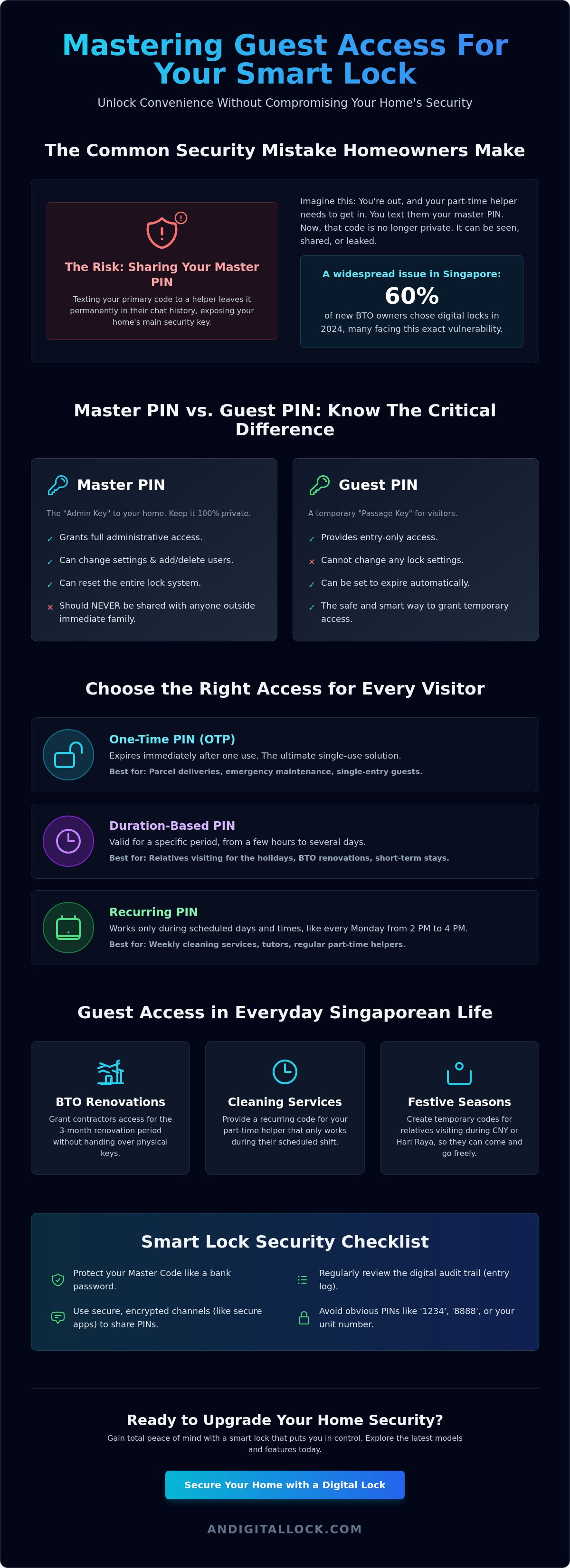
Imagine you're at dinner in Orchard when your part-time helper calls because they've forgotten the entry code. You're forced to text your private master PIN just to let them in, leaving your home's primary security key sitting in a chat history forever. This risky move is exactly why setting up guest pin on smart lock systems is a critical skill for every modern homeowner. This common Singaporean headache affects many of the 60% of new BTO owners who chose digital locks in 2024, leaving them feeling more vulnerable than secure.
You shouldn't have to compromise your safety for the sake of convenience. We understand the anxiety of a leaked master code or the frustration of navigating a confusing mobile app interface. This guide ensures you master secure guest access to keep your home protected and private. You'll learn how to create temporary access for visitors and gain total peace of mind through scheduled entries. We'll preview the latest 2026 app workflows for top brands and show you exactly how to track every entry and exit from your smartphone.
Key Takeaways
- Protect your home's integrity by mastering the "Master Code Rule" to keep your primary access PIN strictly private.
- Simplify your hosting duties by setting up guest pin on smart lock devices, allowing for seamless entry for helpers and maintenance teams.
- Discover how to use One-Time PINs and Duration-based codes to provide flexible access that expires automatically after use.
- Secure your digital communication by learning the best practices for sharing codes via encrypted channels and avoiding common PIN patterns.
- Troubleshoot connectivity and keypad issues efficiently to ensure your guests never face a lockout due to app sync errors.
Understanding Guest PINs and Why Your Smart Lock Needs One
A guest PIN is a secondary, restricted access code designed specifically for people who don't live in your home. Unlike your permanent family code, these restricted PINs provide a secure way to grant entry without handing over the keys to the kingdom. For homeowners still learning what are smart locks and how they function, the guest PIN feature is often the most used security layer in a high-traffic Singaporean household. It allows you to maintain total control over your front door while providing seamless entry for others.
The Master Code Rule is simple: never share your primary PIN with anyone outside your immediate family. Your master code is the administrative key that allows a user to change settings, delete fingerprints, or even reset the entire system. By setting up guest pin on smart lock hardware, you isolate your primary security credentials from external exposure. This practice prevents your private code from being saved in someone else's chat history or shared among service staff without your knowledge.
Modern smart locks also offer a digital audit trail. This feature creates a log of every entry event, telling you exactly who unlocked your door and at what time. It turns your entrance into a monitored security hub. You'll gain peace of mind knowing that your parcel delivery was successful or that your helper arrived on time, all through real-time notifications on your smartphone.
Guest PIN vs. Master PIN: The Security Difference
The master PIN is for management; the guest PIN is for passage. Master codes grant full authority to modify the lock's internal database. In contrast, a guest PIN only triggers the motor to retract the bolt. Sharing a single code with everyone creates a high risk of credential leakage. If a renovation contractor accidentally shares your code with a sub-contractor, your home security is immediately compromised. Your home security strategy should follow the Principle of Least Privilege: give people only the minimum level of access they need to perform their task and nothing more.
Common Scenarios for Guest Access in Singapore
Many Singaporeans find that setting up guest pin on smart lock systems solves daily logistical hurdles. Common scenarios include:
- BTO Renovations: Grant access to contractors during the intensive 3-month renovation period of a new HDB flat without being physically present.
- Cleaning Services: Provide weekly access to part-time helpers that automatically expires after their shift ends.
- Festive Seasons: Create temporary codes for relatives visiting during Chinese New Year or Hari Raya to avoid the "who is home to open the door" dance.
Using these specific codes ensures your home remains a sanctuary of safety while remaining welcoming to those you trust.
Types of Guest Access: One-Time, Recurring, and Duration PINs
Choosing the right access type is just as important as the lock itself. When you're setting up guest pin on smart lock apps, you'll encounter several options tailored to different visitor needs. These features allow you to customize how people enter your home without compromising your long-term security. With 42% of Singaporean households now using smart devices, mastering these access types is becoming a standard part of home management. Understanding these variations ensures you don't accidentally grant permanent access to a temporary visitor.
When to Use a One-Time PIN (OTP)
One-Time PINs (OTPs) are the ultimate solution for single-use scenarios like parcel deliveries or emergency maintenance. These codes expire immediately after one successful entry. This prevents a visitor from returning unannounced at a later time. High-quality digital lock Singapore models often allow you to generate these codes remotely. You can text the code to a courier while you're at the office, knowing it'll be useless as soon as they close the door. It's a simple, effective way to handle unexpected arrivals without leaving your home vulnerable.
Managing Recurring Access for Helpers and Tutors
Recurring access is built for regular service providers. You can set specific windows, such as every Monday from 2 PM to 4 PM. The lock hardware automatically disables the code outside these designated hours. This is perfect for tutors or weekly cleaning services. You won't have to worry about manually deleting the code every week. It provides a "set it and forget it" convenience that fits perfectly into a busy Singaporean lifestyle. The system handles the scheduling for you, so you can focus on your day without tracking who has an active code.
For visitors staying longer, Duration or Period PINs are the best choice. These are ideal for house sitters or relatives visiting for a week. You define a specific start and end time. Once the guest leaves, the code simply stops working. Some tech-savvy homeowners also prefer Bluetooth-based guest keys. Instead of typing a code, the guest uses their smartphone to unlock the door via the manufacturer's app. This creates a digital handshake that is highly secure and easy to track. Every entry is logged, giving you a clear history of when your visitors arrived and left.
Modern systems make managing these different access levels incredibly simple. If you're looking for a lock that handles these complex schedules with ease, consider exploring our latest BTO lock bundles for a complete home security upgrade.
Step-by-Step Guide: Setting Up Guest PINs for Top Brands
Before you begin the technical process, ensure your hardware is ready for configuration. The primary prerequisite for any app-based setup is a successful pairing between your lock and the official manufacturer app. For Zigbang owners, this requires the Zigbang Smart Doorlock app, which reached version 2.0.50 in late 2025. Philips users should utilize the Philips EasyKey Plus app, updated as of April 13, 2026. Solity owners will manage their access through the Smart Solity platform, currently on version 2.0.17. Ensure your smartphone's Bluetooth is active and your home Wi-Fi bridge is powered on to maintain a stable data link during the process.
Zigbang and Philips: App-Based Guest Management
Digital management is the most efficient way to handle visitor access. These apps provide a visual interface that simplifies setting up guest pin on smart lock systems. Follow these direct steps to issue a new code:
- Step 1: Open your brand's app and select your specific lock model from the main dashboard.
- Step 2: Navigate to the "User Management," "Member Access," or "PIN Management" menu.
- Step 3: Tap the "Add" or "+" icon and choose "Guest" or "Temporary PIN."
- Step 4: Select the PIN type based on your needs. Choose a One-Time PIN (OTP) for a single delivery or a Duration PIN for a week-long guest stay.
Setting Codes Manually via Keypad (Offline Method)
If your lock isn't connected to a Wi-Fi bridge, you can still manage access using the physical keypad. This offline method is a reliable fail-safe but requires you to be physically present at the door.
- Enter Master Mode by pressing the registration button. You'll typically find this button behind the battery cover on the internal unit of your digital door lock.
- Follow the automated voice prompts or specific manual sequences. For most premium models, the pattern follows a logical flow: [Master PIN] + [#] + [User Number] + [New Guest Code] + [#].
- Verify the code works before your visitor arrives. Always test the new PIN at least twice while the door is standing open. This simple check prevents accidental lockouts and ensures the mechanism is functioning correctly.
Security Best Practices for Managing Digital Access in Singapore
Managing digital access in a high-density environment like Singapore requires a proactive approach to security. While setting up guest pin on smart lock devices adds convenience, it also creates new digital touchpoints that need monitoring. You must treat these codes with the same care as a physical key. Start by enforcing a strict "No Repeating PIN" rule. Avoid using obvious numbers like your birth year, HDB block number, or simple sequences like 1234. These are the first patterns an intruder will try.
When you share access, use secure communication channels. Don't send PINs via unencrypted SMS or leave them on sticky notes. Encrypted apps like WhatsApp or Signal provide a safer way to transmit sensitive data. Once your renovation is complete, change your Master PIN immediately. It's a standard precaution to ensure that only your family has administrative control after the contractors have left. By regularly setting up guest pin on smart lock profiles for different visitors, you keep your main access code entirely private.
Conduct a monthly audit of all active codes to delete any that are no longer necessary. Digital locks are designed to simplify your life, but they're most effective when you manage them with discipline. Reviewing your entry logs every few weeks ensures that no old contractor or delivery code remains active without your knowledge.
Protecting Your Privacy in HDB and Condo Corridors
Singapore's common corridors mean neighbors or delivery riders often pass by while you're entering your home. Most premium locks feature a "Scramble Code" or "Fake PIN" function. This allows you to enter random digits before or after your real code to hide your actual PIN from prying eyes. For enhanced security during long holidays, enable "Double Authentication," which requires both a PIN and a fingerprint for entry. Remember that while software is vital, the physical mortise lock provides the heavy-duty mechanical protection your door needs.
What to Do if a Guest PIN is Compromised
If you suspect a code has been shared with unauthorized individuals, take action immediately. You shouldn't wait for an incident to happen before securing your door.
- Open your mobile app and revoke the specific guest PIN instantly.
- Review your entry logs to check for unauthorized access attempts at unusual hours.
- Perform a factory reset if you suspect your Master PIN has been leaked.
Troubleshooting Common Guest PIN Issues
Even the most advanced technology can encounter occasional hiccups. When you're setting up guest pin on smart lock systems, you might face technical friction that prevents a visitor from entering. Don't panic if a code doesn't work immediately. Most issues are related to connectivity or simple configuration settings rather than hardware failure. Understanding these common roadblocks ensures you can provide a smooth experience for your guests every time.
- Issue 1: Keypad Rejection. If the keypad doesn't recognize a PIN, ensure the "Privacy Mode" or "Do Not Disturb" switch on the internal unit isn't engaged. This physical override blocks all external entries, including valid guest codes.
- Issue 2: Sync Failures. If you've issued a code but the lock doesn't react, your Wi-Fi bridge may be offline. App-based changes require a stable bridge connection to push data from the cloud to the lock's local memory.
- Issue 3: Time Zone Errors. A code that works at noon but fails at night often indicates a clock mismatch. Verify that your lock's internal time is synced to Singapore Time (SGT) within the app settings.
If these basic checks don't solve the problem, it may be time to consult a best digital lock Singapore provider for professional diagnostic support.
Connectivity and Syncing Solutions
Connectivity issues are the most frequent cause of guest access errors. Start by checking your battery levels. When power drops below 20%, many locks disable power-hungry Wi-Fi or Bluetooth modules to save energy for the physical bolt motor. Ensure your Wi-Fi bridge is within five meters of the door lock for a strong signal. Finally, always refresh your mobile app after setting up guest pin on smart lock profiles. Wait until the "Syncing" or "Updating" icon completely disappears before testing the code.
The Importance of Professional Installation and Support
A DIY setup often leads to subtle configuration errors that only appear when you try to use advanced guest features. Professional installation ensures that your mortise is perfectly aligned and your software is correctly calibrated for the Singaporean network environment. At AN Digital Lock, we don't just sell hardware; we provide comprehensive after-sales support to help you manage your digital ecosystem. If you encounter persistent app issues or need help with complex scheduling, our team is ready to assist. Contact AN Digital Lock for expert setup and support to keep your home security running flawlessly.
Take Control of Your Home Security Today
Mastering the art of guest access is more than just a convenience; it's a fundamental layer of protection for your Singaporean household. By isolating your master code and utilizing temporary PINs, you eliminate the risk of credential leakage while maintaining a clear audit trail of every entry. Whether you're managing renovation contractors for a new BTO flat or coordinating with weekly helpers, the right digital lock makes these transitions seamless and safe.
Setting up guest pin on smart lock systems shouldn't be a source of stress. As an authorized dealer for global leaders like Zigbang, Philips, and Solity, AN Digital Lock brings over 10 years of experience to every HDB and condo installation. We ensure your hardware is configured perfectly from day one, providing the expert support you need to manage your digital keys with ease. You deserve a home that's both welcoming to guests and impenetrable to intruders.
Upgrade to a Smart Lock with Easy Guest Management at AN Digital Lock and experience the perfect blend of security and contemporary refinement. Your peace of mind starts at the front door.
Frequently Asked Questions
How many guest PINs can I set on a standard smart lock?
Most standard smart locks support between 10 and 100 guest PINs depending on the specific model and brand. High-capacity Zigbang and Solity models are designed to handle larger volumes of users, making them perfect for rental properties or large families. You should always consult your manufacturer's specifications to confirm the exact memory limit for your device before you begin adding multiple visitors.
Do I need a Wi-Fi bridge to set up guest PINs remotely?
Yes, a Wi-Fi bridge is essential if you want to manage access while you're away from the property. Without this bridge, you must be within Bluetooth range of the door to sync any new codes. Setting up guest pin on smart lock profiles remotely requires a constant connection between your home network and the lock's internal software to push updates in real-time.
Can I set a guest PIN that only works on certain days of the week?
You can easily schedule access for specific days and hours using the recurring access feature in your mobile app. This is the most efficient way to manage part-time helpers or tutors who visit on fixed schedules, such as every Monday and Wednesday. The lock's software automatically disables the code outside of these pre-set windows to ensure your home stays protected at all times.
What happens to the guest PIN if the smart lock batteries die?
Guest PINs are stored in the lock's non-volatile memory, which means they remain active even if the batteries completely fail. The only issue is that the keypad won't have power to recognize the input. In this scenario, use a 9V battery or a USB-C power bank at the emergency terminal to provide temporary power so your guest can enter their code.
Is there a limit to how long a temporary PIN can last?
Most manufacturer apps allow you to set a duration for a temporary PIN ranging from a single hour to several months. For long-term visitors like house sitters, you can define a specific start and end date for their access. Once the expiration time arrives, the code is deactivated immediately by the system, so you don't have to remember to delete it manually.
Can I delete a guest PIN immediately after it has been used?
You can manually revoke any guest access at any time through the user management dashboard in your app. If you prefer an automated solution, use a One-Time PIN (OTP) which the system deletes immediately after one successful entry. This is a highly secure option for one-off service calls or deliveries where you want to prevent any possibility of a return visit.
Will my smart lock notify me when a guest PIN is used?
Most modern smart locks send real-time push notifications directly to your smartphone whenever a specific guest PIN is used. This feature provides an instant digital audit trail of everyone entering and leaving your home. Setting up guest pin on smart lock notifications ensures you're always informed about visitor arrivals, providing an extra layer of security and peace of mind while you're out.
Do guest PINs work on digital gate locks as well as main door locks?
Yes, guest PIN functionality is fully supported on most digital gate locks and main door locks sold in Singapore. If you've installed a synchronized "gate + door" bundle, you can often issue a single guest code that unlocks both barriers simultaneously. This simplifies the entry process for your visitors while maintaining the dual-layer security that many HDB and condo owners prefer.