


A keypad code can be easier to observe than you might think. If you’re asking what a scramble code feature is and why you need it, it lets you enter extra random digits with your PIN, making the correct sequence less obvious to someone watching. Your PIN remains secret, while the added digits make its position harder to spot.
This added layer can help if someone might see you use a keypad or notice marks from repeated key presses. Scramble methods vary: some let you place your PIN within a longer string of digits, while a position code depends on knowing where the real code sits. Neither replaces a strong PIN or careful use.
This guide explains how random characters and position codes work, when the feature can be useful, and what to consider before creating or using a secret. You’ll also see how scramble codes fit into the broader role of digital door locks in a Singapore home, so you can make a clear, practical choice.
Key Takeaways
- Learn how random digits can disguise the position of a PIN, and why the method depends on keeping the real code secret.
- Understand what scramble codes can help with, and where they fall short as a security measure.
- See why code obfuscation is different from protecting a door lock or account with an access code.
- Get practical guidance on creating or using a secret without confusing it with a PIN or one-time passcode.
- Explore how digital door locks can support a more convenient home entry setup in Singapore.
How a scramble code adds random characters and uses a position code
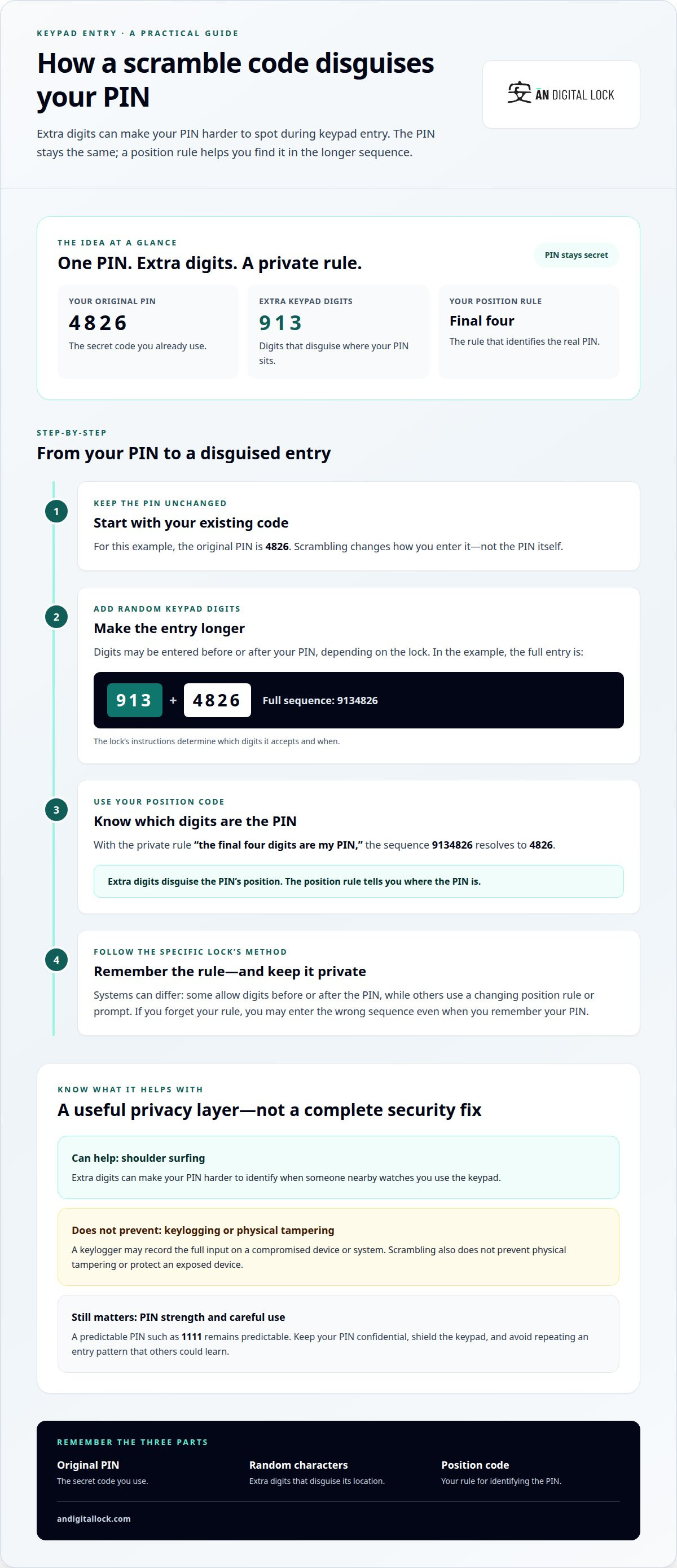
A scramble code changes how you enter a PIN, not the secret PIN itself. On a keypad, random digits can appear before or after the original code, making it harder for someone nearby to identify the correct sequence by watching your fingers. For example, if your PIN is 4826, you might enter extra digits around it, depending on how that lock’s feature works.
A position code gives you a rule for locating the real PIN within a longer entry. Imagine that your private rule is “the final four digits are my PIN.” If you enter 9134826, the last four digits, 4826, are the code. The extra digits are there to disguise its position, not to replace or strengthen the PIN itself.
The sequence isn’t the same on every system. One keypad may let you add digits before or after your PIN; another may use a changing position rule or prompt. Follow the lock’s instructions to learn which digits it accepts and when. A rule that’s easy for you to remember but predictable to someone else can weaken the benefit.
For everyday use, treat keypad entry as private: shield the keypad, keep your PIN confidential, and avoid sharing your position rule. These practical privacy steps don’t replace protecting personal information stored by a device or service.
There’s no single extra charge for this feature. Any added cost depends on the specific lock and whether its scramble feature is built in or offered as a separate option. The feature’s name alone doesn’t tell you how a particular model is priced.
To understand the difference, separate three parts: your original PIN, the random characters, and the position rule. The PIN identifies you; the extra digits disguise its entry; the rule tells you which part of the longer sequence is your PIN. If you forget the rule, you may enter the wrong sequence even if you remember the PIN.
- Original PIN: The secret code you already use, such as 4826.
- Random characters: Extra keypad digits that can make the PIN’s location less obvious.
- Position code: Your method for identifying the PIN within the full entry.
Think of scramble entry as a way to make shoulder surfing harder, not as a replacement for a strong PIN or careful keypad use. Before relying on it, learn the exact sequence your lock expects and choose a position rule you can remember without writing it beside the keypad.
Scramble’s intended use and limitations
A scramble feature aims to make a PIN harder to identify by watching keypad entry. In a shared corridor, for example, a passer-by may see you press keys but struggle to distinguish your PIN from the extra digits. This helps address shoulder surfing, when someone watches you enter a code. It won’t stop other attempts to access a lock.
The feature’s value depends on what an observer can see. If someone records the entire keypad sequence, the extra digits may not conceal your PIN. Repeating the same PIN and entry pattern can also reveal clues over time. Vary how you enter the code, shield the keypad, and avoid being watched while unlocking the door.
Scramble entry doesn’t make a weak PIN stronger. A memorable sequence such as 1111 remains predictable, even when surrounded by random digits. Choose a PIN that isn’t an obvious pattern, and keep it private. Also learn the lock’s entry rules. An incorrect position rule can cause you to enter the wrong code, even when you remember your PIN correctly.
Does a scramble code feature improve security against shoulder surfing or keylogging? It can make a PIN harder to spot during direct observation, but it doesn’t prevent keylogging. A keylogger records input on a compromised device or system; random keypad digits don’t protect data captured there.
The distinction matters because the threat determines whether scrambling helps. If someone is nearby as you enter a door code, obscuring your PIN’s position can add a useful layer. If a device records every key pressed, the full sequence may still be exposed. Scramble entry also won’t prevent physical tampering with a keypad or someone taking a device.
- Useful against: someone trying to spot a PIN by watching keypad use.
- Not a fix for: keyloggers, exposed devices, predictable PINs, or physical tampering.
- Best paired with: a private PIN, careful entry, and a keypad shield from view.
Use the feature as part of your routine, not as a reason to share your code. For example, block the keypad from the view of people in the corridor as you enter the sequence, and don’t tell visitors your PIN or position rule. If you suspect someone has learned the code, change it through the lock’s normal settings rather than relying on scrambling alone.
To explore related keypad security features, consider how the entry method fits your home’s daily access needs.
Code scrambling and obfuscation
In software, code scrambling usually means obfuscation: changing readable source code to make it harder to understand, reverse engineer, or modify. For example, an obfuscator might replace descriptive names such as userPassword with short, unclear labels. The program may still run, but its internal logic becomes less readable to someone inspecting it.
This meaning differs from scrambling digits on a physical keypad. A keypad feature changes how a person enters a PIN. Code obfuscation changes how software looks to someone examining its code. Neither term, by itself, means information is encrypted or unauthorised access is impossible.
Obfuscation can deter casual copying or make straightforward code inspection harder, but it doesn’t make an application invulnerable. Someone with enough time and effort may reverse engineer obfuscated software, and determined attackers can study what a program does while it runs. It adds difficulty, not an impenetrable barrier.
There’s also a trade-off for developers. Obfuscated web application code can be difficult to inspect for vulnerabilities because ordinary and malicious code may look alike. Dynamic code analysis can help track issues, but it can be time-consuming, costly, and inefficient when the code is hard to follow. This makes maintenance and security review more demanding.
Consider a single-page web application that collects no user data and doesn’t require security. Obfuscation may be an option if the aim is simply to make its code less readable. It’s a poor substitute for stronger safeguards in an application handling sensitive information. If a browser-based application includes third-party scripts, a malicious script could expose personal or credit card data.
A skimming attack shows why hiding code isn’t enough. If a malicious third-party script captures payment details, obfuscated code around it may make the activity harder for developers to spot. The script may continue running unnoticed. Code that looks confusing to a reviewer can conceal harmful behaviour as well as legitimate functions.
Free obfuscation tools are available, but using one doesn’t resolve security concerns. Developers still need to understand what their application collects, which scripts it loads, and how to investigate unexpected behaviour. These factors matter more than whether the source code looks scrambled.
- Obfuscation: Makes code harder to read, not impossible to reverse engineer.
- Security review: Can become more difficult when normal and malicious code look alike.
- Best fit: A simple application that collects no user data and doesn’t require security.
Obfuscation may suit a simple, single-page web application collecting no user data and requiring no security. Code de-obfuscators on the market do not work, yet an obfuscated third-party skimming script may remain undetected and run indefinitely. Testing one billion combinations per second would take more than 10^60 years to find the scrambled password.
Generating or using an existing secret
A scramble feature works with a secret you can remember and enter consistently. For a door keypad, that secret is usually your PIN. The random characters change the visible entry sequence, while your private rule identifies which part is the PIN. Keep your PIN and position rule distinct in your mind.
How do I enable and use a scramble code feature? Follow the lock’s setup instructions to activate the feature, set or retain your PIN, and learn the required entry pattern. Practise entering the full sequence while the door is open, so you can confirm the keypad accepts it before relying on the feature.
If you’re setting a new PIN, avoid personal details or simple patterns. A birthday, repeated digit, or sequence such as 1234 can be easier to guess than an unrelated code. Choose a secret that you can recall without writing it beside the door. Don’t reuse a code that already protects another account or device.
You may be able to keep your existing PIN if the lock’s feature allows it. The key is to understand how the random characters fit around the PIN. For example, if your private rule places the PIN at the end of the entry, remember that rule exactly. A mistaken rule can lead to failed entry attempts.
Some software projects use the word “secret” differently. A software encryption key protects data through a cryptographic process; a keypad position rule simply helps identify a PIN within a longer typed sequence. AES-128, for example, refers to a symmetric encryption key size of 128 bits. That is not the same as a door PIN or its scramble pattern.
Keep the setup manageable. Choose a private method you can recall under ordinary conditions, and don’t share it with people who shouldn’t have access. If someone else needs access, use the lock’s supported access-management process rather than revealing your personal PIN or position rule.
- Choose: A private PIN that avoids obvious personal details and simple patterns.
- Understand: The exact sequence and position rule the keypad expects.
- Practise: Test the full entry while the door is open, before depending on it.
- Protect: Keep the PIN and its rule private, and don’t write them together.
Scramble functionality helps only if you can use it reliably. If the entry pattern is confusing, pause and review the lock’s instructions before changing your secret. Remembering your PIN but forgetting the rule may still leave you unable to enter, so clarity matters as much as concealment.
How does a scramble code feature compare with a PIN, password, or one-time passcode?
A scramble code feature changes how you enter a PIN; it isn’t a separate credential. If your PIN is 4826, extra digits may disguise where that PIN appears in the keypad entry. A password, by contrast, is the secret itself, while a one-time passcode is temporary and intended for a particular login or verification step.
A PIN is a short numeric secret used to authenticate access, such as opening a keypad lock. Scrambling can make the PIN’s position less obvious to someone watching. It doesn’t change the PIN’s strength, so a predictable choice such as 1111 remains predictable even when extra digits surround it.
A password usually belongs to a digital account or service. It may include letters, numbers, and symbols, depending on the system. Typing a password into a web page differs from entering a PIN on a physical keypad. Scramble entry doesn’t protect a password typed into a compromised device or intercepted online.
A one-time passcode is intended for a limited use or verification event. For example, a service may send a temporary code during sign-in. Unlike a persistent PIN, it isn’t the same secret used every time. A keypad scramble feature doesn’t generate or deliver one-time passcodes.
These methods address different parts of access:
- PIN: A numeric secret that identifies an authorised user to a lock or system.
- Scramble feature: A keypad entry method that can obscure the PIN’s position from an observer.
- Password: A secret used to sign in to an account or application.
- One-time passcode: A temporary code used for a specific authentication step.
For a door keypad, the relevant comparison is between entering a PIN plainly and entering it with a scramble rule. The latter may make direct observation less useful, but it doesn’t replace protecting your PIN. For an online account, a unique password and the account’s available verification methods serve different purposes. Don’t assume one feature covers every access risk.
Choose a method based on what you’re protecting. A home entrance needs a keypad credential you can use reliably. An online account needs its own sign-in credentials. A service requesting a one-time passcode needs that temporary code for its stated verification step. Keeping these roles distinct helps you avoid treating a scramble feature as a password manager or authentication code.
Ready to take the next step? Explore entry security options for your home.
AN Digital Lock
AN Digital Lock offers digital door locks for homeowners considering keypad entry and features such as scramble codes. Start with your household’s access needs, how you expect to use the lock, and which entry method feels practical. A scramble feature can inform your decision, but it isn’t a complete security solution.
Explore digital door lock options alongside the door and gate setup at home. Considering the full entrance helps you look beyond the keypad alone. Contact AN Digital Lock to discuss your home entry needs and available options.
Choose an entry setup that fits your home
Before choosing a lock, consider who uses the entrance, how they access it, and what makes daily entry straightforward. Understanding what a scramble code feature is and why you need it can help you decide whether keypad entry suits your household, but the wider door and gate setup matters too.
AN Digital Lock offers Digital Door Locks, Wooden Doors, and Metal Gates, helping homeowners consider entrance products as part of a home setup. Think about the access experience you want, then explore the options with AN Digital Lock.
Contact AN Digital Lock to discuss your home entry needs. A thoughtful choice can make everyday access feel simpler and more comfortable.
Frequently Asked Questions
What does Scramble actually do?
For keypad users, scramble entry adds digits around a valid PIN so its position is less obvious to an observer. Picture entering a code while another person waits nearby: the extra digits can make it harder to tell which presses matter. The lock still relies on the correct PIN and entry pattern. Scrambling won’t stop someone from learning a code you share or enter openly.
What is a scramble code feature?
A scramble code feature is an optional keypad-entry method that adds concealment when you unlock a door. Its exact design depends on the lock: one model may accept extra digits around the PIN, while another may use a different entry pattern. Understanding what a scramble code feature is and why you might need it starts with considering whether someone could observe you using the keypad.
How does a scramble code feature work?
The lock accepts an entry that includes your PIN and additional keypad digits, following its programmed method. For instance, a model might let you enter digits before and after your PIN, while another may expect a particular placement rule. The lock then recognises the valid code within that entry. Check the specific model’s instructions, as the order and accepted format vary.
What is a scramble code feature used for?
The feature makes a keypad PIN harder to identify by sight. This can be useful at a home entrance shared with visitors, delivery personnel, or other people passing nearby. It may add privacy during entry, but it doesn’t determine who should have access. Keep control of your PIN and use the lock’s access settings to manage household entry.
What are the risks and limitations of scramble code features?
A scramble feature can’t protect a PIN that’s shared, guessed, or captured by a device recording every keypad press. It may also cause confusion if you forget the entry pattern or misunderstand the lock’s instructions. Before relying on it, learn the correct sequence and consider whether everyone who needs access can use it comfortably. Treat it as one entry safeguard, not complete security.
Which devices or apps offer a scramble code feature?
Some digital door locks with keypads offer a scramble code feature.