


A well-positioned peephole helps you see who’s at the door before opening it. For many HDB doors, a practical starting height is 145 to 160 cm above the ground, while the hole itself must match the viewer’s specifications. Knowing how to install a peephole viewer on an HDB door starts with measuring carefully and choosing a position that suits the people in your home.
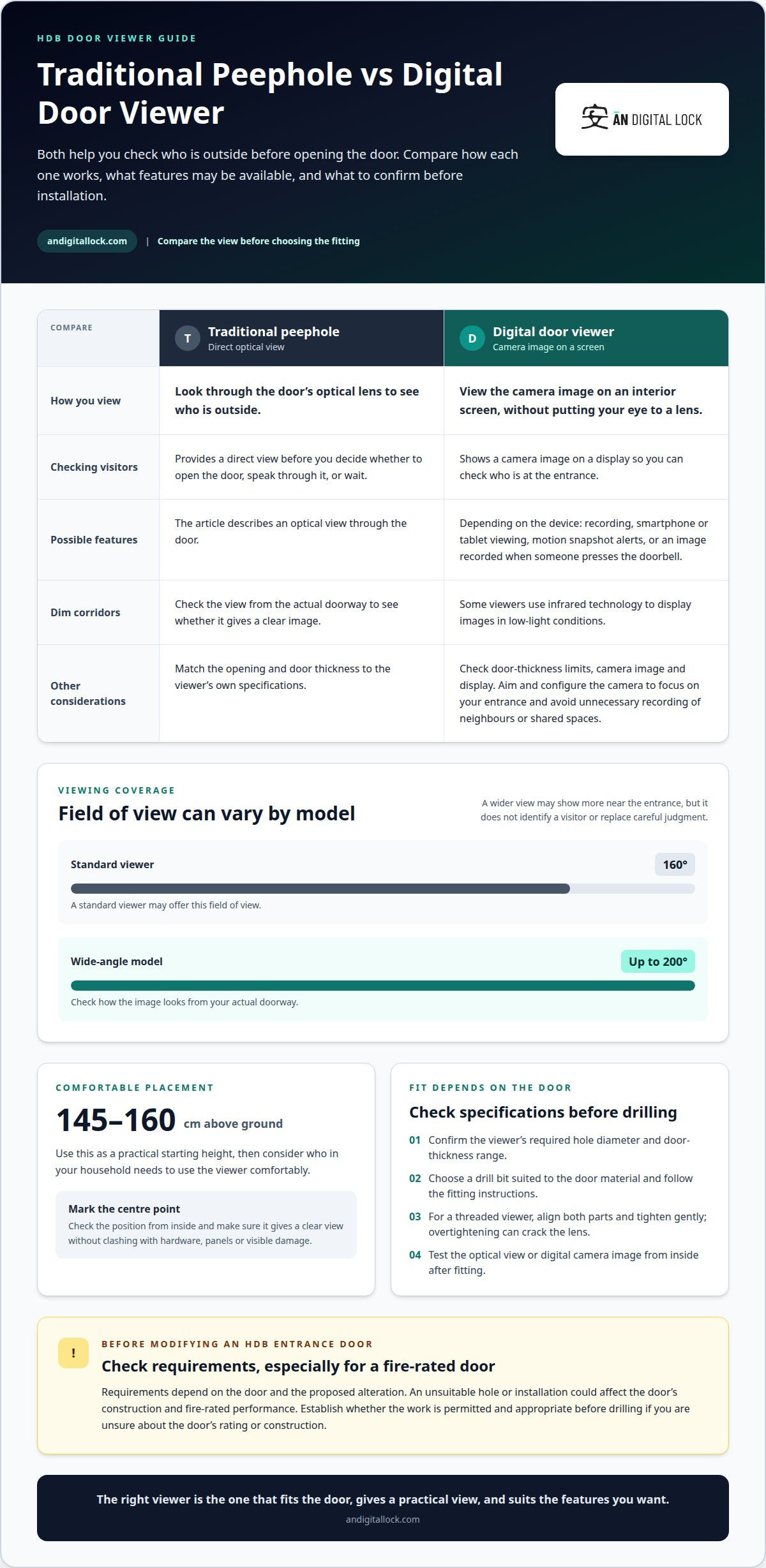
A traditional peephole lets you look through the door, while a digital door viewer uses a camera and screen to show who is outside without putting your eye to a lens. Both can help you check visitors, but placement matters: the viewing position should be comfortable, and the door’s thickness and material must suit the device.
This guide explains how to measure and mark an HDB door, choose a suitable height and position, and understand the security considerations of a peephole viewer. It also covers when a digital viewer may be a practical alternative, helping you choose the right option for your home.
Key Takeaways
- Learn why the viewer’s own specifications should guide hole size, rather than assuming every peephole fits the same opening.
- Use 145 to 160 cm above the ground as a practical height range, then consider who needs to use the viewer comfortably.
- See how placement can affect the view from inside and outside the HDB door.
- Understand how a door viewer can help you identify visitors before opening the door, and what digital features may add.
- Find out what to consider about HDB requirements before drilling or modifying an entrance door.
Measuring and marking the door
Start with the viewer’s installation specifications, not a guessed hole size. Most standard door viewers need a hole between 1/2 inch (12 mm) and 9/16 inch (14 mm) in diameter. The purchased viewer’s instructions determine the correct size, because a hole that is too wide can leave the threaded barrel loose. A hole that is too narrow can prevent the viewer from fitting.
Measure the door’s thickness and compare it with the viewer’s specified range before marking a position. Digital viewers have thickness limits too, so check that both the camera and interior display are suitable for the door. Choose a height that works for the household, then mark the centre point. Check from inside that the mark gives a clear view and avoids existing hardware, panels, and visible damage.
Does installing a peephole in an HDB door require HDB or town council approval? Requirements depend on the door and the proposed alteration, particularly if drilling could affect a fire-rated door. Establish the applicable requirements before making a hole, especially if you are unsure about the door’s rating or construction.
For a wooden door, support it securely and keep the drill perpendicular to the surface. Use the bit size specified for the viewer. Drill from the inside until the tip just emerges, then finish from the outside to help reduce splintering around the opening. For a metal door, use a suitable metal drill bit, such as high-speed steel or cobalt, and follow the bit and viewer instructions.
How do you fit a threaded viewer? Insert its two parts from opposite sides, align the threads, and turn the interior section until the viewer sits snugly. Avoid overtightening, which can crack the lens. Make sure the optical lens or camera faces outward and the interior view is level.
What are the risks of drilling an HDB fire-rated entrance door? An unsuitable hole or installation could affect the door’s construction and fire-rated performance. Do not drill unless the proposed work is permitted and appropriate for that door.
Use this sequence to keep the opening accurate:
- Confirm the viewer’s hole diameter and door-thickness requirements.
- Mark the centre point, then verify its height and clearance from hardware.
- Drill with a material-appropriate bit, controlling the direction and pressure.
- Fit the viewer from both sides, tighten it gently, and test the view.
After tightening a traditional viewer, check the view from inside. For a digital unit, check the camera image on its display. When installing a peephole viewer on an HDB door, careful measuring and marking help the parts fit securely and put the viewing position where it is practical to use.
Security benefits of a door viewer
A door viewer lets you check who is outside before opening your HDB door. You can then decide whether to open it, speak through the door, or wait. A traditional peephole provides a direct optical view. A digital door viewer shows a camera image on a screen, so you do not need to put your eye against the door.
Field of view affects what appears at the edges of the image. A standard viewer may offer a 160-degree view, while a wide-angle model can offer up to 200 degrees. A wider view can help reveal more of the area near the entrance, but it doesn’t identify a visitor or replace careful judgment. Check how the image looks from your actual doorway.
Some digital viewers include recording or smartphone features. A Wi-Fi-enabled model may let you view live footage remotely on a smartphone or tablet. Depending on the device, you may receive a snapshot alert when motion is detected or have an image recorded when someone presses the doorbell. These features can help you check who approached while you were away, subject to the viewer’s functions and setup.
Night vision may be useful in a dim corridor. Viewers with infrared technology can display images in low-light conditions. Some doorbell-camera systems also offer two-way audio through an app, allowing you to speak to a visitor without opening the door. Features vary by device, so choose according to how you want to check arrivals.
Can you install a digital peephole camera on an HDB door, and what privacy rules apply? A digital viewer can be fitted if its specifications suit the door and the installation. For privacy, aim and configure the camera to focus on your entrance, avoid unnecessary recording of neighbours or shared spaces, and handle captured images carefully.
Before starting, prepare the viewer kit and tools. The drill bit and opening size must match the selected viewer, and the door material determines which drill bit to use.
- Door viewer kit with its fitting instructions
- Tape measure and pencil for marking
- Drill and a bit suited to the door material
- Screwdriver, if required by the viewer fittings
- Soft cloth to protect the door surface
What peephole viewer sizes and viewing angles are available in Singapore? Standard peephole diameters can range from 14 mm to 22 mm, while standard viewers may offer a 160-degree view and wide-angle models up to 200 degrees. Match the opening to the chosen viewer’s specifications rather than assuming every model fits the same hole.
After installation, check the image from inside the flat and confirm that it covers the approach you want to see. For a digital model, test the camera image, screen, and any enabled alerts. A wider field of view can show more of the entrance, while a clear, well-positioned image helps you decide what to do before opening the door.
Accessible viewer height
A peephole should work for the people who use it, not just match a standard eye-level position. A practical starting range is 145 to 160 cm above the ground. For comparison, a common standard placement is 57 to 60 inches, approximately 145 to 152 cm, above the floor. These ranges overlap, but they’re guides rather than a substitute for testing the view.
Measure from the finished floor to the centre of the viewer, then consider the heights and viewing habits of everyone in the household. An adult who can comfortably use a traditional lens may not represent a child, wheelchair user, or shorter resident. Mark the proposed position temporarily and check whether each person can use it without straining.
For an accessible unit, the stated ADA recommendation is 42 to 44 inches above the floor. ADA refers to an American accessibility standard, not a Singapore-specific requirement. Treat it as a reference when considering a lower viewing position, rather than assuming it sets HDB installation rules.
Children may benefit from a lower peephole, with roughly 40 to 48 inches suggested for older children. That position can make the viewer easier for them to use, but it may not suit every household member. Consider whether a single height serves the main users, or whether another viewing option would make access easier.
A digital viewer changes how residents check the entrance. Instead of lining up an eye with a small lens, they view the camera image on an interior screen. This may be more convenient for someone who finds bending, standing close, or positioning an eye difficult. Screen height and visibility still matter, so test the display from the user’s usual position.
Use these checks before fixing the mark:
- Measure the proposed centre from the finished floor.
- Test the view at the marked height from inside the flat.
- Ask each regular household user to try the viewing position.
- For a digital viewer, check that the screen is easy to see and reach.
- Confirm that a lower position still gives a useful view of approaching visitors.
Choose the final height based on comfortable use and a clear view, not appearance alone. For example, if a resident cannot comfortably reach a traditional peephole at 150 cm, a lower position or screen-based viewer may better suit the household. Keep the door’s construction and viewer specifications in mind before marking a drilling point.
A door viewer is usually installed around eye level, but comfort should determine the final position for the people who will use it.
Choosing the installation location
Choose a position that gives a useful view of the approach to your HDB entrance. Stand inside and consider where a visitor will appear, including someone standing close to the door. A viewer too near an edge may show a wall or corridor corner instead. A central position can work if it clears the locks, panels, and other fittings.
Check both door surfaces before marking. Look for an existing peephole, decorative grooves, metal plates, and visible labels. Avoid placing the opening across a raised panel or close to hardware, where the viewer’s rim may not sit flat. If reusing an existing hole, compare its position and diameter with the new device before fitting it.
How much does peephole installation cost in Singapore, including handyman fees? The total depends on the viewer type, door material and thickness, whether an existing opening can be reused, and the work involved. Making a new hole in a metal door requires different tools and steps from fitting a viewer into a suitable existing opening.
Before drilling, check the proposed hole against the door’s visible hardware to reduce the risk of damage. Keep clear of the lock body, handle, and surface-mounted components. Do not drill through a fire-rating label or remove it to make room. If the position could affect the door’s construction or rating, stop and establish an appropriate installation plan first.
Protect the finish by placing a soft cloth around the marked point, and keep the drill aligned with the door surface. On a wooden door, drilling from the inside until the bit tip just emerges, then finishing from the outside, helps limit splintering. Use a metal-appropriate bit, such as high-speed steel or cobalt, for a metal door. Follow the viewer’s instructions for the required opening.
Before settling on the point, use this location check:
- Confirm the viewer’s camera or lens will face the corridor approach.
- Keep the opening clear of locks, handles, plates, and decorative panel edges.
- Check that the interior fitting can sit flat against the door surface.
- Keep the fire-rating label visible and intact.
- Test the view from inside before drilling, using the marked position as a guide.
A small change in position can improve the view or prevent interference with a lock. For example, if the first mark falls beside a raised panel, move it to a flat area while keeping a clear line of sight. Check the camera or lens position from both sides. Proceed only if the viewer suits the door, the position clears the hardware, and the door’s construction is appropriate for the work.
What are HDB rules for drilling or modifying a flat entrance door?
Do not assume that a small peephole in an HDB entrance door is automatically permitted. Whether approval is required depends on the door and proposed alteration, particularly if drilling could affect a fire-rated door. Check the applicable requirements before modifying the door, rather than relying on the hole’s size alone.
First, identify the door type and look for a fire-rating label. Treat the label as a warning not to drill through or remove it. An opening in a fire-rated door could affect its construction or performance, making the door’s rating an important consideration before choosing a position or starting work.
Next, define the proposed work. Reusing an existing peephole differs from creating a new opening, and replacing a viewer differs from cutting into a previously solid section of the door. Note whether the work changes the door, frame, or surrounding fittings. These details help you describe the alteration accurately when checking applicable HDB or town council requirements.
Keep the viewer instructions with the door details. Note the required hole diameter, door material, and door thickness. For example, a metal entrance door needs a metal-appropriate drill bit, while a wooden door requires a different drilling approach. These technical details do not establish whether approval is required, but they clarify what the installation involves.
Before work begins, use this decision sequence:
- Identify whether the entrance door is fire-rated and preserve its label.
- Determine whether the installation reuses an opening or requires new drilling.
- Describe which door or frame components the work will change.
- Check the requirements that apply to that proposed alteration before proceeding.
- Do not drill if the plan could compromise the door’s fire-rated construction.
A peephole viewer does not replace a fire-rated door or resolve concerns about modifying one. If the proposed position intersects a label, lock area, or door component, revise the plan before drilling. Reusing an existing opening may avoid making another hole, but the opening must still suit both the viewer and the door.
Keep a simple record of the decision: note the door type, whether it is fire-rated, the proposed alteration, and the requirements you followed. This can be useful if the door is repaired or replaced later. For an HDB entrance, including approval and fire-rating checks in the installation plan helps prevent an avoidable alteration from becoming a door-safety issue.
Once the applicable checks are complete and drilling is appropriate, follow the installation sequence: mark the desired height, drill the hole, insert the viewer, and fasten it securely on both sides. Establish the marked position before drilling, and insert the viewer only when the opening is ready. Secure fastening on both sides completes the installation.
AN Digital Lock: Wooden Doors
AN Digital Lock is a natural next step if you are planning a wooden door upgrade and want a clearer way to see visitors. Its range includes Wooden Doors, Digital Door Viewers, and Digital Doorbells, so you can consider the door and viewing setup together. A Digital Door Viewer may suit households that prefer checking visitors on a screen, while a traditional peephole remains a straightforward option.
Consider your door material, preferred viewing method, and whether you are replacing a door or adding a viewer. These details help guide the right choice for your HDB entrance. If you are considering a wooden door or digital viewing option, contact AN Digital Lock to discuss your needs.
Make the next door decision with confidence
If you are deciding how to install a peephole viewer on an HDB door, let the door’s construction guide your next step. Choose a viewer that suits the door and provides a useful view without compromising important safety features. If drilling could affect a fire-rated entrance door, pause and resolve that concern before making changes.
Planning a wider entrance update? AN Digital Lock offers Wooden Doors, Digital Door Locks, and Metal Gates. Considering these together can help you plan a coordinated entryway instead of treating each component as a separate decision. The right choice depends on what you want to change and how you use your entrance.
Share what you’re planning and explore a suitable next step with AN Digital Lock. A considered decision can make your HDB entrance more practical and comfortable for your household.
Frequently Asked Questions
What is a door viewer?
A door viewer lets residents see a visitor from inside without opening the door. A traditional model uses a lens through the door, while a digital model displays a camera image on an interior screen. For example, a resident can check whether a delivery person is at the entrance before deciding how to respond. A viewer helps you assess who is there, but it does not verify their identity.
Can you install a peephole viewer on an HDB flat entrance door?
Yes, installation is possible if the viewer suits the door’s thickness and material and the proposed alteration meets applicable requirements. Reusing an existing peephole may avoid creating another opening, provided the viewer fits. Before drilling a new hole, consider whether the entrance door is fire-rated and whether the work could affect its construction. Do not remove a fire-rating label or drill through it.
How do you measure and mark the correct peephole height on a door?
Use 145 to 160 cm above the ground as a practical starting range, measuring to the centre of the proposed opening. Mark that point lightly, then check the view from inside before drilling. Consider who will use the viewer most often. For example, if a shorter household member cannot comfortably reach or see through it, adjust the position to suit regular users.