


Imagine arriving at your HDB flat after a long day, only to find your premium touchscreen completely unresponsive. You tap the panel, but nothing happens. That familiar sense of security quickly turns into a stressful lockout situation. Many homeowners in Singapore face this exact hurdle when software glitches or forgotten PINs occur. Learning how to reset digital door lock hardware is the fastest way to regain control and ensure your home remains a safe sanctuary.
We understand that your family's safety is your top priority. You deserve a hassle-free experience that doesn't involve expensive locksmith fees or technical confusion. Our 2026 guide provides the ultimate solution by walking you through the factory reset process for every major brand, from Philips to Kaadas. You'll learn how to restore original settings, update your master PIN, and reconnect your mobile app for seamless access. We've simplified the technical steps so you can restore your peace of mind in minutes.
Key Takeaways
- Secure your resale HDB or Condo by performing a full factory reset to wipe all previous user data and restore ultimate peace of mind.
- Master the specific steps for how to reset digital door lock models from major brands like Zigbang and Kaadas using hidden reset buttons.
- Avoid common troubleshooting pitfalls by understanding the "Alkaline Only" rule and how low battery voltage can cause reset failures.
- Follow a professional post-reset checklist to immediately update your Master PIN and re-register fingerprints for a seamless, secure experience.
- Learn when to contact a trusted expert for help to ensure your warranty remains intact and your lock's motor functions perfectly.
Why and When Should You Reset Your Digital Door Lock?
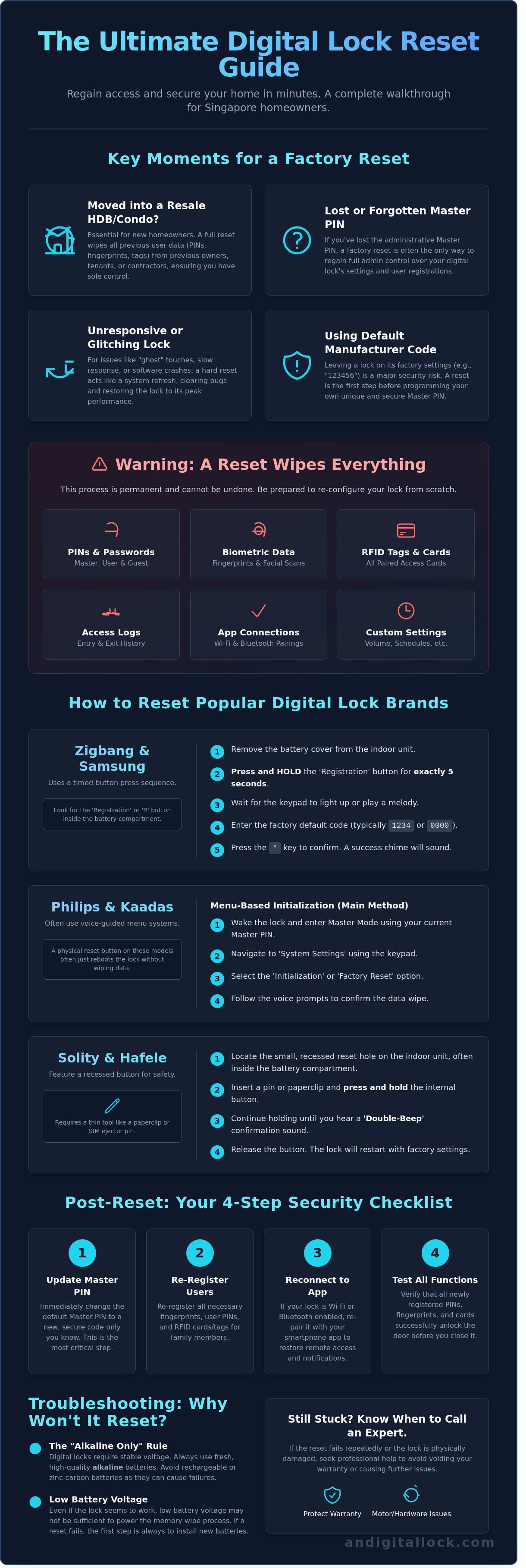
A factory reset provides the ultimate peace of mind by returning your security device to its original out-of-the-box settings. It wipes every piece of user data, including PINs, fingerprints, and facial recognition profiles. If you are searching for how to reset digital door lock procedures, it's usually because you need to clear the memory for a fresh start. This process is the digital equivalent of changing the cylinders on a traditional lock, ensuring that no unauthorized person holds a "digital key" to your home.
If you just collected keys to a resale HDB flat or a condo unit in Singapore, a reset is non-negotiable. You can't be sure if previous owners, tenants, or renovation contractors still have active access codes. Your Master PIN is the gateway to all settings. If you lose this code, a factory reset is the only way to regain admin control. Sometimes hardware behaves strangely. You might notice "ghost" touches on the keypad or slow response times. A hard reboot clears these software glitches. Understanding what is a smart lock helps you realize these devices are essentially small computers that occasionally need a system refresh to maintain peak performance.
Identifying the Need for a Hard Reset
Don't confuse a simple battery swap with a factory reset. If your lock is just unresponsive, try fresh alkaline batteries first. You need a full system reset if the internal software crashes or if you're still using the default manufacturer code. Leaving a lock on its factory settings is a massive security risk. Intruders often target default codes like "123456" to gain entry. A reset ensures your premium security remains uncompromised and your home stays protected.
What You Lose During a Factory Reset
Preparation is key because this process is permanent and cannot be undone. You'll lose all registered fingerprints and RFID tags immediately. The lock will also drop its Wi-Fi or Bluetooth pairing with your smart home hub. All access logs, which track who enters and exits your home, will be cleared along with any temporary guest codes. Knowing how to reset digital door lock hardware correctly ensures your HDB or condo remains a secure sanctuary once you begin the reconfiguration process from scratch.
How to Reset Popular Digital Lock Brands in Singapore
Knowing how to reset digital door lock systems is essential for maintaining your home's security, especially during a tenant handover or if you've forgotten your master PIN. Most premium brands found in Singapore HDBs and condos hide their reset controls to prevent unauthorized access. You'll usually find the 'I' (Input) or 'R' (Registration) button tucked away inside the battery compartment on the internal unit. Locating this button is your first step toward restoring factory settings.
Zigbang & Samsung Digital Lock Reset Steps
Zigbang, which carries the legacy of Samsung's smart technology, uses a straightforward timed sequence for its security wipe. Follow these steps to clear your device:
- Remove the battery cover on the internal side of your door.
- Press and hold the 'Registration' button for exactly 5 seconds.
- Wait for the keypad to light up or for a melody to play.
- Enter the factory default code; this is typically 1234 or 0000.
- Press the '*' key to confirm.
A successful reset is confirmed by a specific success chime. If you don't hear this sound, the process didn't complete, and you'll need to restart the sequence from the beginning.
Philips & Kaadas: Menu-Based Initialization
Philips and Kaadas models often rely on sophisticated voice-guided menus for initialization. To perform a full system wipe, you must access the master mode using your current master PIN. Navigate to 'System Settings' and select 'Initialization'. The lock will talk you through the confirmation process to ensure no data is deleted by accident.
If your touchscreen is unresponsive, look for a small physical reset button. This is often located near the emergency power port at the bottom of the external unit. While a menu-based reset clears all user data, a physical button press on these brands often acts as a hard reboot to fix software glitches without deleting your registered fingerprints.
Solity & Hafele: Physical Button Methods
Solity and Hafele locks are known for their durability and often feature a recessed reset hole that requires a pin or a paperclip. This design prevents accidental triggers during battery changes. Insert your tool into the hole and hold the button until you hear the 'Double-Beep' rule. This distinct sound is the industry standard signal that the factory reset has been successfully triggered.
These brands are popular choices for Singaporean homeowners because of their straightforward recovery options. You can see how they compare against other top-tier brands in our best digital lock singapore guide. If you're still struggling with an older, unresponsive model, it might be time to explore our latest smart security solutions for a more reliable upgrade that fits your modern lifestyle.
Troubleshooting: Why Your Digital Lock Won't Reset
Sometimes, following the manual isn't enough. If you're struggling with how to reset digital door lock systems, the issue usually stems from power inconsistencies rather than a software bug. Most premium locks from brands like Philips or Kaadas require a specific voltage to clear their internal memory. If your batteries are below 20% capacity, the logic board might lack the energy required to complete the factory wipe. This leaves your lock in a "half-reset" state where it's neither functional nor cleared.
Hardware obstructions also play a role. If the deadbolt is slightly jammed or the door alignment is off, the motor might fail its initial calibration. This prevents the software from finishing the initialization process. You should also check for corroded terminals. Even a small amount of white powdery residue can disrupt the stable power flow needed for a system-wide reset. Clean these contacts with a dry cloth or a specialized electronic cleaner before trying again. This ensures the hardware can communicate perfectly with the software.
- The Alkaline Only Rule: Don't use rechargeable batteries. These typically output 1.2V, whereas standard alkaline batteries provide 1.5V. This slight difference causes logic board glitches and failed resets.
- Mechanical Jams: Ensure the door is wide open during the reset. This prevents the bolt from hitting the strike plate and triggering an error code.
- Terminal Integrity: Ensure the battery springs are tight. Loose connections can cause the power to flicker during the critical reset phase.
Power Supply Problems in Singapore's Climate
Singapore's average humidity of 84% is a silent killer for home electronics. High moisture levels often lead to battery leakage, which can coat the reset button's internal contacts and make it unresponsive. For any digital lock singapore homeowners install, we strictly recommend premium brands like Energizer or Duracell. These brands offer better leak protection compared to generic alternatives. If your lock is completely dead and won't respond to the reset command, use a 9V battery to jumpstart the external terminals. This provides a temporary power burst to allow the reset to proceed.
Unresponsive Touchscreens or Buttons
A "frozen" panel is a common frustration for HDB and condo owners. If the screen stays dark or doesn't register your touch, the system might be stuck in a processing loop. Try the "Battery Pull" method. Remove all batteries for at least 60 seconds to drain the residual capacitors. This power cycle often fixes minor software hangs. If the physical reset button feels "mushy" or doesn't click, it might be broken inside the housing. In these cases, professional help is necessary to avoid damaging the main circuit board while trying to figure out how to reset digital door lock components manually.
Post-Reset Checklist: Re-Securing Your Home
Completing the steps on how to reset digital door lock is only half the battle. Once the reset is successful, your device usually reverts to a factory default setting, such as "123456" or "0000". Leaving your lock in this state makes your HDB or condo vulnerable to anyone familiar with manufacturer defaults. You must immediately follow this checklist to restore your premium security and peace of mind.
Setting a Secure Master PIN
Change the master code before doing anything else. Avoid obvious patterns like your birth year, your HDB unit number, or repetitive digits. Many Singapore homeowners make the mistake of using guessable sequences that hackers or persistent intruders can easily predict. To enhance your safety, utilize the "Fake PIN" feature found on most Philips and Kaadas models. This technology allows you to enter a string of random numbers before or after your actual code. It prevents neighbors or delivery personnel from shoulder-surfing while you enter your home. For the ultimate security layer, enable dual-authentication. This mode requires both a PIN and a registered fingerprint to retract the bolt, making unauthorized entry nearly impossible.
Smart Home & App Re-Pairing
If you use a Philips EasyKey or a Zigbang Smart Lock, your previous app profile is now obsolete. Delete the old lock profile from your smartphone app to avoid sync errors. Re-pair the device via Bluetooth or Wi-Fi to regain remote monitoring capabilities. It's vital to check for firmware updates immediately after the reset. Manufacturers often release security patches to close vulnerabilities identified in 2025 or earlier. Once updated, configure your push notifications. You should receive a real-time alert every time the door is unlocked, ensuring you stay informed about who enters your home at all times.
Re-Registering Biometrics and Testing
When re-adding fingerprints, ensure the scanner surface is clean and dry. For a high-quality scan, register the same finger at slightly different angles to account for varied placements in the future. Don't forget to test your mechanical override. Even the most advanced electronic systems can face battery drain or hardware glitches. Insert your physical emergency key and turn it to ensure the manual override functions perfectly. We recommend keeping these physical keys in a secure location outside the house, such as a locked drawer at your workplace or with a trusted family member living in a different estate.
Ensuring your home remains a sanctuary requires the right hardware and expert setup. If you're looking for a seamless security experience, shop our latest digital lock bundles today for professional installation and support.
When to Seek Professional Help for Your Digital Lock
While knowing how to reset digital door lock systems can solve about 85% of minor software glitches, some situations require a specialist's touch. DIY repairs often backfire if the issue is deeper than a simple firmware hang. If you tinker with the internal wiring or force the casing open on a premium Philips or Kaadas lock, you risk voiding your 2 year manufacturer warranty. Most major brands in Singapore require authorized technicians to handle hardware internalities to maintain your coverage.
The 'Dead Bolt' scenario is a common frustration for many HDB owners. You might hear the successful reset chime, but the motor won't engage to retract the bolt. This usually indicates a mechanical failure within the motor or the clutch assembly rather than a software error. In these cases, repeated resetting won't help. Our team at AN Digital Lock specializes in diagnosing these hardware fatigue issues, especially regarding complex mortise lock mechanisms that secure your main entrance.
Professional Locksmith vs. Authorized Distributor
It's vital to contact your original wooden door supplier singapore or authorized distributor for any installation-related issues. Unauthorized locksmiths often lack the specific diagnostic tools required for high-end digital locks and might use brute force methods that damage your door frame. AN Digital Lock provides comprehensive after-sales support and free consultations. We've helped over 3,700 happy customers with professional re-installations and technical troubleshooting to ensure their homes stay secure.
Time for an Upgrade?
Electronic components don't last forever. If your lock's motherboard is failing, you'll notice signs like rapid battery drainage, "system busy" voice prompts, or an unresponsive keypad even after you've learned how to reset digital door lock settings. Most digital locks have a peak performance lifespan of 5 to 7 years. If your lock is reaching this age, a repair might cost 40% of the price of a new unit, making an upgrade more cost-effective.
Newer 2026 models offer superior HDB and Condo gate compatibility, faster fingerprint recognition, and enhanced weather resistance. Don't compromise your family's safety with an aging, glitchy system. Get the ultimate peace of mind with a modern security solution. Browse our latest BTO digital lock bundles today!
Upgrade Your Home Security Today
Mastering how to reset digital door lock settings is a vital skill for every Singapore homeowner. Whether you're moving into a new HDB flat or managing a condo rental, a proper factory reset ensures you maintain total control over your property's access. Always follow up a reset by immediately re-registering your fingerprints and PIN codes to keep your family safe. If your current lock is showing its age or if the reset process reveals hardware wear, it's the perfect time to consider a more reliable solution.
AN Digital Lock stands as a premier provider with over 3,700 5-star customer reviews from satisfied homeowners across the island. As an authorized dealer for world-class brands like Philips, Zigbang, and Kaadas, we offer expert installation for HDB, condo, and landed properties. Our team ensures a hassle-free experience so you can enjoy the ultimate peace of mind that comes with modern technology. Don't settle for outdated security when a premium upgrade is just a click away.
Secure your home with the latest digital locks from AN Digital Lock – Shop Now!
Your safety is our priority, and we're here to help you build a smarter, more secure home environment today.
Frequently Asked Questions
How do I reset my digital lock if I forgot the master code?
You can perform a factory reset using the physical reset button located on the interior unit. Most premium brands like Kaadas or Philips require you to hold this button for 10 seconds until you hear a voice prompt. This bypasses the forgotten master code and restores the lock to its original factory settings. It's a reliable way to regain control of your home security quickly.
Will a factory reset delete my fingerprints and RFID cards?
Yes, a factory reset will wipe all stored data including your fingerprints, RFID cards, and user PINs. After the process, you must re-register every family member. This ensures no old credentials remain active. Most Singapore homeowners find this process takes about 15 minutes for a standard household of four people. It provides ultimate peace of mind knowing the system is clean.
Where is the reset button located on most digital locks?
You'll usually find the reset button hidden under the battery cover on the indoor side of the door. In 85% of models sold in Singapore, it's a small circular pinhole or a red button labeled "RES" or "S". You might need a small pin or paperclip to reach it. Always check the back of the battery lid for specific instructions provided by the manufacturer.
What is the default master PIN for most smart locks after a reset?
The default master PIN is typically 1234, 123456, or 0000 depending on the brand. For example, many Samsung models default to 1234 immediately after you learn how to reset digital door lock systems. You must change this default code immediately to prevent unauthorized access. Using a common sequence is a major security risk for your HDB or condo unit.
Can I reset my digital lock from the mobile app?
You can reset the lock through the mobile app if the device is still connected to your Bluetooth or Wi-Fi gateway. Apps like TTLock or the Kaadas App have a "Delete" or "Reset" function in the settings menu. If you've lost the phone or the account, you'll have to use the physical button on the lock body instead. This software-side reset is convenient for managing rental properties.
Why is my digital lock beeping even after a factory reset?
Persistent beeping usually indicates a low battery warning or a tamper alarm. If the batteries provide less than 4.8V of power, the lock will alert you even after a reset. Replace all batteries with four or eight fresh AA alkaline ones immediately. Don't mix old and new batteries, as this causes voltage fluctuations that trigger the internal sensors.
Is it safe to use a second-hand digital lock if I reset it?
It's safe to use a second-hand lock as long as you perform a hardware factory reset to clear all previous data. Verify that the mechanical override keys are included in the sale. You should also check the battery terminals for leakage, which occurs in roughly 12% of older units. Buying from a trusted supplier in Singapore ensures you get a professional inspection first.
How often should I reset my digital door lock for security?
You don't need to perform a full factory reset regularly. Instead, security professionals suggest updating your master PIN every 180 days to maintain high security levels. You should only learn how to reset digital door lock procedures when you move into a new HDB flat or if an RFID card is lost. Regular maintenance and firmware updates through the app are more important for daily performance.