


You're standing at your front door with a guest arriving in ten minutes, but you've realized the physical manual for your lock is long gone. Every time you press a button, you're met with a series of confusing beep codes instead of a success tone. Learning how to add new user to digital lock systems shouldn't feel like cracking a safe. We know the frustration of trying to program modern hardware when instructions are missing. It's natural to worry about accidentally locking yourself out while testing a new code, but managing your home security should be a seamless experience.
This complete 2026 guide will help you master your home security with a straightforward process for adding users, fingerprints, and PINs to Singapore's most popular digital locks. You'll learn how to set up temporary access for guests and ensure your new credentials work across both door and gate locks without calling a technician. We'll walk you through the latest biometric settings and app integrations to keep your property safe, refined, and accessible. From semiconductor fingerprint sensors to 3D facial recognition, we've got you covered.
Key Takeaways
- Differentiate between Master, User, and Guest tiers to maintain total control over your home's entry points.
- Follow our simplified framework to add new user to digital lock systems quickly without triggering confusing error codes.
- Get clear, brand-specific instructions for Philips EasyKey, Zigbang, and Solity models to bypass the need for old manuals.
- Utilize advanced security features like "Fake PINs" and "One-Time Codes" to keep your primary credentials private from guests.
- Leverage professional on-site tutorials to confirm your new user settings work perfectly across both door and gate locks.
Understanding Digital Lock User Management in 2026
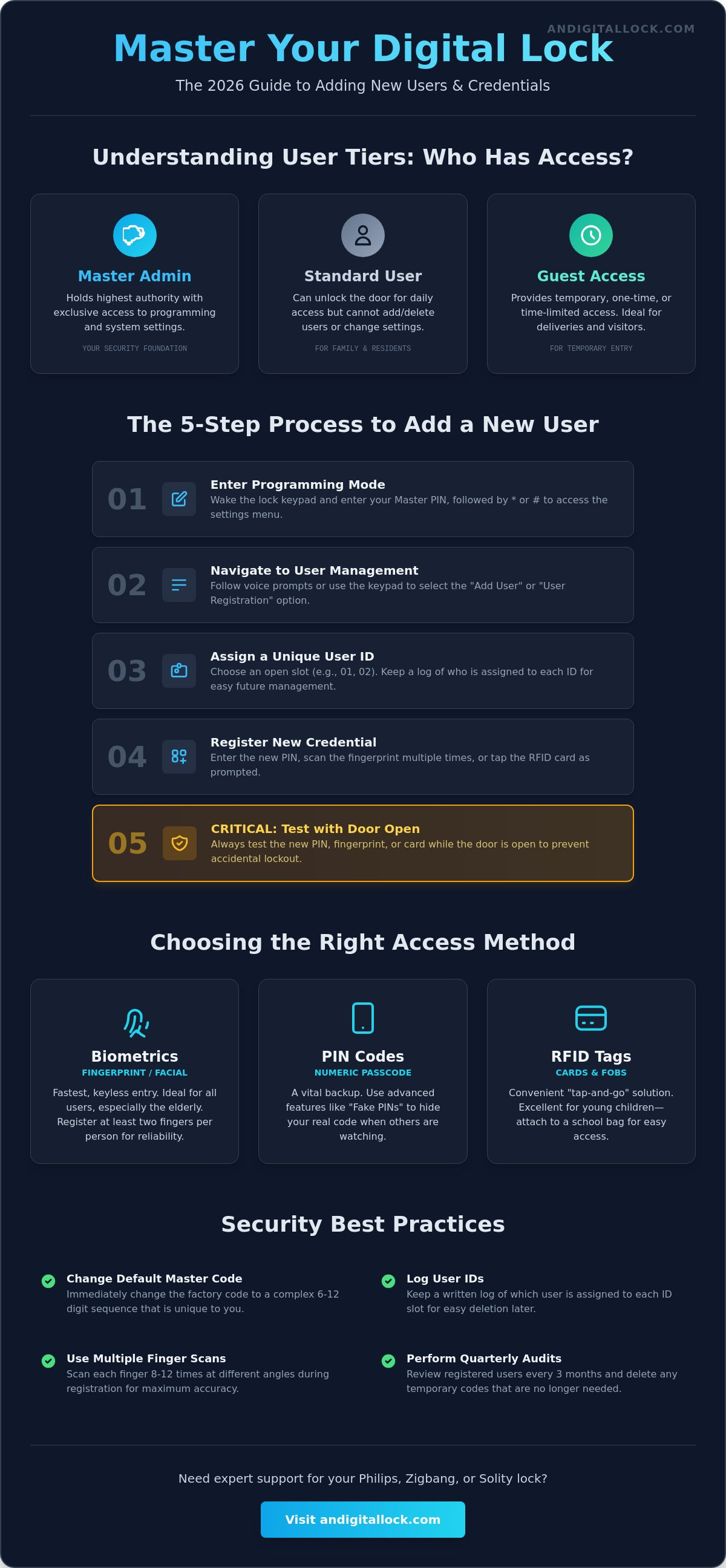
Effective home security relies on more than just a strong door. It's about controlling who enters and when. When you prepare to add new user to digital lock systems, you're essentially acting as a digital gatekeeper. Modern Smart lock technology uses a tiered hierarchy to keep your home secure. Master Admins hold the highest authority, with exclusive access to the programming menu. Standard Users can unlock the door daily but cannot modify settings. One-time Guest access is perfect for deliveries or short-term visitors. This structure ensures that even if a guest knows their code, they can't change yours.
The Master Code: Your Security Foundation
Your lock's security starts the moment it's installed. Every manufacturer provides a factory default master code, but leaving it unchanged is a critical error. In high-density residential areas like HDB blocks, foot traffic is high. Using predictable sequences like "123456" or your birth year makes your home a target. Choose a complex 6-12 digit sequence that's easy for you to remember but impossible for others to guess. This code is the only way to add new user to digital lock memory, so keep it private. If you lose this code, you may need a full factory reset, which wipes all existing user data and forces you to start from scratch.
Biometrics vs. PIN Codes: Which is Better for New Users?
Deciding how a new user should access your home depends on their specific needs. Biometric fingerprints offer the fastest entry and are ideal for the elderly. They don't require memorizing numbers or carrying physical keys. However, be aware that some seniors or manual laborers may have faint or worn fingerprints. For these individuals, a PIN code serves as a vital backup. RFID tags are another excellent alternative, especially for young children who might find the keypad or fingerprint sensor difficult to reach. These small tags can be attached to school bags, allowing for a simple "tap and enter" experience that requires zero technical knowledge.
Singaporean households often see a rotating list of visitors. From part-time cleaners to aircon technicians, many people may need temporary access. Regular user auditing is a must. We recommend reviewing your registered users every quarter. Delete any temporary codes that are no longer needed. This practice keeps your lock's memory organized and ensures that only authorized people have active credentials. It's a simple step that significantly enhances your long-term safety and peace of mind.
General Steps to Add a New User to Your Digital Lock
Programming your hardware doesn't have to be a mystery. While every brand has slight variations, the core logic remains consistent across the industry. To add new user to digital lock systems, follow these five essential steps to ensure a successful registration every time. By following a structured process, you eliminate the risk of programming errors that could compromise your home's safety.
- Wake up the lock: Touch the keypad with your palm or press the registration button on the interior body. Enter your Master PIN followed by the confirmation key, usually the * or # sign, to enter Programming Mode.
- Navigate the menu: Select the "User Management" or "Add User" option. Most modern locks use voice prompts or numbered menus to guide you through these choices.
- Assign a User ID: Choose a unique slot number, such as 01 or 02. Keep a written log of who is assigned to each slot. This makes it easy to delete a specific person later without resetting the entire system.
- Register the credential: Input the new PIN, scan the fingerprint, or tap the RFID card as prompted by the device's audio or visual cues.
- Test the access: Always perform this step while the door is OPEN. Extend the deadbolt manually and use the new credential to retract it. This prevents an accidental lockout if the code was recorded incorrectly.
Registering Fingerprints for Maximum Accuracy
High-quality biometric data reduces entry errors and frustration. Clean the sensor with a dry microfiber cloth before you start to ensure the best possible read. When scanning, place the finger at multiple angles, repeating the process 8 to 12 times as requested by the lock. This allows the semiconductor sensor to capture the full ridge pattern. Register at least two fingers per person as a reliable fail-safe. If one finger is too dry or has a minor injury, the secondary print ensures you still have instant access.
Pairing RFID Tags and Key Fobs
RFID tags offer a convenient tap-and-go solution for children or those who prefer not to use PINs. Most Singaporean models use the 13.56MHz frequency standard for secure communication. To pair a new tag, trigger the Card registration mode via the interior panel or the Master menu. Hold the tag against the reader until you hear the success chime. Following security best practices, link each tag to a specific user profile in your mobile app. This allows you to track exactly who enters your home in real-time. If you're looking to upgrade your setup, our digital door locks feature the latest in secure RFID and biometric technology for your peace of mind.
Brand-Specific Instructions: Philips, Zigbang, and Solity
Different manufacturers design their interfaces with distinct philosophies. While some rely on physical buttons, others use sophisticated voice menus. Understanding these nuances makes it easier to add new user to digital lock hardware without feeling overwhelmed. Most high-end brands in Singapore share a common logic. The "Star" (*) or "Hash" (#) key almost always functions as the "Enter" or "Confirm" command, providing a sense of familiarity across different models.
Philips EasyKey: Voice-Guided Setup
Philips locks are famous for their intuitive voice-guided prompts. You don't need to memorize complex beep patterns or blink sequences. To start, wake the keypad and enter your Master PIN followed by #. The lock will announce the menu options clearly. Press '2' for user settings, then '1' to add a new user. Many Philips models allow you to store up to 100 fingerprints and 20 user PIN codes, providing ample space for large families or office staff.
Pay attention to your power settings during the setup. In "Normal" mode, all features and sensors are fully active. If your lock is in "Eco" mode, certain wireless functions might be restricted to preserve battery life. For the most seamless experience, use the Philips app to send digital keys. This allows you to invite family members or guests remotely. It's a modern solution that connects technical hardware to your emotional need for simplicity and protection.
Zigbang and Solity: The Physical Button Method
Korean brands like Zigbang, formerly Samsung, and Solity favor a more direct approach. You'll find a dedicated "Register" button, often labeled 'S' or 'R', hidden behind the battery cover on the interior unit. Pressing this button immediately puts the device into programming mode. For Zigbang models, you typically press the Register button, enter the current Master PIN, and then follow the numeric sequence to register fingerprints or passwords. These systems can often manage up to 100 different access credentials, including mobile keys.
Solity locks follow a nearly identical pattern. Open the battery compartment to find the 'S' button. A single press allows you to begin registering new users. If you're comparing different models to see which interface suits you, check our digital lock singapore guide for a breakdown of model-specific features. Regardless of the brand, always keep the door open during the entire process. Testing the new credentials while the door is ajar ensures that any registration errors don't lead to an accidental lockout. This simple precaution ensures your transition to a smart home is both safe and frictionless.
Security Best Practices for Multi-User Access
Managing multiple users requires a balance between convenience and strict security protocols. When you add new user to digital lock systems, you are creating new potential entry points into your home. To maintain a high level of protection, utilize the "Scramble Code" or "Fake PIN" feature. This allows you to enter random digits before or after your actual PIN, preventing anyone standing nearby from memorizing your code. It's a simple yet effective way to protect your primary credentials from shoulder surfing in busy HDB corridors.
For visitors who only need one-time access, avoid creating permanent profiles. Modern locks allow you to generate "One-Time PINs" specifically for delivery personnel or contractors. These codes automatically expire after a single use or a set duration. In Singapore, many homeowners also need to synchronize access between their hdb main door and their metal gate lock. Ensuring both devices share the same user data or use a linked remote system creates a frictionless entry experience while maintaining a double layer of security.
Managing Access for Domestic Helpers and Tenants
If you have a domestic helper or a tenant, use "Schedule Codes" to restrict entry to specific times. For example, you can set a code to work only from Monday to Friday, between 9 am and 5 pm. This ensures that access is only granted when it's appropriate. Never share your Master Admin code with anyone outside your immediate family. Instead, use the activity log in your mobile app to monitor entry times. This provides peace of mind by confirming exactly when the door was unlocked and by which user ID.
When to Delete and Reset All Users
Security hygiene is just as important as the initial setup. If you've just moved into a pre-owned resale HDB, perform a full factory reset immediately. This wipes any existing data from previous owners or renovation contractors. If a physical key fob or RFID tag is lost, use the "Bulk Deletion" or "Delete by ID" function to deactivate that specific credential. Remember that resetting a mortise lock or any smart system typically requires physical access to the interior unit. This prevents remote tampering and ensures only the homeowner can perform high-level resets. Browse our full range of digital door locks to upgrade your home's security features today.
Regularly auditing your user list is the best way to prevent unauthorized access. We recommend a quick review every three months. Delete any profiles for former tenants, past contractors, or friends who no longer visit frequently. Keeping your user database lean makes it easier to manage and significantly reduces the risk of credential misuse. Smart security is about active management, not just installation.
Expert Support: Getting the Most from Your AN Digital Lock
Buying a smart lock is just the first step toward a more convenient home. The real value lies in the support that follows, ensuring your investment works flawlessly for years. When you choose AN Digital Lock, you aren't just getting hardware. You're gaining access to a team of experts who ensure you can add new user to digital lock systems with total confidence. Professional installation is vital because it ensures the hardware is perfectly aligned. Even a minor misalignment can cause friction, leading to battery drain or registration errors that disrupt your programming mode.
Our commitment to service means we don't just install a device and leave. We stay to ensure you know exactly how to add new user to digital lock credentials, from fingerprints to RFID tags. We provide on-site tutorials for every customer, walking you through the menu logic before we finish the job. If you ever face troubleshooting issues or forget your programming sequence, our team is just a phone call away. We also offer specialized BTO lock bundles that combine door and gate locks, simplifying the move-in process for new homeowners across Singapore.
The AN Digital Lock Difference
We've served the Singapore market since 2013, bringing over 10 years of experience to every residential project. We understand the specific technical requirements of HDB main doors and condo entrances. Our showrooms provide a pressure-free environment where you can practice user programming before you buy. You can explore a wide range of premium brands, including Philips, Zigbang, and Hafele, to find the interface that feels most intuitive to you. Testing the biometric sensors and keypad responsiveness in person removes the guesswork and ensures you select a solution that fits your family's lifestyle.
Final Steps to Secure Your Home
Your home's safety shouldn't be left to chance or confusing manuals. If you're still deciding which model is right for your property, explore our best digital lock singapore roundup for 2026's top-rated picks. We encourage you to book a consultation to discuss a complete entrance upgrade, including our high-quality wooden doors and metal gates. Our team is ready to help you create a secure, modern, and frictionless entry system. Upgrade your home security with AN Digital Lock today and enjoy the peace of mind that comes with professional expertise and reliable after-sales care.
Take Control of Your Home Security Today
Mastering your digital lock's user settings is the key to a safer, more efficient household. By understanding the hierarchy between Master Admins and temporary guests, you ensure that your home remains protected while staying hospitable. Whether you use the voice-guided menus of Philips or the physical registration buttons of Zigbang and Solity, the ability to add new user to digital lock systems gives you total authority over your entrance. Remember to audit your user list regularly and utilize scramble codes to keep your primary PINs private.
Established in 2013, AN Digital Lock brings over a decade of security expertise to your doorstep. We are trusted by thousands of HDB and Condo owners across Singapore as an authorized dealer for Philips, Zigbang, and Solity. Our commitment to high-quality service ensures your home remains a sanctuary of contemporary refinement. Browse our latest Digital Lock collections and secure your Singapore home today. Your journey toward a modern, smart-home lifestyle starts with a single, secure step.
Frequently Asked Questions
How many users can I add to a standard digital lock?
Most modern models from brands like Philips and Zigbang allow you to store up to 100 fingerprints and 100 key tags. For PIN codes, the capacity typically ranges between 10 and 20 unique sequences. This generous storage capacity makes it easy to manage access for large families or small office teams without ever running out of available slots.
What happens if I forget my Master PIN code?
You'll generally need to perform a full factory reset using the physical reset button located behind the battery cover. This process wipes all existing data, so you must use your mechanical backup key to enter the home first. Once the reset is complete, you can establish a new Master PIN and begin the registration process from scratch.
Can I add a new user to my digital lock remotely using my phone?
Yes, you can add new user to digital lock systems remotely if your model supports Wi-Fi or Bluetooth connectivity. Using dedicated smartphone apps like Smart Solity or Philips EasyKey, you can generate temporary PINs or digital keys for guests from anywhere in the world. This feature is perfect for granting access to delivery personnel while you're at the office.
Is it possible to add the same fingerprint to both my door and gate lock?
You can use the same finger for both locks, but you must register the print on each device individually. The door and gate locks operate on separate biometric sensors, so they don't automatically share user data. Registering the same finger on both units ensures a seamless, one-touch entry experience for your entire home entrance system.
How do I delete a specific user without resetting the whole lock?
Enter the Master menu and select the "Delete User" option using the specific User ID or slot number assigned during setup. This allows you to remove a single person's access without affecting any other registered users. Keeping a written log of assigned slot numbers is the most efficient way to manage these individual deletions quickly and accurately.
Why is my digital lock not recognizing a newly added fingerprint?
The most common reasons are a dirty sensor or an incomplete initial scan during the registration phase. Clean the semiconductor sensor with a dry microfiber cloth and try re-registering the finger at several different angles. If your skin is very dry or worn, the sensor may struggle to read the ridge patterns, so try using a different finger.
Can I set a PIN code that only works for a single day?
You can definitely set time-sensitive access using the "One-Time PIN" or "Duration PIN" features found in most modern menus. These codes are designed to expire automatically after a single use or at the end of a specific 24-hour window. It's an ideal security measure for one-day contractors or visiting friends who don't need permanent credentials.
Do I need to re-add users after I change the batteries?
You don't need to re-register any credentials after a battery swap. Digital locks use non-volatile memory to store all user data, PINs, and fingerprints even when the power is completely disconnected. Your settings remain safe and active the moment you install fresh alkaline batteries, ensuring a frictionless transition during your regular home maintenance routine.