


A facial recognition lock verifies a recognised face as someone approaches and can unlock the door within seconds. For homeowners, impressing visitors with a facial recognition lock means offering hands-free entry without making security a guessing game. The technology can also be set up with alternative authentication methods, such as a card or PIN.
It’s easy to see the appeal: visitors can enter without searching for keys, while residents can feel confident that the lock distinguishes a real person from a photo or video. Convenience matters, but so do privacy and a dependable backup if recognition doesn’t work as expected.
This guide explains how facial recognition verifies identity, how keyless visitor access works, and what to consider about security, biometric data, and spoofing risks. You’ll also learn how to assess a digital door lock for your home entrance in Singapore, balancing a modern welcome with practical safeguards.
Key Takeaways
- Understand how a facial recognition lock captures and matches facial features before granting entry.
- Consider how keyless access can make arrivals smoother, while backup authentication offers another way to enter.
- Assess biometric security carefully: convenience does not remove the need to protect stored face data and manage access responsibly.
- Learn what anti-spoofing measures are designed to do when a photo or video is presented to the lock.
- Weigh speed, privacy and security together to decide whether facial recognition suits your home entrance in Singapore.
1. Why Do You Need a Digital Door Lock with Face Recognition?
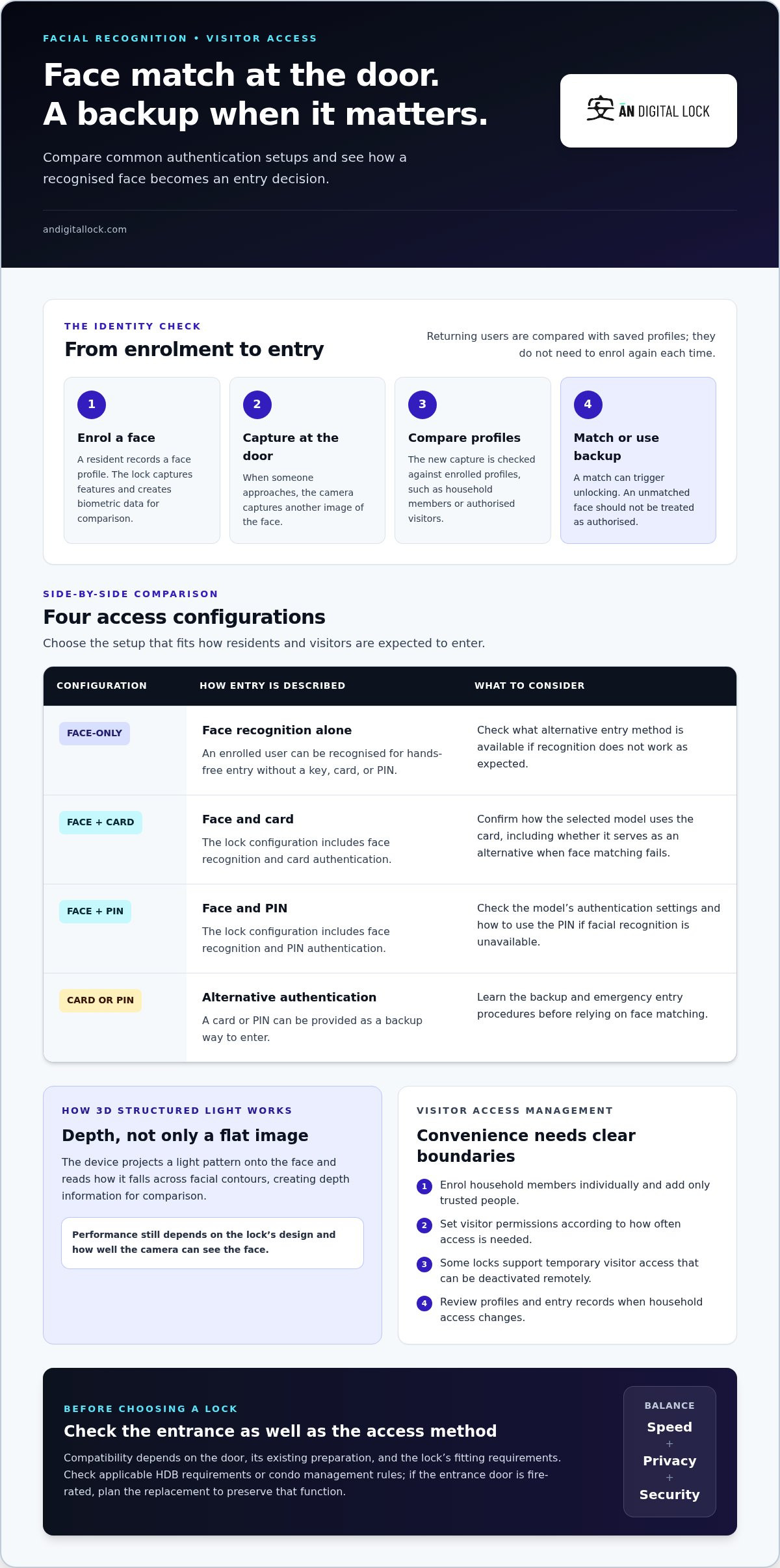
Facial recognition can make entry feel effortless, but the process begins with enrolment. The resident records a face profile at the lock, which captures facial features and creates biometric data for later comparison. When someone approaches, the camera captures another image and compares it with enrolled profiles. A match can trigger the unlock; an unmatched face should not be treated as an authorised user.
With 3D structured-light recognition, the device projects a light pattern onto the face and reads how that pattern falls across its contours. This creates depth information, rather than relying only on a flat image. A visitor standing at the entrance, for example, presents a three-dimensional facial shape for comparison. Performance still depends on the lock’s design and how well the camera can see the face.
Returning visitors don’t need to enrol again each time. The lock compares each new capture with saved profiles, such as those of household members or authorised visitors. Depending on the model, authentication may use face recognition alone, face and card, face and PIN, or a card or PIN as a backup. This gives recognised users hands-free entry while preserving another option if recognition fails.
Which facial recognition locks are best for impressing visitors? Choose a model with clear face matching, a practical backup method, and access settings suited to your household. Card or PIN authentication, for example, can help when a visitor’s face isn’t enrolled.
What Singapore regulations or fire-safety rules apply to replacing a front-door lock? Requirements depend on your home and door, so check applicable HDB requirements or condo management rules before changing hardware. If the entrance door is fire-rated, plan the replacement to preserve that function.
How much do facial recognition door locks cost in Singapore, including installation? The total cost depends on the lock, door compatibility, and installation work required. Compare the full installation scope, not just the device.
What facial recognition smart locks are available in Singapore? Configurations can include face-only, face-and-card, face-and-PIN, and card or PIN backup authentication. Choose the arrangement that balances visitor convenience with an alternative way to enter.
Are facial recognition smart locks compatible with Singapore HDB and condo doors? Compatibility depends on the door, its existing preparation, and the lock’s fitting requirements. Check these details along with building rules before selecting a model.
What happens if the lock loses power, the network fails, or facial recognition does not work? Entry options depend on the model’s backup power and alternative authentication methods. Learn how to use its card, PIN, or emergency entry procedure before relying on face matching.
What maintenance, warranty, and repair support do Singapore lock brands offer? Warranty and repair terms vary by brand. Keep the camera area clean, review enrolled profiles, and follow the lock’s maintenance instructions to support consistent recognition.
2. Keyless entry and identity verification
Keyless entry replaces handing over a physical key with an identity check at the door. A resident enrols authorised profiles, and the lock compares a visitor’s face with those records. When it recognises an enrolled user, it can unlock without a key, card, or PIN. For homeowners, impressing visitors with a facial recognition lock starts with a clear, convenient way to enter.
This can reduce reliance on shared keys or passcodes. A key can be copied, and a PIN can be shared; face matching instead compares the person at the entrance with biometric data. It still requires sensible user management: add only trusted people and remove access when it’s no longer needed. For example, a former household helper shouldn’t retain an active profile.
For a visiting relative who needs repeat access, you can enrol a profile. Some locks support temporary visitor access that can be deactivated remotely. This lets the household manage permissions without handing over a permanent key. Before setting temporary access, decide who can enter, when access should end, and who will manage the setting.
Touchless recognition means visitors don’t need to press a shared keypad or handle a communal card. A delivery guest, for example, can approach the entrance and use an authorised entry method. Touch-free access may be convenient, but it doesn’t replace cleaning frequently touched door hardware or following household hygiene practices.
Some facial recognition locks provide real-time entry notifications and remote access control through smart-home integration. With an internet connection, users may manage permissions and review entry logs remotely. A notification can help residents know when an authorised profile has entered while they’re away. Set notifications and profile permissions to suit the household, especially when several people share the entrance.
Make the setup useful for residents and expected visitors:
- Enrol household members individually using the lock’s profile process.
- Choose face-only, face-and-card, face-and-PIN, or card/PIN backup authentication.
- Set visitor permissions according to how often access is needed.
- Review profiles and entry records when household access changes.
Impressing visitors with a facial recognition lock also means making arrival straightforward without blurring access boundaries. Consider the entry methods your household prefers and how visitor permissions will be managed. To explore how digital door lock options fit into a home entrance, weigh those needs alongside your daily routine.
3. Biometric security and resistance to tampering
A face image used to identify someone is biometric data, a physical trait associated with the person seeking entry. This changes how homeowners should manage access: enrol only authorised users, keep profiles current, and remove a profile when someone no longer needs entry. For example, a former household helper should not retain an active face profile.
Facial recognition addresses one security task: checking who is at the entrance. It doesn’t replace the door’s physical security. The lock body, its fit, and the door itself still matter. A secure setup combines careful profile management with a correctly fitted lock and a door that closes properly. If the door doesn’t latch, face matching alone can’t secure the entrance.
Facial recognition locks may be designed to resist common tampering methods, including picking or hacking, but resistance is not immunity. Treat the biometric reader and mechanical hardware as separate parts of the system. The recognition feature can verify an enrolled user, while the lock’s physical components must still resist forced manipulation.
Reduce avoidable access risks with a simple review routine. Check enrolled profiles after household changes and remove those that are no longer needed. Restrict backup access methods to the people who need them instead of sharing one PIN widely. These steps make access easier to manage without assuming any single feature prevents every form of misuse.
Biometric alternatives have different practical limits. Fingerprints can become harder to capture as people age, because skin elasticity, nail ridges, or furrows may change. A household with older residents might therefore value a face-based option, while keeping a card or PIN available if recognition is unsuccessful.
Use this security check when setting up a face-recognition lock:
- Enrol each authorised resident individually, instead of sharing one profile.
- Review profiles when household access changes.
- Test the door’s latch and lock operation after installation.
- Know which backup method each resident can use.
A seamless arrival is useful only when access remains controlled. Pair face verification with sound door hardware and sensible profile management. This helps homeowners understand what biometric security can do and where physical protection still plays a part.
4. Biometric consent, privacy and data retention
A face image used to identify a person is biometric data, making enrolment a privacy decision as well as a setup step. Before adding a household member or visitor, explain what the lock uses their face profile for, who can manage it, and how access can be removed. A clear explanation helps people understand the choice before they reach the door.
Visitors who decline facial recognition should have another way to check in. A host can meet them, or the household can use a card or PIN option where the lock supports it. Avoid making face enrolment feel like the only way to enter. A practical alternative respects a visitor’s preference and keeps entry arrangements clear.
Retention deserves the same attention as consent. Decide which profiles still need access and remove those that no longer serve a purpose. A former visitor, departing household member, or previous service provider may not need an active profile. Review enrolled faces whenever access arrangements change, and make profile removal part of the household’s digital security routine.
Also consider where information is managed. Face-recognition access systems may use on-premise servers or cloud-based dashboards, depending on an organisation’s IT and security policies. For a household, ask who can administer profiles, whether access logs are visible, and what account controls protect remote management. If a lock integrates with other digital systems, understand which permissions remain linked.
Keep the process simple and consistent:
- Explain face enrolment before capturing a new profile.
- Offer an alternative entry method to visitors who decline.
- Limit profile management to trusted household members.
- Remove profiles when access is no longer needed.
- Review entry records and connected permissions as part of routine upkeep.
Entry logs can show which profile unlocked a door, helping residents understand access activity. Use that visibility carefully: review records for a clear household purpose and avoid sharing them casually. A resident, for instance, may consult an entry record to resolve uncertainty about an arrival, while keeping access limited to people who genuinely need it.
Good privacy practice should keep pace with the technology. Explain the process, offer a choice, manage profiles deliberately, and review integrations. These steps help residents balance convenience with respect for the people entering their home.
5. Facial-recognition speed and anti-spoofing
A face-recognition lock can identify an enrolled user and grant access within seconds. Its camera captures a face at the entrance, then the system analyses the image, compares facial features with stored profiles, and applies its access-control decision. A clear view helps the camera capture the details needed for matching.
Speed depends on more than the lock’s processing. The visitor’s distance, face angle, lighting, and movement can affect what the camera captures. Someone walking past the sensor, for example, may not present their face clearly. Standing in front of the reader gives it a better chance to capture an image and complete the comparison.
Can facial recognition locks recognise visitors wearing glasses, masks, or in low light? Glasses can leave facial features visible, while a mask may cover details used for matching. Low light can reduce the image detail available to the camera. Recognition depends on the device’s design and what it can capture in those conditions.
Anti-spoofing is designed to distinguish a real face from a photo or video. This matters because a camera could otherwise be presented with an image instead of the person seeking entry. Face-recognition locks in Singapore can use anti-spoofing technology for this purpose. It supports identity checking, but it should be understood as one part of an access-control system.
Test the lock in normal conditions before relying on it for everyday arrivals. Have an enrolled user approach at a natural pace, then try the backup method if recognition doesn’t work. Check the reader’s position and the entrance lighting. These practical checks show whether visitors can present themselves comfortably to the sensor.
Digital security systems continue to evolve. A software update may improve a system, but the lock’s performance still depends on its hardware and configuration. Follow the manufacturer’s instructions for updates and test recognition afterward. Show household members how to use the backup method, too, so an unsuccessful match doesn’t leave them unsure what to do.
Before choosing a lock, consider these practical points:
- Place the reader where visitors can face it directly.
- Keep the camera area clear of dirt or objects that block its view.
- Test recognition in the lighting conditions present at your entrance.
- Learn the backup entry procedure before visitors arrive.
For a closer look at digital door lock options, consider how recognition speed, anti-spoofing, and backup access fit your entrance.
AN Digital Lock: Digital Door Locks
AN Digital Lock offers Digital Door Locks for homeowners planning a more convenient, considered entrance. If you’re comparing face recognition with card, PIN, or other access methods, start by thinking about who needs entry and how visitors will use the door. The right setup should suit your household’s access habits and the door itself.
For a complete entrance project, Wooden Doors and Metal Gates are also available. Considering the lock and entrance components together can help you plan how residents and guests approach the home. Safe Boxes provide a separate option for securing valuables indoors.
Review your entrance needs and preferred access experience, then contact AN Digital Lock to discuss your requirements.
Plan an Entrance That Welcomes Visitors
Start by picturing how people actually arrive at your home. Consider whether visitors come regularly, who should manage access, and which alternative entry method would suit your household. These choices can help you assess whether facial recognition fits your entrance, rather than choosing technology for novelty alone.
A thoughtful approach to impressing visitors with a facial recognition lock balances a smooth welcome with clear access boundaries. AN Digital Lock offers Digital Door Locks, Wooden Doors, and Metal Gates, giving you entrance options to consider together. Think about the door, gate, and daily entry routine as one connected experience.
Bring your priorities into the next conversation: visitor access, preferred authentication, privacy expectations, and the entrance itself. Contact AN Digital Lock today to discuss your home entrance plans and explore suitable options. A considered choice can make everyday arrivals feel simpler and more welcoming.
Frequently Asked Questions
What is Facial Recognition and How Does It Work?
Facial recognition checks facial features to identify an enrolled person. During setup, a user registers a profile; at the door, the reader captures a new face image and compares it with saved profiles. A household can enrol each resident separately, for example, making it easier to manage access if someone moves out.
Why Do You Need a Digital Door Lock with Face Recognition?
A facial recognition lock can suit households that want residents to enter without carrying a key or touching a keypad. It can also simplify regular visits when trusted people have their own profiles. Before choosing one, consider how guests will enter, who will manage profiles, and which backup method the household prefers. A lock that fits your daily routine is more useful than one chosen for novelty.
How accurate and fast are facial recognition smart locks?
Recognition can grant access within seconds when the lock captures a clear image and matches it to an enrolled profile. Accuracy depends on factors such as camera view, face position, lighting, and the device’s recognition design. For a practical test, have each regular user approach from their usual direction and try the backup entry method. This shows whether the setup works smoothly in your entrance.
How do facial recognition locks protect stored face data and personal privacy?
Privacy depends on how a particular system stores and manages face profiles, so understand its controls before enrolling users. Limit profile administration to trusted household members, remove access when it’s no longer needed, and offer visitors another way to enter if they decline face enrolment. Some systems use on-premise servers, while others use cloud dashboards. Connected features can affect who manages access remotely.
How do facial recognition locks compare with fingerprint, PIN, and card locks?
Face recognition checks a person without touch, while fingerprint entry requires a finger, PIN entry requires remembering a code, and card entry requires carrying a credential. Each method has practical trade-offs. A household that often forgets cards may prefer face entry, for example, while a visitor who doesn’t want biometric enrolment may prefer a PIN or card. Some digital locks combine authentication methods.
How do you install and set up a facial recognition door lock?
Choose a lock compatible with the door, enrol authorised users individually, and select face-only, face-and-card, face-and-PIN, or card or PIN backup authentication. After installation, test the lock and door latch, and make sure each resident knows how to use a backup method.