


What if the biggest threat to your home security isn't a sophisticated intruder, but a leaking S$2 battery? Most Singapore homeowners install a smart lock for its convenience and contemporary refinement, yet many overlook the simple digital lock maintenance required to keep it functioning. It's stressful to think about being locked out at 2 AM, especially when an emergency locksmith call-out can cost up to S$250. You shouldn't have to worry about your technology failing when you need it most.
Proper care is the key to ensuring your home remains a safe haven. In this guide, you'll learn the professional secrets to extending your lock's lifespan and keeping its mechanical parts in peak condition. We will provide a clear schedule for battery replacement, explain how to avoid common mechanical wear, and highlight the essential accessories every homeowner needs to protect their investment in 2026. Get ready to master your smart home security with ease and confidence.
Key Takeaways
- Understand how Singapore's tropical climate affects your electronics and learn to prevent the #1 cause of lock failure.
- Identify the specific battery types that protect your lock from internal damage while avoiding "silent killers" like rechargeable cells.
- See how high-quality door accessories can stop mechanical wear and prevent damage caused by door slamming.
- Learn the safe way to clean biometric sensors and touchscreens to ensure your fingerprints are always recognized instantly.
- Follow a professional digital lock maintenance checklist to perform monthly and quarterly inspections like an expert.
Why Digital Lock Maintenance is Critical for Singapore Homes
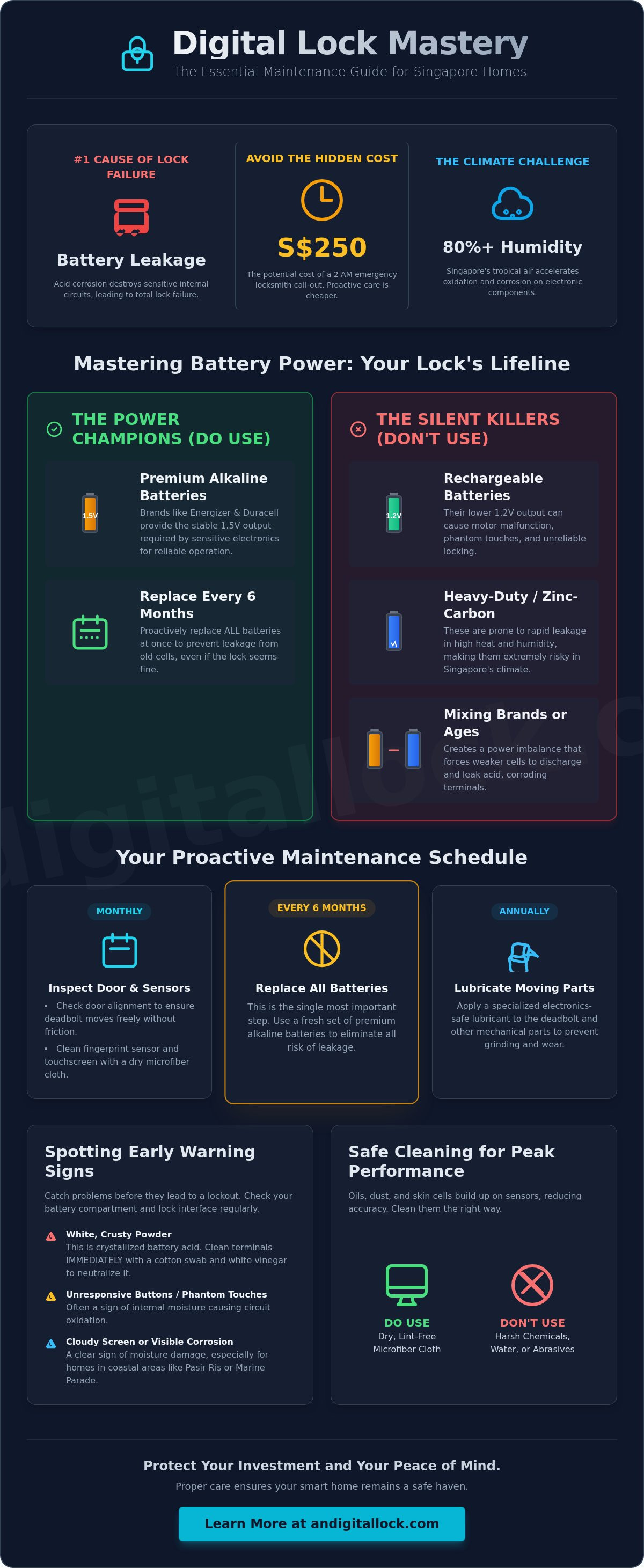
Singapore's tropical climate is a relentless challenge for high-end electronics. While these devices offer contemporary refinement and ease of use, they require consistent care to function reliably in our heat. Regular digital lock maintenance prevents the most common cause of failure: battery leakage. In our humid environment, batteries can leak acid if left too long, which quickly destroys internal circuit boards. This leads to expensive repairs or total replacements that could have been avoided. For HDB and Condo residents, a failing lock isn't just an inconvenience. It's a significant security risk that compromises your home's protection. Maintaining your lock ensures your family stays safe and your investment lasts for many years.
The Impact of Humidity and Salt Air
Singapore consistently sees humidity levels above 80%. This moisture causes internal circuit oxidation over time, leading to phantom touches or complete sensor failure. Residents in coastal neighborhoods like Marine Parade, Pasir Ris, or Punggol face even greater risks. Salt air is highly corrosive. It attacks metal components and sensitive sensors much faster than in inland areas. You should check for early warning signs of moisture damage. Look for unresponsive buttons, a cloudy appearance on the glass interface, or visible corrosion on the battery contacts. For a comprehensive overview of smart lock technology, the complexity of these systems highlights why keeping them dry and clean is a high priority for longevity.
Mechanical Wear and Tear in High-Traffic Homes
Daily use creates physical stress on your door's hardware. The long-term health of your mortise lock depends on perfect door alignment. If a wooden door sags or warps due to moisture, the deadbolt will rub against the strike plate. This friction forces the motor to work harder, draining batteries faster and wearing out internal gears. High-traffic households with kids or large families also see faster degradation of biometric sensors. Fingerprint scanners collect oils, skin cells, and dust with every touch. This buildup reduces accuracy and forces users to try multiple times, which increases mechanical wear on the handle and locking mechanism.
- Inspect your door alignment every month to ensure the bolt slides freely.
- Clean sensors with a dry, lint-free microfiber cloth to maintain recognition speed.
- Apply specialized electronics-safe lubricant to moving parts annually to prevent grinding.
Proactive care is always more affordable than an emergency locksmith. By spending a few minutes on basic digital lock maintenance, you avoid the S$150 to S$250 surcharge often applied to late-night emergency calls. This small investment of time protects your peace of mind and keeps your smart home running smoothly.
Mastering Battery Life: The Foundation of Digital Lock Care
Battery health is the heartbeat of your home security. While modern smart locks are incredibly efficient, they rely entirely on consistent voltage to operate their motorized bolts and biometric sensors. Neglecting this aspect of digital lock maintenance is the fastest way to find yourself stranded outside at an inconvenient hour. You must treat your power source as a critical component rather than an afterthought.
The golden rule of smart lock ownership is simple: only use premium alkaline batteries. Brands like Energizer and Duracell are industry standards because they provide the stable 1.5V output required by sensitive motherboards. Never use rechargeable or heavy-duty (zinc-carbon) batteries. Rechargeable cells often sit at a lower 1.2V, which can cause the lock to malfunction or fail to engage the motor fully. Heavy-duty batteries are the "silent killers" of electronics in Singapore; they are prone to rapid leakage in our high-temperature environment. Mixing different brands or combining old and new cells is equally dangerous. This creates a power imbalance that forces the weaker battery to leak acid, which can corrode your lock's internal components beyond repair.
If you find white, crusty powder on the battery terminals, leakage has already started. You can often save the lock by carefully cleaning the area with a cotton swab dipped in a small amount of white vinegar or lemon juice. This mild acid neutralizes the alkaline discharge. Once clean, dry the terminals thoroughly with a lint-free cloth before inserting fresh cells. Regular inspections help you catch these issues before they migrate to the main circuit board.
Choosing the Right Power Source
Homeowners should proactively replace all digital lock batteries every six months to eliminate the risk of corrosive leakage and unexpected lockouts. Waiting for the low-battery warning is a mistake. In high-humidity environments, a battery might leak before the voltage drops enough to trigger an alarm. Proactive replacement is a cheap insurance policy for your expensive hardware. If you are moving into a new flat, exploring BTO lock bundles is a great way to start with fresh, high-performance equipment that is optimized for long-term reliability.
Emergency Power Protocols
Even the best maintenance routines can hit a snag. If your lock dies completely, look for two small metal contacts on the bottom or front of the exterior unit. Touching a standard 9V battery to these contacts provides enough temporary power to enter your PIN or scan your fingerprint. Newer models often feature a USB-C emergency port, allowing you to jumpstart the device with a standard power bank. Despite these tech solutions, always keep a physical backup key in a secure location outside the home, such as your car or office. This ensures you have a fail-safe entry method regardless of electronic health.
Preventing Mechanical Failure with Essential Door Accessories
Your digital lock is a precision instrument, but it lives in a high-impact environment. While software updates and battery changes are vital, the physical health of your door is what determines the lock's ultimate lifespan. Mechanical stress is a leading cause of premature failure. If your door isn't aligned or if it slams constantly, the delicate internal motors will degrade quickly. Integrating physical protection into your digital lock maintenance routine is the best way to avoid expensive hardware replacements in 2026.
Many homeowners encounter the dreaded "motor jam" error. This usually happens because the door has sagged or warped, causing the bolt to rub against the strike plate. When the bolt meets resistance, the motor strains to complete its cycle. This doesn't just drain your batteries; it wears down the gears inside the mortise. You should regularly check the gap between the door and the frame. If you feel any friction when the bolt extends, it's time for an adjustment. As recommended by professionals like Liberty Door Repair, ensuring your door is perfectly plumb prevents the mechanical stress that leads to lock failure. To keep the movement fluid, apply a dry lubricant like graphite powder or a silicone-based spray to the bolt. Avoid using WD-40 or heavy grease. These petroleum-based products attract dust and Singapore's humidity, creating a sticky residue that eventually jams the mechanism.
The Role of Door Closers in Lock Longevity
Slamming is the primary enemy of smart home electronics. Every time a door slams, a shockwave travels through the lock's motherboard and biometric sensors. A hydraulic door closer is an essential companion for any digital lock. It controls the closing arc and ensures the latch engages the strike plate with exactly the right amount of force. You can easily adjust the "latching" and "closing" speeds to prevent the door from bouncing or hitting the frame too hard. Browse our premium door closers to protect your smart home investment and ensure a smooth, silent entry every time.
Using Door Stoppers and Viewers
Physical impact protection extends beyond the closing cycle. A sturdy door stopper is a simple but effective part of digital lock maintenance. It prevents the lock handle or touchscreen from hitting the wall or an adjacent metal gate when the door is opened wide. This prevents cracks in the glass interface and keeps the internal sensors from being knocked out of alignment. Additionally, check out the latest door viewers for enhanced security. By using a viewer to identify visitors, you reduce the number of times you wake up the lock's screen or sensors, which preserves both battery life and mechanical components over the long term.
- Inspect the strike plate for signs of rubbing or metal shavings.
- Ensure the door closer doesn't allow the door to "bounce" after latching.
- Check that your door stopper is positioned to protect the lock handle from wall impact.
Cleaning and Sensor Care for Biometric Digital Locks
Biometric sensors provide contemporary refinement and a frictionless entry experience, but they are the most sensitive components of your hardware. Every time you touch a fingerprint scanner, you leave behind natural skin oils, moisture, and microscopic debris. Over time, this buildup creates a cloudy film that interferes with the sensor's ability to read your unique print. If you find yourself scanning your finger multiple times just to get inside, your lock isn't necessarily failing; it likely just needs a specific digital lock maintenance routine to clear the sensor's vision.
Oils and dust aren't the only enemies. Micro-scratches caused by using rough paper towels or abrasive fabrics can permanently degrade a sensor's accuracy. For high-use family homes, a weekly wipe-down is essential to keep the system responsive. If your lock features facial recognition cameras, even a thin layer of dust on the lens can cause depth-sensing errors, particularly in the low-light conditions of HDB corridors. Keeping these optical surfaces pristine ensures your security system recognizes you instantly every time.
Step-by-Step Biometric Sensor Cleaning
The most effective tool for cleaning a sensor is a simple, dry microfiber cloth. Gently wipe the scanner in a circular motion to lift away smudges and oils. You must avoid using liquid cleaners, glass sprays, or alcohol-based sanitizers. These harsh chemicals are "silent killers" for electronics because they strip away the protective oleophobic and anti-fingerprint coatings. Once these coatings are gone, the sensor will attract even more grease and become much harder to clean. If a dry cloth isn't enough, use a slightly damp cloth with plain water, followed immediately by a dry one. As a pro-tip, re-register your fingerprints every 12 months. Your skin texture changes slightly over time due to age or manual work, and a fresh scan improves recognition speed significantly.
Keypad and Housing Maintenance
Physical keypads and touch panels also require attention. Use a soft-bristled brush or a can of compressed air to remove debris from the tiny gaps around physical buttons. This prevents keys from sticking or failing to register a press. For locks exposed to Singapore's intense afternoon sun, the exterior finish can fade or crack over time. If your door faces the sun directly, consider installing a dedicated protective cover to shield the electronics from UV damage and heat soak. Maintaining the exterior housing is just as vital as the internal tech for long-term reliability. To upgrade your home with the latest sensor technology, browse our full range of digital door locks designed for the Singaporean climate.
- Wipe fingerprint sensors weekly with a dry microfiber cloth.
- Never use alcohol, bleach, or abrasive materials on touchscreens.
- Clear dust from button gaps to prevent mechanical sticking.
- Protect sun-exposed locks with a UV-resistant cover.
The Ultimate Digital Lock Maintenance Checklist & Toolkit
Consistency is the secret to long-term reliability for your home security. A structured approach to digital lock maintenance ensures you never face a hardware failure at the most inconvenient time. By following a predictable schedule, you turn complex security care into a simple habit that protects your investment for years. This proactive strategy keeps your technology sharp and your entry experience frictionless.
Your maintenance schedule should be broken down into specific intervals to cover both electronic and mechanical components. Every month, perform a visual inspection of the handle and bolt. Look for signs of sagging or misalignment. Every quarter, conduct a deep check of the battery compartment. Look for the early stages of corrosion or any white powder on the terminals. Every six months, take a screwdriver and ensure all mounting screws are tight. Doors vibrate with every use, and these vibrations can slowly loosen the connection between the lock and the door. Finally, schedule an annual professional audit. Having the experts at AN Digital Lock perform a comprehensive check of your firmware, sensor calibration, and internal motor health is the best way to ensure peak performance.
Your 5-Minute Monthly Maintenance Routine
You don't need hours to keep your home safe. Follow these three simple steps every month to maintain your lock's contemporary refinement:
- Step 1: Wipe the biometric sensors and keypad with a dry microfiber cloth to remove oils and dust.
- Step 2: Test your manual override key. Insert the physical key and turn it to ensure the cylinder isn't seized from disuse.
- Step 3: Observe your door closer. Ensure it is engaging the latch smoothly without slamming or requiring a manual push.
Building Your Maintenance Toolkit
Having the right tools on hand makes digital lock maintenance effortless. You don't need a heavy toolbox; just a few specialized items will suffice. Keep a dedicated stash of fresh AA alkaline batteries from reputable brands like Energizer or Duracell. Include a high-quality microfiber cloth for sensor care and a tube of dry graphite lubricant for the mechanical bolt. Avoid oily lubricants that attract dust. You can also upgrade your setup with specialized door accessories from our store to add an extra layer of physical protection to your hardware.
A well-maintained lock is the first step to a secure Singapore home. By investing a few minutes each month into these simple checks, you protect your family and ensure your smart home technology remains a reliable asset rather than a source of stress. Start your routine today to enjoy the peace of mind that comes with professional-grade home security.
Secure Your Smart Home's Future Today
Protecting your home starts with a commitment to consistent care. You've learned that simple steps, like using premium alkaline batteries and maintaining sensor cleanliness, prevent the most common electronic failures. Pairing your technology with the right mechanical hardware, such as hydraulic door closers, ensures your lock isn't damaged by the daily stress of Singapore's high-traffic environments. Effective digital lock maintenance is a small time investment that yields massive returns in long-term safety and convenience.
Since 2013, AN Digital Lock has provided over 10 years of expertise to Singapore homeowners. As an authorized dealer for global leaders like Zigbang, Philips, and Solity, we understand exactly what it takes to keep your security hardware in peak condition. Our reputation is backed by thousands of 5-star reviews from satisfied customers who trust us for reliable service and contemporary refinement. Shop our curated collection of door accessories to protect your lock and ensure your smart home remains a safe haven. You've made a great investment in your home's future; now take these simple steps to keep it performing perfectly for years to come.
Frequently Asked Questions
How often should I change the batteries in my digital lock?
You should replace your batteries every six to ten months to prevent corrosive leakage. Don't wait for the low-battery alarm, as Singapore's high humidity can cause batteries to leak even while they still have power. Always use high-quality alkaline batteries like Energizer or Duracell for stable voltage and long-term reliability.
What should I do if my digital lock starts beeping randomly?
Random beeping is typically a low-battery alert or a tamper alarm. First, check your battery levels and look for signs of leakage in the compartment. If the beeping persists after a battery change, ensure the door is fully closed and the bolt is not hitting the strike plate, as this often triggers a jam alarm.
Is it safe to use WD-40 on my digital door lock?
Never use standard WD-40 on your digital hardware. It's a petroleum-based product that attracts dust and creates a sticky residue, which will eventually jam the motor. Instead, use a dry graphite lubricant or a dedicated silicone spray to keep the mechanical parts moving smoothly without attracting debris.
Why is my fingerprint lock not recognizing my thumbprint anymore?
Recognition failure is usually caused by a dirty sensor or changes in your skin texture. Clean the scanner with a dry microfiber cloth to remove oils and smudges. If that doesn't work, try re-registering your print, as digital lock maintenance includes updating biometric data every year for better accuracy and speed.
Can I use rechargeable batteries to save money on maintenance?
You cannot use rechargeable batteries in most smart locks. These cells typically output 1.2V, which is lower than the 1.5V required for the motorized bolt to function reliably. Using them can lead to frequent low-battery errors and may cause the lock to fail when you are trying to enter.
How do I protect my digital gate lock from rain and humidity?
For gate locks exposed to the elements, installing a dedicated waterproof cover is the most effective solution. This shields the sensitive keypad and sensors from direct rain. It also reduces the impact of humidity on the internal circuit boards, which is essential for locks in coastal areas like Pasir Ris.
Does a door closer really help maintain my digital lock?
A hydraulic door closer is one of the best investments for digital lock maintenance. It prevents the door from slamming, which protects the delicate internal motherboard from shock damage. It also ensures the door aligns perfectly every time it closes, preventing the motor from straining against a misaligned strike plate.
What is the average lifespan of a digital lock in Singapore?
A high-quality digital lock in Singapore typically lasts between five and seven years. This lifespan depends heavily on your environment and how well you follow a cleaning routine. Locks on coastal properties or high-traffic HDB flats may require more frequent care to reach their full potential.