


Imagine sitting in your office at Suntec City and receiving a real-time notification that your helper just entered your home at 1:45 PM. You don't have to worry about duplicated physical keys or the S$180 cost of replacing a manual lock cylinder when a contract ends. Most Singaporean homeowners agree that managing domestic help shouldn't mean compromising your family's safety or dealing with the constant anxiety of who holds a key to your HDB or condo. You want your home to be accessible for your staff but strictly monitored by you at all times.
Finding the right digital lock for helper access is the smartest way to achieve this balance while ensuring a hassle-free experience for everyone. This 2026 guide will show you how to choose and manage a premium system that provides secure, trackable, and convenient entry for your helper. We'll preview the latest smart features like recurring access hours and seamless door-to-gate integration that deliver the ultimate peace of mind for your modern household.
Key Takeaways
- Understand why physical keys are a liability and how real-time notifications provide Singaporean parents with ultimate peace of mind.
- Discover how to configure a digital lock for helper access using recurring windows to restrict entry to specific days and times.
- Compare fingerprint, PIN, and RFID methods to identify the most secure and hassle-free biometric solution for your household.
- Follow our professional step-by-step protocol to register helpers under "User" profiles, ensuring you maintain full administrative authority.
- Explore the best 2026 models from trusted brands like Philips and Zigbang that offer seamless security for HDB and condo owners.
Why Digital Locks are Essential for Managing Helper Access in Singapore
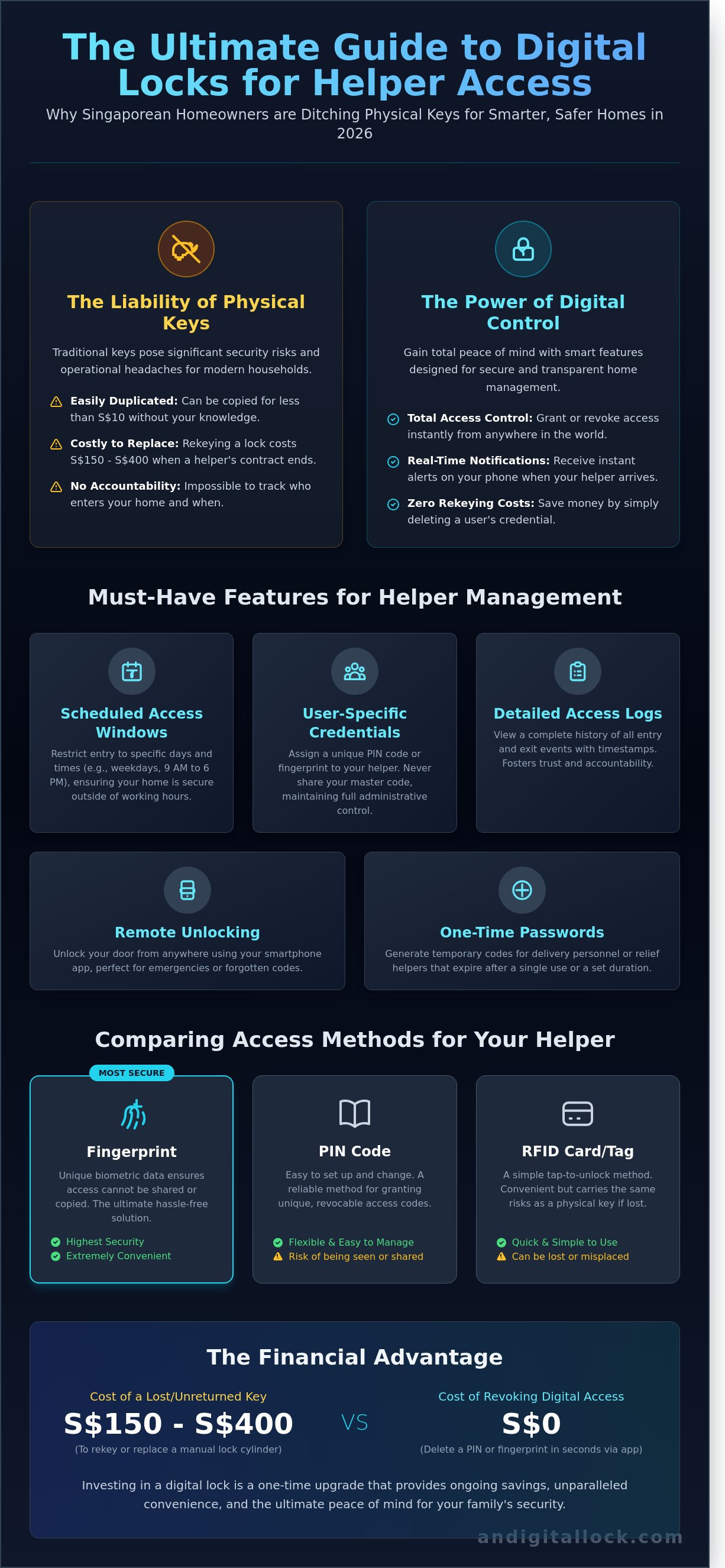
Managing a household in Singapore often requires extra help. Whether you live in a 4-room HDB in Punggol or a condo in District 9, security remains a top priority for every homeowner. Traditional physical keys represent a significant security liability for modern employers. They are easily lost, misplaced, or copied without your knowledge. A premium digital lock for helper access eliminates these risks while providing a seamless entry experience for your domestic employee.
Understanding what a smart lock is helps homeowners see beyond simple door hardware. These devices replace mechanical cylinders with encrypted digital credentials like fingerprints or PIN codes. For working parents, real-time notifications provide ultimate peace of mind. You'll receive an instant alert on your smartphone when your helper arrives home with the kids after school. This level of visibility reduces daily anxiety and ensures your family's schedule stays on track.
Security upgrades also save significant money over time. Rekeying a traditional lock or replacing a high-security cylinder during a helper transition can cost between S$150 and S$400. With a digital system, you simply delete the old PIN or fingerprint and register a new one in seconds. In the Singapore context, this is especially vital for HDB owners who must manage both a metal gate and a main door. Syncing both locks to one credential creates a hassle-free experience that avoids the "heavy keychain" problem.
Eliminating the Risk of Key Duplication
Standard keys are inherently vulnerable. Any neighborhood locksmith can duplicate a traditional key for less than S$10 in under five minutes. Digital credentials provide a non-transferable access method that cannot be replicated at the local hardware shop. You retain full control over the master access codes. This ensures your private residence remains secure even after a contract ends. Knowing that no unauthorized copies exist provides a level of security that physical metal cannot match.
Transparency and Accountability
Building a healthy relationship with your helper requires trust and clear boundaries. Digital systems facilitate this through detailed records that remove guesswork from daily operations. Use these features to manage your home professionally:
- Verify exactly when the helper returns from marketing or errands.
- Check the time the kids were brought home from the school bus.
- Confirm the door is securely locked during late-night hours.
- Grant temporary access to relief helpers or cleaning services.
Access logs are digital timestamps that record every entry and exit event to provide a clear history of home management activity. These records help resolve misunderstandings and foster a professional environment based on factual data. You can view these logs directly through a mobile app, making your 2026 home management strategy more efficient and secure.
Key Features to Look for in a Digital Lock for Helpers
Choosing a digital lock for helper access requires more than just picking a stylish handle. It's about balancing home security with daily convenience. As part of Singapore's Smart Nation initiative, smart home technology has evolved to provide granular control over who enters your HDB or condo. You don't have to compromise your primary security settings to grant access to others.
- User-Specific PIN Codes: Never share your master PIN. Premium models from brands like Philips or Kaadas allow you to store up to 100 unique user codes. This keeps your primary code private and lets you track exactly when your helper enters or leaves the premises.
- One-Time Passwords (OTP): These are perfect for ad-hoc services or delivery personnel. You can generate a code that expires after a single use or a set duration, such as 20 minutes, ensuring no one can reuse the credentials later.
- Remote Unlocking: If your helper encounters a technical glitch or forgets their code, you can unlock the door instantly via a smartphone app from your office or even while traveling abroad.
- Dual-Scan Synchronization: Many Singaporean homes feature both a metal gate and a wooden door. Syncing these locks means your helper only needs to scan once to open both, creating a seamless entry experience that saves time and effort.
If you're looking for a hassle-free experience, our team at AN Digital Lock provides a free consultation to help you select the best bundle for your specific door type.
Time-Restricted Access Control
For families with part-time help, recurring access windows are essential. You can program the lock to allow entry only on specific days, such as Mondays and Thursdays between 9 AM and 1 PM. If someone tries to use the code at 3 PM or on a Saturday, the system denies entry automatically. This feature significantly reduces the risk of unauthorized visitors during your off-hours and ensures your home remains a private sanctuary when help isn't scheduled.
Notification Systems and Connectivity
Real-time monitoring provides the ultimate peace of mind for busy homeowners. While Bluetooth locks work well at close range, a Wi-Fi-enabled system is superior for remote management. By using a Wi-Fi bridge, you receive instant push notifications every time the door is accessed. This connectivity also provides critical low battery alerts. Most systems will notify you when the power hits 20%, so you can ensure your helper is never accidentally locked out due to a dead battery. It's a simple way to maintain a professional and reliable environment for your household staff.
Comparing Access Methods: Fingerprint vs. PIN vs. RFID
Choosing the right digital lock for helper access depends on your household routine and your helper's comfort with technology. Modern 2026 models from trusted brands like Philips, Kaadas, and Samsung offer multiple entry modes to ensure a seamless experience for everyone in your Singapore home.
- Biometric Access: This is the most secure and convenient method for stay-in helpers. It eliminates the risk of lost keys or forgotten codes. Most premium locks now feature 360-degree sensors that recognize prints in under 0.5 seconds.
- PIN Codes: These serve as the most reliable backup. You can issue a unique code to your helper and change it instantly if they finish their contract. It requires careful management to ensure the code isn't shared with unauthorized parties.
- RFID Tags and Fobs: These provide a familiar transition for helpers who are used to traditional mechanical keys. They are small, portable, and easy to use for those who might struggle with biometric sensors.
- Mobile App Access: This is best for tech-savvy users and remote management. You can unlock the door from your office in Orchard or a meeting in the CBD if your helper forgets their access method.
Your goal is to find a balance between high-end security and daily practicality. A lock that offers all four methods provides the ultimate flexibility for your HDB or condo unit.
The Pros and Cons of Biometrics
Fingerprint technology offers 99.9% accuracy in modern locks. The main advantage is that fingerprints cannot be shared or lost like physical tags. However, helpers often perform household chores involving water and detergents, which can temporarily wear down fingerprint ridges or cause issues with wet hands. We recommend always registering a backup PIN for your helper to prevent any lockout situations during a busy day of cleaning or grocery runs.
Managing RFID Tags and Key Fobs
RFID tags are incredibly efficient for daily routines. One major benefit is the ease of deactivating a lost tag via the mobile app. If your helper loses their fob at the wet market, you don't need to call a locksmith. A professional locksmith in Singapore can charge between S$150 and S$300 for an emergency house call. Replacing one of our RFID tags costs as little as S$10 to S$25. Integrating these tags into a lanyard or a keychain makes them a hassle-free part of the daily routine for any digital lock for helper access. This simple tool ensures your home stays protected without the high costs associated with traditional lock failures.
Setting Up Your Helper’s Access: A Step-by-Step Security Protocol
Securing your home involves more than just picking the right hardware. It's about establishing a clear, repeatable system. Follow these five steps to maximize your digital lock for helper access while maintaining total control of your HDB or condo unit in Singapore.
- Step 1: Register as a "User" Profile: Never share your Master Admin PIN. Register your helper under a "User" or "Member" profile. This ensures they can unlock the door but cannot change settings, add new users, or delete existing ones.
- Step 2: Set Secure Credentials: Configure a unique 6 to 8 digit PIN. If your lock supports biometrics, scan at least two different fingers, such as the thumb and index finger. This provides a backup if they have a minor cut or dry skin from household chores.
- Step 3: Enable Smartphone Notifications: Link the lock to your mobile app. Set up real-time push notifications so you receive an alert every time the helper enters or leaves. This creates a digital log of activity for ultimate peace of mind.
- Step 4: Conduct a "Lock Drill": Spend 10 minutes practicing with your helper. Ensure they know how to engage the deadbolt from the inside and how to recognize the "Door Unlocked" versus "Door Locked" audio cues.
- Step 5: Establish Secrecy Protocols: Make it clear that the PIN must never be shared with delivery personnel or friends. Provide a physical backup key to a trusted family member, but keep the helper's access strictly digital.
Best Practices for PIN Code Management
Don't use obvious numbers like birthdays or the last four digits of an NRIC. These are the first combinations intruders try. We recommend changing the helper's PIN every 180 days to keep your security fresh. Teach your helper the "Scramble Code" feature. They can enter any random numbers before or after their real PIN. This hides the actual code from anyone standing nearby, ensuring your digital lock for helper access remains truly private.
Training Your Helper on Smart Lock Care
Premium locks require simple but specific care. Show your helper how to clean the fingerprint sensor with a dry microfiber cloth. This is vital after they've been working in the kitchen with oil or water. If the lock sounds a "Low Battery" warning, it typically has enough power for 50 more openings. In the rare event of a total power drain, show them the emergency contact points at the bottom of the lock. A standard 9V battery, available for about S$3.00 at any local convenience store, provides an instant jumpstart so they can enter the PIN and get inside.
Ready to upgrade your home security with the latest smart technology? Browse our collection and find the perfect digital lock for your family today.
Top Digital Lock Recommendations for Helper Access in 2026
Choosing the right digital lock for helper access involves more than just picking a brand. You need a system that is easy for your domestic helper to use while giving you total control over home security. In 2026, Zigbang (formerly Samsung) continues to lead the market with its intuitive interfaces. Their locks are famous for being user-friendly, making them ideal for helpers who prefer a straightforward entry process. You get world-class reliability and a sleek design that fits any modern Singaporean home.
Philips Digital Locks are another premium option for homeowners who value connectivity. The EasyKey series is particularly popular for its outstanding app integration. You can manage access levels directly from your smartphone, which is perfect for setting temporary PINs or tracking entry logs in real-time. If you prioritize durability for a high-traffic household, Solity and Hafele offer some of the most robust hardware available. These brands are built to last and handle the humidity and heavy usage common in Singaporean HDB and condo environments.
The Best HDB Gate + Door Bundles
For HDB residents, the "Dual-Sync" feature is a genuine game-changer. This technology allows the gate lock and the door lock to communicate wirelessly. When your helper scans her fingerprint at the gate, the main door unlocks automatically at the same time. It eliminates the need for two separate actions, making entry faster and more secure for everyone. We often recommend pairing a Solity Gate Lock with a Philips EasyKey door lock for the ultimate seamless experience. You can explore these combinations in our BTO lock bundles to see how you can save on these coordinated sets.
Why Choose AN Digital Lock for Your Installation?
Buying from a trusted digital lock supplier in Singapore ensures you aren't just getting a product, but a complete security solution. AN Digital Lock has earned over 3,700 five-star reviews by focusing on customer satisfaction and "peace of mind." We don't just sell locks; we provide a hassle-free experience from the moment you browse our catalog to the final installation. Our team offers:
- Professional installation by experts who understand the specific requirements of Singaporean door types, including fire-rated doors.
- Comprehensive after-sales support and local warranty coverage so you're never left stranded.
- A free consultation to identify the best digital lock for helper access based on your family's specific daily routine.
We've helped over 15,000 families transition to a keyless lifestyle with confidence. Whether you live in a new BTO or a resale condo, our goal is to make your home security simple and effective. Contact us today to secure your home with the best technology 2026 has to offer.
Secure Your Singapore Home with Smarter Access Control
Managing a household shouldn't be a source of constant worry. Choosing the right digital lock for helper access ensures your HDB or BTO flat remains secure while providing your domestic helper with a seamless way to enter. Modern features like fingerprint recognition and temporary PIN codes eliminate the risks associated with lost or duplicated physical keys. These tech-driven solutions offer the ultimate peace of mind for every Singaporean homeowner in 2026. Security is no longer just about a sturdy door; it's about smart, manageable entry points.
AN Digital Lock is the trusted expert you need for a professional, hassle-free experience. As an official distributor for world-class brands like Philips, Zigbang, and Solity, we bring premium security directly to your doorstep. Our specialized HDB and BTO installation experts have already served thousands of families, earning over 3,700 five-star reviews for our exceptional service and reliability. We're ready to help you find the perfect bundle for your lifestyle and budget.
Secure your home and manage helper access with our premium digital lock bundles today!
Take the first step toward a more convenient and modern home today. Your family's safety is our priority; let's get your new lock installed perfectly so you can focus on what matters most.
Frequently Asked Questions
Can I see exactly what time my helper entered the house?
Yes, you can track every entry through the mobile app's activity log. Premium brands like Philips and Kaadas record the exact date and time a specific PIN or fingerprint is used. You'll receive real-time push notifications on your smartphone the moment the door opens. These digital logs typically store the last 100 to 500 entry events, giving you total visibility over home traffic while you're at work.
What happens to the helper’s access if my home Wi-Fi goes down?
Your helper can still enter the home because the lock stores all access codes and fingerprints in its local internal memory. Wi-Fi is only required for remote features like receiving notifications or changing settings from your office. Local authentication happens in less than 0.5 seconds without an internet connection. Statistics show that 99% of smart locks sold in Singapore function perfectly as standalone units during network outages.
Is it possible to give my part-time helper access only on certain days?
You can easily set recurring time-sensitive schedules for part-time staff. This is a vital feature of a digital lock for helper access, allowing you to restrict entry to specific windows, such as Mondays and Thursdays from 9:00 AM to 1:00 PM. Outside of these 4 hour blocks, the helper's PIN or fingerprint won't work. Most modern apps allow you to manage up to 20 different scheduled users simultaneously.
Should I give my helper a physical backup key for emergencies?
It's better to keep the two provided mechanical keys in a secure external location, like your car or a relative's home. Giving out a physical key creates a security loophole that keyless systems are designed to fix. If the lock's 8 AA batteries fail, you can use a 9V battery jumpstart from any convenience store for S$2.50. This is more secure than risking a lost key which costs S$150 to S$300 to replace the entire cylinder.
How do I delete a helper’s access when their employment contract ends?
You can revoke access immediately through your smartphone app or the master keypad settings. It takes roughly 20 seconds to delete a specific user profile without affecting other family members. This instant revocation provides ultimate peace of mind, as you don't need to worry about unauthorized copies of keys. In Singapore, 95% of homeowners prefer this method over the traditional and expensive process of changing mechanical door locks.
Will the digital lock still work if there is a power outage in my HDB?
Your lock will remain fully functional because it operates on independent battery power rather than the HDB electrical grid. Most units use 4 to 8 AA alkaline batteries that last between 10 to 12 months. You'll hear a low-battery warning chime about 2 weeks before the power runs out. Even in a total blackout, your home security remains uncompromised since the locking mechanism doesn't rely on your flat's electricity.
Can I remotely unlock the door for my helper if they forget their PIN?
Yes, you can unlock the door from anywhere in the world using your mobile app if your lock has a Wi-Fi bridge. If your helper is stuck outside, you simply tap a button on your screen to grant entry. This feature is standard on most 2026 models and eliminates the need for you to rush home during a busy workday. It's a seamless solution that ensures your household chores stay on track.
Are digital locks difficult for older helpers to learn how to use?
Digital locks are actually easier for seniors to use than traditional keys because they eliminate fumbling with small metal objects. Choosing a digital lock for helper access with a biometric fingerprint scanner is the most user-friendly option for older staff. They simply place their thumb on the sensor for a 0.5-second recognition. Our team provides a free 10 minute training session during installation to ensure everyone is comfortable with the new system.