


The best lock for a shared house with roommates in Singapore is usually a digital door lock with PIN access, auto-locking and a tamper alarm. It lets residents enter without sharing a physical key, while the door can secure itself after closing. Most core digital-lock functions work without Wi-Fi.
Sharing a home means balancing convenient access with clear boundaries and security. A digital lock can simplify entry, but the right choice depends on the door, the access methods your household prefers and the features you’ll use. This guide compares practical considerations, explains how digital locks work, and covers Singapore costs, installation, user setup, alarms and auto-locking.
Key Takeaways
- Compare PIN, card and biometric access to find a practical way for every roommate to enter without relying on a shared physical key.
- Check how the lock fits your door and factor installation into your overall budget before choosing a model.
- Understand which setup steps may involve user access management and, for some locks, a 2.4GHz Wi-Fi connection.
- Look for auto-locking and tamper alarms if you want added help securing the shared entrance.
- Explore digital door locks from AN Digital Lock when you’re ready to compare options for your home.
1. What Is a Digital Door Lock and How Does It Work?
For a shared-house bedroom in Singapore, suitable options include a mechanical keyed lock, a combination lock or an electronic digital lock. Digital locks can offer PIN, card or biometric access, while a keyed lock works without batteries or user accounts. To choose the best lock for a shared house with roommates in Singapore, match the mechanism to the door and the household’s access routine.
An electronic lock replaces or works with door hardware to control entry using an approved credential. A PIN is practical when several roommates need access: each person enters a code instead of carrying a shared key. Some smart models connect to an app for activity records, remote unlocking and temporary PINs. App features depend on the model, and core lock functions generally work without Wi-Fi.
Fingerprint access avoids remembering a code, while a card offers a simple tap-in option. For short guest stays, share a temporary PIN for the agreed period, then remove or change it. Decide who manages codes, remove access when a roommate moves out, and avoid sharing one permanent PIN with guests. App-based management can simplify updates when the model supports it.
The choice between mechanical and smart locks comes down to access management. With a keyed lock, a departing roommate may mean collecting keys or changing the cylinder. A combination lock avoids keys, but roommates must share and update its combination. A digital lock can support separate PINs or temporary guest codes, but relies on batteries and user setup. For a rented room, a portable, non-destructive lock may suit households that cannot alter existing hardware.
Tenants should get the landlord’s written permission before drilling, replacing a lock or changing door hardware. This helps prevent disputes about alterations, keys and access when the tenancy ends. For HDB bedroom doors and shared rental rooms, choose a lock compatible with the internal door and keep access arrangements consistent with the rental agreement. Treat the flat’s main entrance separately: choose a digital lock suited to that door and its fire-rating requirements.
A padlock is an option for a compatible hasp or locker, not a typical bedroom-door handle. It opens with a key or combination, so roommates should agree who holds the key or knows the code. For example, use one to secure a personal storage box rather than as the only lock on a bedroom door. Choose the best lock for a shared house with roommates in Singapore by considering the actual door and intended use.
2. How much does a digital lock cost in Singapore?
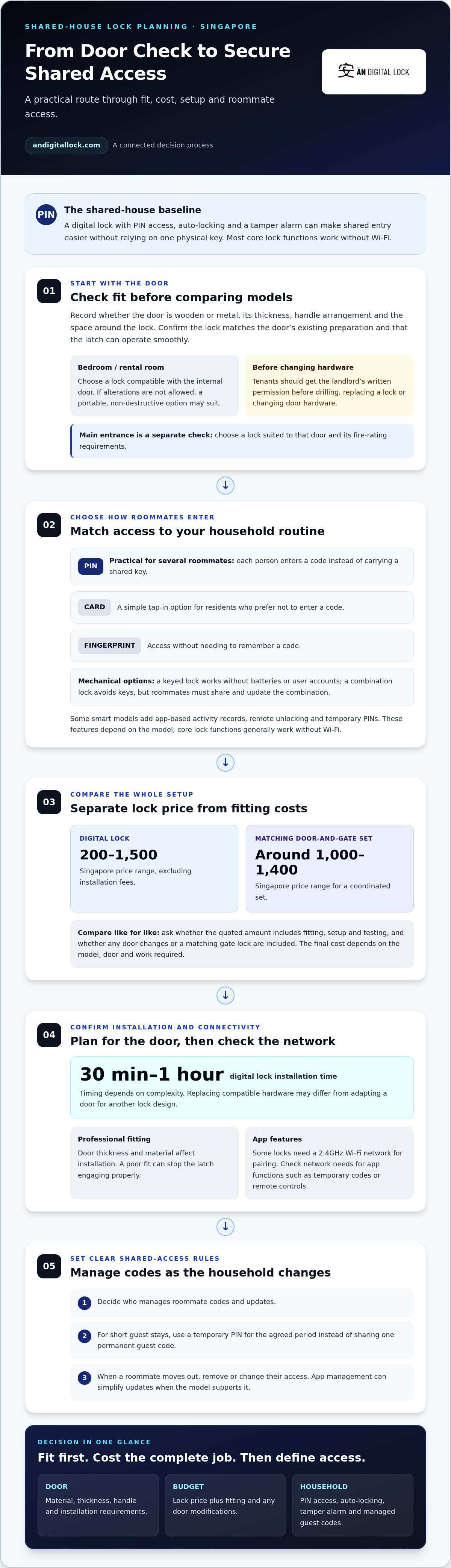
For a bedroom door in Singapore, total spending depends on the lock, door material and installation work. Digital lock installation can take 30 minutes to an hour, depending on complexity. The door’s fit and condition matter before you compare models.
Start with the door itself. Check its material, thickness, handle arrangement and the space around the lock area. A digital door lock must fit the door and operate smoothly with its latch. A lock designed for one door setup may not suit another, even within the same HDB flat.
Compatibility matters in HDB and condominium homes. Before choosing a model, match its requirements to the specific door. Note whether the door is wooden or metal, then consider how its handle and locking mechanism work. Checking the door’s thickness and material helps establish whether installation can use the existing preparation or requires additional work.
Installation affects the overall cost because the lock must sit securely and align with the door frame. A poor fit can stop the latch engaging properly. Professional installation accounts for door thickness and material. The work may differ between replacing compatible hardware and adapting a door for a different lock design.
To compare options fairly, separate the lock price from installation and any door changes. Ask what the quoted amount includes, such as fitting, setup and testing. A basic replacement differs from adapting a door or adding a matching gate lock. Compare the complete setup, not just the digital lock’s listed price.
Smart-home compatibility can affect which model suits your household. Some digital locks require a 2.4GHz Wi-Fi network for pairing. A lock with PIN code access may work as a standalone device, while app features such as temporary codes or remote controls may depend on network setup. Check the functions you need against your home network and roommates’ access routine.
Before making a decision, use this assessment:
- Identify whether the door is wooden or metal.
- Record its thickness and existing lock arrangement.
- Match the door details to the lock’s installation requirements.
- Separate hardware costs from fitting and any door modifications.
- Confirm whether app functions need 2.4GHz Wi-Fi.
This process gives homeowners a clearer basis for comparing digital door locks without overlooking fit or setup. For a closer look at door lock options, consider how each model suits your door and shared access needs.
A digital lock typically costs 200 to 1,500 in Singapore, excluding installation fees, so the final amount should be considered separately from the listed lock price. Matching digital door and gate sets in Singapore cost around 1,000 to 1,400. These ranges give a starting point for comparing a lock on its own with a coordinated door-and-gate setup, but the right option still depends on the specific door and the work required.
Before purchase, check that the digital lock is compatible with the specific HDB or condo door. Professional installation helps ensure the lock works properly with the door's thickness and material. Considering compatibility and fitting needs helps clarify the total cost, rather than relying on the lock price alone. This is especially useful when comparing a single lock with a matching set.
3. Digital lock prices in Singapore
Compare digital locks in Singapore by separating hardware, installation and any door changes. The final cost depends on the model, its access features and how well it fits the HDB or condominium door. A keypad-only model and an app-connected model suit different routines, so compare functions before judging value.
For an HDB flat, distinguish the main entrance from an internal bedroom door. For the main entrance, choose a digital lock designed for the door and its fire-rating requirements. A main-door lock must suit the existing hardware, while a bedroom lock may have different fitting needs. Door material and thickness also affect installation.
Condominium doors vary too. A mortise lock has a lock body fitted into the door, so the existing cut-out and handle arrangement matter when selecting a replacement. Before comparing models, note whether the door is wooden or metal, identify the current lock type, and check how the latch meets the frame. These details help establish whether a digital lock fits.
Build a like-for-like comparison based on the same access needs. A household that needs only PIN entry, for example, shouldn’t compare a keypad model with a smart lock’s app functions as if they were equivalent. Roommates who want temporary guest access may value app-based code management; those who mainly need shared entry may prefer simpler controls. Include installation and any required door adaptation.
Use this checklist to organise quotes and model details:
- Record the door type, material, thickness and current lock arrangement.
- List required access methods, such as PIN entry, card access or biometrics.
- Separate hardware, installation and door modification costs.
- For an HDB main door, select a digital lock designed to meet fire-rated requirements.
- For a condominium, compare the lock’s fitting needs with the existing mortise or other hardware.
A basic model may suit a household seeking keypad entry, while a more feature-rich model may add app controls or biometric recognition. Those features add value only if roommates will use them. Consider how codes will be managed when tenants change, whether temporary access is useful, and whether the household wants remote functions. A clear comparison keeps the decision focused on everyday needs.
Compare the complete setup before choosing, not just the lock. A model that fits the door without substantial adaptation may be a better practical match than one with features your household won’t use. For HDB flats and condominiums alike, door compatibility, access needs and installation requirements shape the sensible choice.
4. Smart-lock installation and user setup in Singapore
In Singapore, digital lock installation can take 30 minutes to an hour, depending on the lock’s complexity. The installer needs to fit the lock to the door’s material and thickness, then test its operation. A smart lock can look ready on the door, but user setup still matters for shared access.
Installation typically involves removing or adapting existing hardware, fitting the lock, aligning the latch and checking that the door closes correctly. After fitting, test every supported access method at the door. For example, enter a PIN, use a registered card or try fingerprint recognition if the model supports it. Poor alignment can affect the latch, so test with the door both open and closed.
App-enabled smart locks also require account setup. One roommate can act as administrator, pair the lock with a phone and add other users. Each resident should know which credential they use and what to do if they change phones. Depending on the model, app-enabled locks can record activity, unlock remotely and create temporary PINs. These features can help manage guest entry without sharing a permanent household code.
Connectivity varies by model. Core digital-lock functions generally work without Wi-Fi, but some locks require a 2.4GHz Wi-Fi network for pairing. Bluetooth may support nearby phone connections on models designed for it; it does not automatically mean remote access. Remote functions depend on the lock’s supported connection and setup. Before installation, check whether the household’s router and phones support the model’s required pairing method.
Smart-home integration also requires a compatibility check. A lock’s app may operate independently or connect with a wider smart-home setup. Don’t assume every model works with every platform. Compare the supported app, connection type and functions your roommates need, such as remote unlocking or temporary guest codes. Choose authentication methods the household can manage consistently.
Use a simple setup sequence after installation:
- Set the administrator account and keep its recovery method secure.
- Register each roommate’s individual PIN, card or biometric credential.
- Test access at the door, including app control if enabled.
- Agree who can add users and remove access when a tenant moves out.
- Show guests how to use temporary access without disclosing permanent codes.
For a shared HDB flat, keep the household’s access process in a private place, not beside the door. Review temporary codes after each guest visit and promptly remove former tenants’ credentials. Treat the app as an access-management tool, not a replacement for testing the physical lock. These steps make daily entry clearer for every roommate.
5. Anti-tamper alarms and auto-locking
Auto-locking helps prevent a shared entrance from being left unsecured after someone leaves. Digital locks typically secure themselves automatically after the door closes. For roommates with different schedules, this reduces reliance on the last person remembering to turn a key. Check the lock’s settings and test that the latch engages after the door closes.
A digital lock’s tamper alarm adds another layer of awareness. Sensors can trigger an alarm when they detect attempted tampering. Repeated interference with the lock, for example, may activate the alert, depending on the model. An alarm is a warning feature, not a monitored alarm service, so roommates should agree how to respond when it sounds.
Privacy and defence modes serve different purposes. Privacy mode can prevent unlocking from outside, which may suit a roommate inside their bedroom. Defence mode can activate additional security alerts when the home is empty. Before enabling either function, review its effect on everyday entry and make sure all residents understand how it changes access.
Emergency access matters if batteries run out or a roommate cannot use their usual credential. Many digital locks have an emergency charging port or mechanical key for access when the battery runs out. These features address lockouts caused by power or credential problems. They aren’t the same as an inside release, so learn how occupants exit before relying on a model.
Are smart door locks safe and practical for shared houses? They can be practical when roommates manage access carefully, test auto-locking and agree on alarm responses. Individual PINs or fingerprint credentials help distinguish each person’s access from a shared code. Promptly remove a former roommate’s credentials, and keep any mechanical key in an agreed, secure location.
Use a short household routine to make these functions useful:
- Close the door and confirm the locking mechanism engages.
- Test the tamper alarm using the manufacturer’s instructions.
- Agree who responds to an alert and how roommates communicate.
- Review privacy and defence settings before enabling them.
- Show each resident the emergency power or mechanical-key method.
If a roommate is locked inside, understand the lock’s interior exit method before installation. An emergency charging port or mechanical key can help restore outside access after battery failure, but doesn’t explain how someone exits from inside. Choose a lock with clear, usable interior operation, and make sure every resident knows the procedure.
Auto-locking, alarms and backup access work best as part of a shared routine, not as substitutes for one. Compare the functions on digital door locks and choose features that match your household’s entry and emergency-access needs.
AN Digital Lock: Digital Door Locks
AN Digital Lock offers Digital Door Locks for households comparing shared-entry options. If roommates need separate ways to enter, consider how PIN, card or biometric access would fit your household routine. Door material and existing hardware also matter, especially when choosing a lock for an HDB or condominium entrance.
Use this guide to narrow your priorities: access management, door compatibility, installation, connectivity and security functions. Then compare suitable digital lock options with the needs of everyone sharing the home. AN Digital Lock also offers Wooden Doors and Metal Gates for households considering entrance components alongside a lock.
Contact AN Digital Lock to discuss digital door lock options for your shared home.
Make your shared-home choice with confidence
Before choosing the best lock for a shared house with roommates in Singapore, agree on a practical point: who will manage access as household arrangements change? A shared plan can prevent confusion, especially when a roommate moves out or guests need entry. Decide who updates credentials and how everyone will learn about changes.
Consider the door as part of the decision, not just the lock. AN Digital Lock offers Digital Door Locks, Wooden Doors and Metal Gates, so you can consider entrance options together. The right combination depends on your home’s setup and the way roommates share access.
Use your household’s access plan and door requirements to guide the next conversation. Contact AN Digital Lock for lock advice and take the next step toward a shared entrance that suits your home.
Frequently Asked Questions
How much does a digital lock cost in Singapore?
There isn’t one standard total for a digital lock in Singapore: the price depends on the model, access features, door compatibility and fitting requirements. For a useful comparison, separate the lock from installation and any door changes. A model that fits existing hardware, for example, may require different work from one that needs the door adapted. Compare the complete setup, not just the device.
How can roommates manage shared keys, access codes, and lockouts securely?
Agree on a written access plan before sharing codes or keys. Name one roommate to manage credentials, decide how access changes when someone moves out, and record who holds any backup key. Avoid leaving keys near the entrance or writing PINs where visitors can see them. Keep lockout steps somewhere all residents can access, such as a securely stored shared household note.
What lock features help protect privacy without blocking fire or emergency access?
Privacy mode can prevent unlocking from outside, while an interior release should still allow occupants to leave. For a main HDB entrance, choose a digital lock designed to meet fire-rated requirements. If battery failure is a concern, consider a model with emergency power access, such as a 9V battery connection, and teach every roommate how to use it. Test normal exit operation after installation.