


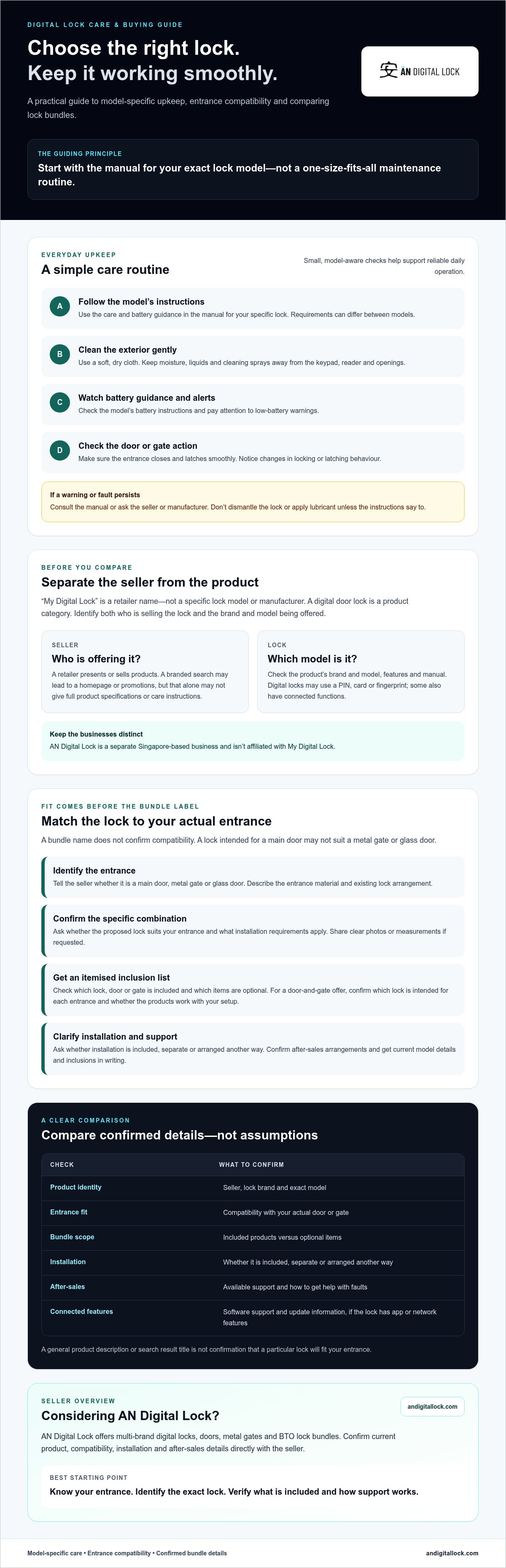
For my digital lock, start with the care instructions for its specific model rather than assuming every lock needs the same maintenance. Check its battery guidance, clean the exterior gently, and make sure the door or gate closes and latches smoothly. Taking time to understand your specific hardware ensures long-term reliability and secure daily operation.
It makes sense to want a lock that’s easy to maintain and suits your entrance. Choosing confidently also means checking what’s included, whether the lock fits your existing door or gate, and what installation and after-sales arrangements apply. AN Digital Lock is a trusted Singapore-based seller you can rely on for professional guidance and quality products.
This guide covers basic upkeep, then explains how to compare a lock-and-door or gate bundle and confirm details with a seller. For maintenance, follow the manual for your model, avoid getting moisture or cleaner into the lock, and ask the seller or manufacturer when a warning or fault persists.
Key Takeaways
- Follow the maintenance instructions for your exact digital lock model.
- Check battery guidance, clean the exterior carefully, and watch for changes in locking or latching.
- Check whether “my digital lock” refers to a retailer or a lock solution before comparing options.
- Judge a lock-and-door bundle by its fit with your actual entrance, not by its label alone.
- Compare sellers using confirmed inclusions, compatibility, installation arrangements, and after-sales support.
- AN Digital Lock offers multi-brand digital locks, doors, metal gates, and BTO lock bundles; confirm current details directly.
What does “My Digital Lock” mean when you are searching for a lock?
“My Digital Lock” is a retailer name. A search for the phrase may lead you to a seller’s website or promotions, even if you’re looking for maintenance advice, a particular lock, or a complete door-and-lock bundle. AN Digital Lock is a separate Singapore-based business and isn’t affiliated with My Digital Lock.
My Digital Lock is a seller name; a digital door lock is a product category. Digital locks may use access methods such as a PIN, card, or fingerprint. A retailer sells or presents products, while each lock has its own manufacturer, model, features, and care instructions. Some digital locks also have connected functions. Read more about what a smart lock is to understand that related category.
Is My Digital Lock a brand, a retailer, or a lock model?
My Digital Lock is a retailer name, not a specific lock model or manufacturer. Don’t assume every product listed under a seller’s name is made by that retailer. Check two details separately: who is selling the lock, and which brand and model it is. The model matters for maintenance too, since battery requirements and care instructions can differ. Use the product manual for model-specific guidance.
Why might a search for My Digital Lock show different results?
A branded search can show a company homepage, promotional pages, and social profiles. These may explain a seller or highlight offers, but they don’t necessarily provide the full specifications or maintenance instructions for an individual lock. A bundle listing may also leave out details about what’s included or whether the lock suits your entrance. Check the product information and ask the seller to confirm anything unclear.
First identify what you need: a retailer to contact, a lock for an existing door or gate, or a bundle that combines entrance products. Then compare the product brand and model, confirmed inclusions, compatibility, and installation arrangements instead of relying on a search result title. For a broader framework on evaluating features and suitability, see our article on choosing a digital lock in Singapore.
Once you know which lock you have or are considering, find its manual and follow the care guidance for that model. As general upkeep, keep the exterior clean with a soft, dry cloth, and keep liquids and cleaning sprays away from the keypad, reader, and openings. Check the battery instructions and pay attention to low-battery alerts. If the lock starts behaving differently, consult its manual or the seller rather than dismantling it or applying lubricant without instructions.
What should a digital lock and door bundle include for your entrance?
A bundle name can sound convenient, but it doesn’t confirm that the products suit your home. A lock intended for a main door may not be suitable for a metal gate or glass door. Before comparing bundle offers, identify the entrance you want to secure and ask the seller to confirm that the specific lock-and-door combination is compatible.
Confirm compatibility for the specific door and lock combination instead of assuming it from the bundle label. Ask the seller to distinguish items included in the quoted bundle from optional products, installation, and other services. Get the current model details and inclusions in writing so you can compare offers accurately.
How do you check whether a lock suits your door or gate?
Start by identifying whether the lock is for your main door, metal gate, or glass door. Tell the seller what the entrance is made from and describe its existing lock arrangement. Share clear photos or measurements if requested. Ask whether the proposed model suits those details and what installation requirements apply. Don’t treat a general product description as confirmation that a lock will fit.
If the lock has app or network features, ask what software support and update information is available. NIST’s cybersecurity guidance for connected locks provides a useful reference for consumer Internet of Things products, but it doesn’t confirm that a particular lock suits your door.
What should you confirm in a BTO lock bundle?
Ask for an itemised list. Check which digital lock, door, or gate is included and which items are optional. If the offer covers both a main door and gate, confirm which lock is intended for each entrance and whether the products are designed to work together in your home’s setup. Also ask whether installation is included, separate, or arranged another way.
For a new HDB home, make sure the proposed door and lock combination suits the entrance you’re planning. Our guide to choosing an HDB main door can help you consider the door alongside the lock. If you’re comparing a bundle that includes a door or metal gate, review AN Digital Lock’s door and gate options, then confirm current models, inclusions, and installation arrangements directly with the seller.
How can you compare My Digital Lock with another digital-lock seller?
A promotion or broad product range can help you find options, but neither proves that a lock fits your entrance or that a bundle includes what you need. Ask each seller the same questions, then verify current model specifications and purchase terms directly. Treat “my digital lock” as a search phrase, not proof that a particular product or offer is right for you.
| What to compare | Ask My Digital Lock | Ask another seller |
|---|---|---|
| Product fit | Which exact lock model is proposed for my door or gate? | Which exact model suits the same entrance and existing lock arrangement? |
| Confirmed inclusions | Which lock, door, or gate items are included, and what is optional? | Can you provide an itemised list of included and optional items? |
| Installation | Who handles installation, and what arrangements or requirements apply? | Who handles installation, and what arrangements or requirements apply? |
| Support | What after-sales support and product terms apply to this model? | What after-sales support and product terms apply to this model? |
| Seller identity | Who is selling the lock, and who makes it? | Who is selling the lock, and who makes it? |
Which details matter more than a promotion headline?
Start with fit, the exact lock model, and clearly itemised bundle contents. Then confirm who handles installation and what support is available after purchase. A headline may leave out conditions or optional items, and offers can change. Check current details directly with the seller before deciding, and keep the written product information and terms for reference.
How do you assess seller credibility without relying on claims?
Check that the seller’s identity is clear and that the product documentation names the lock brand and model. Ask for purchase terms in writing, including confirmed inclusions and support arrangements. If you use customer reviews, check where and when they were published. Don’t treat an unverified ranking, award, or service guarantee as evidence. For broader selection criteria, refer to a Singapore digital-lock buying guide alongside this comparison.
What should you check before enquiring about a digital lock bundle?
A useful enquiry starts with details about your entrance, not just a product name or promotion. Tell the seller whether you’re looking for a lock for an existing door or gate, or asking about a door-and-lock bundle. This gives them practical context to check the proposed model and explain what the offer covers.
What information should you prepare before asking for a recommendation?
Before contacting a seller, note the entrance type and what’s already installed. If requested, provide clear photographs or available details about the door or gate so the seller can assess the specific setup. Be clear about whether you want a lock alone or are considering a bundle.
- 1. Identify the entrance. Is the lock intended for a main door, metal gate, or glass door?
- 2. Describe the door or gate. Share its construction and any details you know that may affect fit.
- 3. Note the existing lock. Describe its arrangement, and provide photographs if requested.
- 4. State what you’re considering. Specify a lock alone, a door-and-lock bundle, or a combination that also includes a gate.
- 5. Ask what needs checking. Find out whether the seller needs more information to assess compatibility.
A clear lock enquiry should identify the entrance, door or gate type, existing lock, requested items, and compatibility details you need confirmed.
What should you get confirmed before placing an order?
Ask for written confirmation of the exact lock model and the entrance it’s intended to fit. Request an itemised list that separates included products from optional items. Confirm the installation scope, including who handles it and what arrangements apply, then ask how to contact the seller about after-sales support. Don’t assume a product is currently available or that installation or other services are included unless the seller confirms this in writing.
These checks help you compare what’s actually being offered instead of relying on a bundle label. If you’re exploring another option, browse AN Digital Lock’s digital locks, doors, metal gates, and BTO lock bundles. Confirm current models, bundle contents, availability, and installation arrangements directly before making a decision.
Considering AN Digital Lock as another option? Start with fit and support
If your search for “my digital lock” has led you to compare sellers, AN Digital Lock is another independent option in Singapore. It is a separate business, not an affiliate of My Digital Lock, and was established in 2013. Its offerings include digital locks from multiple brands, doors, metal gates, and BTO lock bundles.
Buying a lock alongside a door or gate may help you assess the entrance combination in one conversation, if that suits your needs. Product range alone doesn’t confirm compatibility. The right choice depends on your actual entrance, the specific lock and door or gate, and what the seller confirms about fit and support.
When might a multi-product seller be useful?
If you’re replacing an entrance as well as choosing a lock, comparing both together may make it easier to ask how the products are intended to work as a combination. For an existing entrance, share its type and current lock arrangement so the seller can respond to your specific setup. Don’t assume that a lock or bundle will fit based on a general description; request confirmation for the proposed model and entrance.
AN Digital Lock offers digital locks alongside doors, metal gates, and BTO lock bundles. Its multi-brand range gives buyers products to consider, but check current models and bundle contents directly. Ask which items are included, whether any are optional, and what installation and after-sales arrangements apply.
How can you take the next step with confidence?
Make your enquiry specific. State whether you’re considering a main door, metal gate, or glass door, and describe any existing lock. Explain what access method you prefer, if you have one in mind, without assuming every model offers it. Then ask the seller to confirm the exact model, availability, compatibility, bundle inclusions, installation scope, and how to get support after purchase.
Clear answers help you compare options on more than a promotion or product range. Confirm the details in writing before placing an order, especially if your entrance or requested bundle has particular requirements.
Explore AN Digital Lock’s digital locks and entrance products to review its options, then check current product and support details directly with the seller.
Choose a lock with confidence
A search for “my digital lock” may lead to a retailer, an individual lock listing, or a door-and-lock bundle. Identify the seller and product separately, then compare the exact model, confirmed inclusions, fit for your entrance, and installation and support arrangements.
For routine care, use the instructions for your model. Check its battery guidance and respond to low-battery alerts, clean the exterior gently without spraying liquid into the lock, and make sure the door or gate closes and latches smoothly. If operation changes or a warning persists, consult the manual or seller instead of forcing the mechanism or taking it apart.
Before enquiring, note whether the lock is for a main door, metal gate, or glass door, and share details about any existing lock. Ask the seller to confirm compatibility and current terms in writing. AN Digital Lock offers digital locks, wooden doors, metal gates, and BTO lock bundles. Explore digital locks and entrance options from AN Digital Lock, then confirm current models, bundle details, and arrangements directly with the seller.
Frequently Asked Questions
Is My Digital Lock a digital-lock brand or a retailer?
My Digital Lock is a retailer name, not a digital-lock manufacturer or model. Its website presents digital locks alongside doors, gates, and other home products. A digital door lock is the product category. Before relying on a listing, check both the seller’s name and the lock’s manufacturer and model. This helps you distinguish who sells the lock from what you’re buying.
Does AN Digital Lock belong to My Digital Lock?
No affiliation between AN Digital Lock and My Digital Lock is established. Treat them as separate businesses. Before enquiring or ordering, check the company name shown on the product listing, enquiry channel, and purchase documents. This helps direct questions about the product, installation arrangements, or after-sales support to the correct seller. Confirm those details with the business you intend to buy from.
Can a digital lock be installed on any main door or gate?
No, don’t assume that one lock fits every entrance. Suitability can depend on the door or gate construction, its existing lock arrangement, and the specific lock model. Identify whether the lock is for a main door, metal gate, or glass door, then ask the seller to confirm compatibility before ordering. Check whether an assessment or additional installation requirements apply, particularly if you’re considering a door-and-lock bundle.
What should a digital-lock bundle include?
Bundle contents vary, so request an itemised list instead of relying on the offer headline. Confirm the exact lock model and whether a door, gate, installation, or other service is included or optional. Ask the seller to verify that the products suit your entrance. Availability and purchase terms can change, so confirm current details directly before deciding. Keep the written confirmation so you can refer back to what was offered.
How do I compare My Digital Lock with another digital-lock seller?
If you searched for my digital lock, compare the exact product and model with alternatives, not just the promotion or product range. Ask each seller the same questions about entrance compatibility, itemised bundle contents, installation scope, and available after-sales support. Check who is selling the lock and which brand manufactured it. Request current specifications and terms in writing, then compare the answers with your needs.
Can I buy a digital lock and door together?
Yes, some sellers offer digital locks alongside doors or gates, and My Digital Lock lists door-and-gate bundle categories. The specific items and compatibility can vary. Before ordering, ask which products are included, whether they’re intended for your entrance, and what installation arrangements apply. Don’t assume that every product displayed by a seller is part of a bundle. Confirm current inclusions directly with the seller.
What information should I provide when enquiring about a digital lock?
Tell the seller which entrance you’re considering and whether it’s a main door, metal gate, or glass door. Share available details about the entrance and existing lock, and provide photographs if requested. Explain whether you want a lock alone or a door-and-lock bundle. Ask for written confirmation of the recommended model, compatibility, included items, installation scope, and support arrangements. Clear information helps the seller respond to your specific setup.