


One-touch isn’t hands-free. Looking for a one-touch entry solution for when my hands are full with groceries? The distinction matters: a lock may still require you to touch a sensor, keypad or reader before the door opens. When you’re balancing shopping bags at the entrance, even one small action can make a difference.
It’s natural to want a quicker way inside without fumbling for keys. The easiest option depends on what you can comfortably do when you arrive and how you want to balance convenience with home security. Hands-free entry works differently from one-touch access, so the terms aren’t interchangeable.
This guide compares digital-lock access methods, including fingerprint, PIN, RFID and Wi-Fi, through the lens of an everyday arrival. You’ll see what action each method typically requires and what to consider when choosing one for your home. AN Digital Lock has specialised in digital door locks since 2013, with options for different entry needs. By the end, you’ll be better prepared to choose a digital lock that suits your routine.
Key Takeaways
- Identify what “one-touch” requires before choosing a one-touch entry solution for when my hands are full with groceries.
- Compare fingerprint, PIN, RFID and Wi-Fi/app access by the action each typically asks you to take at the door.
- Match an entry method to your usual arrival routine and the preferences of everyone who uses the entrance.
- Use a practical checklist to weigh everyday convenience alongside home security and usability.
- Explore digital-lock access options from AN Digital Lock, specialising in digital door locks since 2013.
One-touch entry when your hands are full: what problem should a digital lock solve?
You reach your door with grocery bags cutting into your fingers, a parcel tucked under one arm and keys somewhere at the bottom of your bag. The challenge isn’t simply unlocking the door. It’s getting inside without an awkward shuffle or putting everything down in the corridor.
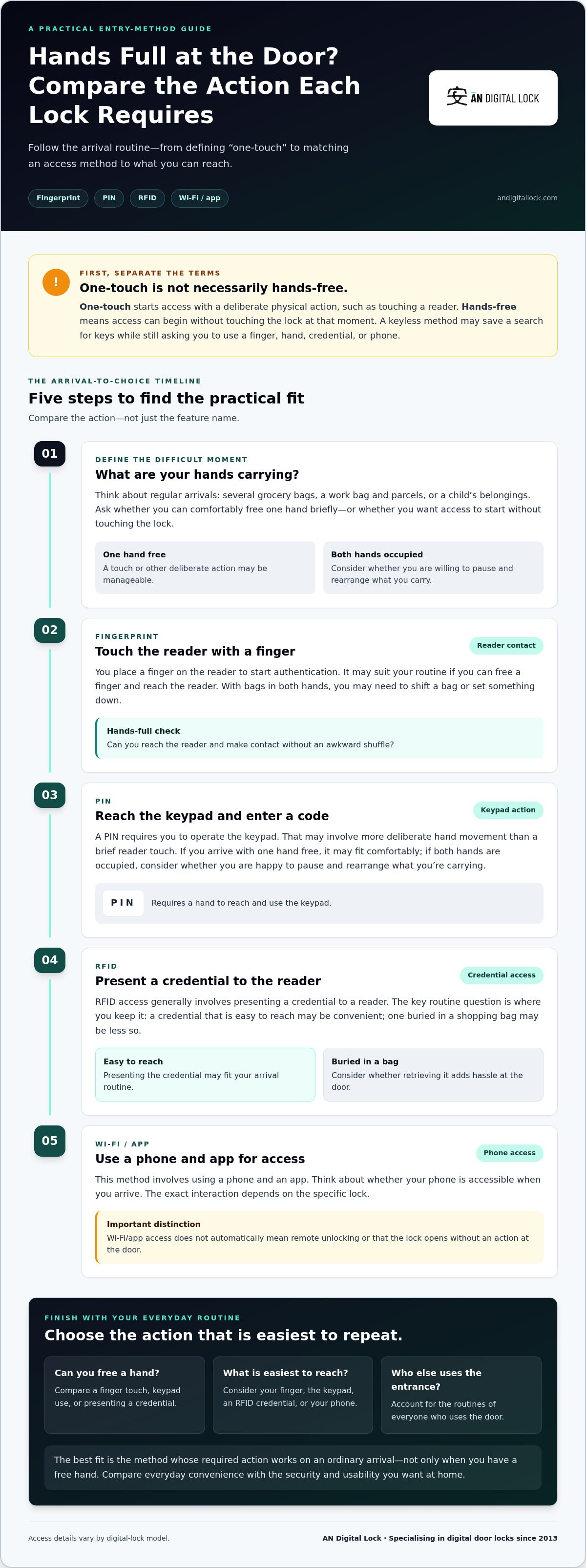
One-touch entry is access started by a deliberate physical action, such as touching a reader or entering a PIN. It can make keyless entry more direct, but it doesn’t necessarily remove the need to free a hand. If you’re looking for a “one-touch entry solution for when my hands are full with groceries,” first decide whether one brief action is manageable or whether you need access that starts without touching the lock.
Digital locks use different access methods, and the interaction depends on the method and the specific lock. A useful overview of smart lock technology describes common approaches such as keypads, biometrics, Bluetooth and Wi-Fi. For your routine, focus on what you’ll need to do at the door, not just what the feature is called.
Is one-touch entry the same as hands-free entry?
No. Touching a fingerprint reader or keypad means making contact with the lock. Hands-free entry, by contrast, would allow access to begin without touching the lock at that moment. The words “one-touch” can sound like no-touch access, but they describe different interactions. A keyless method may save you from searching for keys and still require a finger or hand.
Picture yourself holding shopping in both hands. With touch-based access, you may need to set down a bag, shift it to one arm or ask someone with you to operate the lock. That may still be easier than finding a key, but it isn’t hands-free. Ask yourself whether the method reduces the hassle or removes the action that’s difficult for you.
Which everyday arrival moments should the lock handle?
Think beyond the idealised moment when you arrive with one light bag and a free hand. Consider situations that happen repeatedly: carrying several shopping bags, juggling a work bag and parcels, or arriving with a child’s belongings. Your usual routine is a better guide than a feature demonstration.
- Notice whether you can comfortably free one hand for a moment at the door.
- Think about who else uses the entrance and whether their routines differ from yours.
- Decide whether avoiding keys is enough or whether you need access to start without touching the lock.
There’s no single best answer for every household. A method that suits someone arriving with one hand free may frustrate someone who regularly carries parcels and bags. Define the problem first, then compare access methods by the action they require. That makes it easier to choose a lock that feels practical to use while supporting the security you want at home.
How digital-lock access methods work when you are carrying groceries
AN Digital Lock sells digital locks with fingerprint, PIN, RFID and Wi-Fi access methods. Each changes what you do at the door, but the details vary by model. For a hands-full routine, compare the required action with what you can reach while carrying bags, rather than choosing by feature name alone.
Fingerprint and PIN: quick access, but still a deliberate action
Fingerprint access is touch-based: you place a finger on the reader to start authentication. It can be convenient if you can free a finger and reach the reader, but it still requires physical contact. With bags in both hands, you may need to shift a bag or set something down first.
A PIN requires you to operate a keypad. That means reaching the lock and entering the code, which may take more deliberate hand movement than a brief reader touch. If you often arrive with one hand free, either method may fit comfortably. If both hands are occupied, consider whether you’re willing to pause and rearrange what you’re carrying.
RFID and Wi-Fi/app access: convenience depends on your routine
RFID access generally involves presenting an RFID credential to a reader. The credential needs to be somewhere you can reach, so consider whether you’d carry it separately or keep it in a bag. Wi-Fi/app access involves using a phone and an app as part of the access method. It doesn’t automatically mean remote unlocking or that the lock opens without an action at the door. The exact interaction depends on the specific lock.
| Access method | Typical user action | Hands-full consideration |
|---|---|---|
| Fingerprint | Touch the reader with a finger | Requires a reachable finger and contact with the lock |
| PIN | Operate the keypad to enter a code | Requires a hand to reach and use the keypad |
| RFID | Present a credential to the reader | Convenient if the credential is easy to reach |
| Wi-Fi/app | Use a phone and app for access | Depends on having your phone accessible and the method supported by the lock |
Use the comparison to test your own routine. If your phone is usually in a pocket, app access may be easier to reach than a credential buried in a shopping bag. If you prefer not to take out your phone, a reader-based option may feel simpler, provided you can free a hand. For a one-touch entry solution for when my hands are full with groceries, the best fit is the method whose required action is easiest to repeat on an ordinary arrival, not just on an ideal day.
Compare the available digital-lock access options with your usual routine, and weigh everyday convenience alongside the security you want for your home.
Compare entry options: which digital-lock method suits your hands-full routine?
The most useful comparison isn’t which method sounds most advanced. It’s what you need to reach or do at the door, and whether that action fits the way you arrive. AN Digital Lock sells digital locks with fingerprint, PIN, RFID and Wi-Fi access methods. The table compares these categories generally, not the features of any particular model.
| Method | Required action | Hands-full practicality | Everyday familiarity |
|---|---|---|---|
| Fingerprint | Touch the reader with a finger | May suit you if you can free a finger; still requires contact | Simple if you’re comfortable using a biometric reader |
| PIN | Reach and operate the keypad | Requires a hand to enter the code | Familiar to users who prefer remembering a code |
| RFID | Present a credential to the reader | Depends on whether the credential is within easy reach | Can feel straightforward if you routinely carry the credential |
| Wi-Fi/app | Use a phone and app for access | Depends on having your phone accessible and the lock’s specific interaction | May suit you if using a phone is already part of your routine |
When a touch-based method may be convenient
Fingerprint access can suit someone who can shift a bag or free a finger at the entrance. It avoids entering a code, but your finger still has to reach and touch the reader. PIN access may be familiar if you’re comfortable operating a keypad, though it calls for a hand to enter the code. Neither is hands-free. If you’re carrying groceries in both hands, consider whether making room for that action is an acceptable part of arriving home.
When to consider access that does not rely on a fingertip
RFID changes the item you reach for: instead of a finger, you present a credential to the reader. That may feel easier if it’s kept somewhere accessible, but it can be inconvenient if it’s buried in a bag. Wi-Fi/app access shifts the interaction to your phone. Carrying a phone or credential doesn’t, by itself, make entry hands-free; you still need to access and use it as the lock requires.
When comparing access methods, focus on the practical steps: what you need to carry, where you keep it and whether you can reach it at the entrance. A method that seems convenient in a demonstration may be less useful if its credential or phone is difficult to retrieve when your hands are full.
Choose by your usual arrival, not a perfect demonstration. If you can free a finger, fingerprint access may feel direct. If you’re comfortable entering a code, PIN access may suit your routine. If you keep a credential or phone within easy reach, RFID or app access may be more convenient. For a one-touch entry solution for when my hands are full with groceries, weigh the action you can realistically manage against daily familiarity and home security. The right fit depends on what you carry and how you prefer to use the door.
Practical checklist for choosing an everyday digital lock
Choose for the entrance you use every day, not just the feature that looks most convenient on a product page. Work through this checklist to compare your arrival routine, household preferences and door setup before narrowing down digital-lock options. A one-touch entry solution for when my hands are full with groceries should make sense for the people and entrance that will use it.
- Start with your usual arrival situations. Think about coming home with shopping in one hand or both, carrying work bags, managing a child’s belongings or collecting parcels. Ask whether you can usually free a hand briefly at the door, or whether that would be a regular frustration.
- List everyone who needs routine access. Include household members who use the entrance regularly. Consider which interactions feel straightforward to each person: touching a fingerprint reader, entering a PIN, presenting an RFID credential, or using a phone and app.
- Compare convenience with familiar use. A method is practical when the household can use it comfortably as part of its normal routine. Consider whether people can reach the required finger, keypad, credential or phone while carrying what they commonly bring home.
- Identify the door and entrance setup. Note whether the lock is for a main door, metal gate or glass door. Suitability depends on the door and lock configuration, so the access method alone won’t determine the right fit.
- Keep everyday security in the decision. Weigh easier entry alongside the security needs of your household. A convenient interaction should also feel appropriate for the entrance it protects.
Check the door and entrance setup before comparing features
Start with the physical entrance. A main door, metal gate and glass door can call for different lock considerations, so don’t assume one option fits every configuration. For a home in Singapore, the HDB main door selection guide can help you think through the door itself as part of your choice. Keep the door type in view as you compare access methods.
Prioritize the access method your household will actually use
Convenience depends on who arrives and what they carry. A household member who often has one hand free may find a touch-based method easy to manage. Someone regularly carrying bags in both hands may prefer an option that fits their routine and is easy to reach. Discuss preferences together, especially if one person’s preferred interaction is unfamiliar to another.
For a wider framework on weighing lock features and home needs, use this digital lock buying guide. Compare options by door fit, daily usability and household security priorities. Explore digital-lock options to find access methods suited to your entrance and routine.
Explore AN Digital Lock options for a simpler arrival home
AN Digital Lock has specialised in digital door locks since 2013. Its range includes options from multiple brands, with fingerprint, PIN, RFID and Wi-Fi access methods. Locks are available for different entrance types, including main doors, metal gates and glass doors. These categories give you a practical starting point, while the best fit still depends on the specific lock, door configuration and household routine.
Match the access method to your household’s daily routine
Start with the action you and your household can use comfortably. Fingerprint access means touching a reader with a finger. PIN access involves operating a keypad. RFID requires presenting a credential to a reader, while Wi-Fi/app access involves using a phone and app. These categories describe general interactions, not features shared by every model.
Think through a typical return home. If you usually have one hand free, a touch or keypad interaction may feel manageable. If you carry bags in both hands, consider whether you can shift what you’re carrying to reach a reader, credential or phone. A phone-based method isn’t automatically hands-free, and a fingerprint reader still needs a finger. Focus on the interaction you can repeat easily, not a feature name that sounds convenient in isolation.
Include other household members in the decision. One person may prefer a PIN they can enter, while another may find presenting an RFID credential more familiar. The right access method should make sense for the people who use the entrance regularly and support your home’s security needs. For a one-touch entry solution for when my hands are full with groceries, keep the expected action clear: one-touch access still requires a deliberate physical interaction.
Take the next step toward keyless entry
Before narrowing your options, consider the entrance itself. A lock for a main door may not suit a metal gate or glass door, because product suitability depends on the door and lock configuration. Compare the door type alongside the access method, then use the best digital lock selection guide for a broader view of choosing a digital lock.
Keep your priorities simple: identify who needs access, what they can comfortably use at the door and which entrance the lock is for. Then browse AN Digital Lock’s digital door lock range to compare access methods and options for your home. Explore digital door lock options and find an approach that fits your routine. Your security, all in one place.
Make your next arrival easier
Before choosing a lock, picture an ordinary weekday return home, not a perfect demonstration. What do you usually carry? Which hand can you free, if any? What would feel easiest to reach without interrupting your routine? These details can turn a broad search into a clear shortlist.
Use your answers to decide what “convenient” means for your household. A one-touch entry solution for when my hands are full with groceries may still require a brief physical action, so focus on the interaction you can manage consistently. The right choice should feel natural for the people using the entrance and support the sense of security you want at home.
Compare digital locks by the access method and entrance that fit your needs, then choose with confidence. Explore AN Digital Lock’s digital door locks and find an option that suits the way you come home. A simpler arrival can start with one thoughtful choice.
Frequently Asked Questions
Is fingerprint entry really hands-free when I’m carrying groceries?
No. A fingerprint lock needs contact with its reader, so you must reach it with a finger. If both hands are occupied, you may need to shift a bag or pause before unlocking. For a one-touch entry solution for when my hands are full with groceries, consider your usual arrival rather than assuming “one-touch” means no-touch. If you often carry items in both hands, factor that brief adjustment into your decision.
Can I unlock a digital door lock without using a key?
Yes, many digital door locks offer keyless access, but the available methods depend on the specific lock. AN Digital Lock’s range includes fingerprint, PIN, RFID and Wi-Fi access methods. Consider whether everyone who uses the entrance can use the listed method comfortably, including household members who may not carry a smartphone or prefer not to enter a code. Review the product details for the exact lock’s access options.
Do I need Wi-Fi to use a digital door lock?
Not necessarily. Some digital locks offer access methods such as fingerprint, PIN or RFID, and Wi-Fi is not automatically required for every lock or access function. When comparing locks, separate the access method you plan to use at the door from any connected functions described for that product. This helps you choose based on your routine rather than assuming every digital lock depends on a Wi-Fi connection.
Will a digital lock fit any door?
No. Digital locks are available for different entrance types, but suitability depends on the door and lock configuration. AN Digital Lock offers locks for main doors, metal gates and glass doors. Before comparing individual options, identify which entrance you’re securing and its door type. A lock intended for one kind of entrance shouldn’t be assumed to suit another, so use the product’s stated application as part of your selection.
Is a PIN or fingerprint faster when I’m carrying bags?
There’s no universally faster choice; the easier option depends on what you can comfortably do at your entrance. Fingerprint access means reaching a reader, while PIN access means operating a keypad. Picture a typical return with a bag on your shoulder and shopping in one hand. Would you rather free a finger or use the keypad? Choose the interaction that feels more manageable for the people who use the door.
Can I use RFID access if my hands are full?
RFID access generally involves presenting a credential to a reader, so you’ll need to be able to reach it. If you carry it somewhere easy to access, such as a pocket, it may be simpler than searching for a credential inside a full shopping bag. But carrying an RFID item doesn’t make the interaction hands-free. Review the specific lock’s listed access methods and consider where you’ll keep the credential during everyday trips.