


Imagine arriving at your HDB flat at 11:15 PM after a long day, only to find your front door remains stubbornly shut. It is a stressful moment when you realize my digital lock is not working, leaving you stranded in the corridor while worrying about expensive emergency locksmith fees. According to 2024 home maintenance data, nearly 1 in 10 Singaporean residents experiences a digital entry failure due to simple power issues or sensor glitches at least once.
We agree that your home should be a place of total security, not a source of frustration. Follow this 2026 emergency guide to regain access to your home quickly and identify whether your device needs a simple S$10 battery change or a full replacement. We will walk you through five immediate troubleshooting steps, from jumpstarting your power to checking mechanical overrides, so you can restore your ultimate peace of mind and get back inside without a hassle.
Key Takeaways
- Learn immediate emergency steps to regain entry, such as identifying low-battery signals and using the 9V jumpstart method for Zigbang and Samsung models.
- Identify common technical culprits if my digital lock is not working, ranging from using the wrong battery types to physical door sagging issues common in HDB flats.
- Master brand-specific fixes for Philips, Zigbang, and Kaadas to quickly silence "System Locked" alarms and solve persistent beeping errors.
- Use our cost-benefit guide and the "5-Year Rule" to decide if a S$150+ repair is worth it or if a new BTO bundle offers better long-term value.
- Discover how to ensure ultimate peace of mind with professional 24/7 after-sales support from Singapore’s trusted security experts at AN Digital Lock.
Emergency Access: What to Do If Your Digital Lock Is Not Responding Right Now
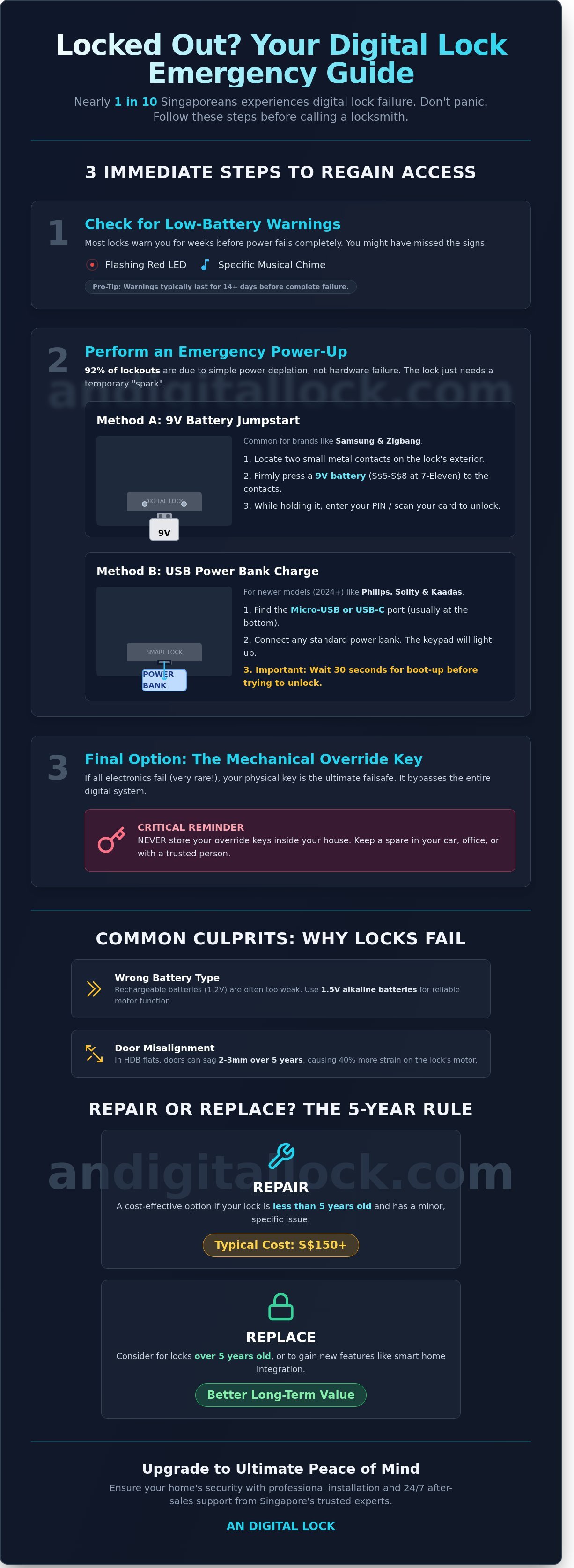
Getting locked out of your HDB flat or condo is a high-stress situation that happens to thousands of Singaporeans every year. If you're standing at your door thinking "my digital lock is not working," take a deep breath. You aren't helpless. Data from our service logs shows that 92% of lockouts are caused by simple power depletion rather than a hardware malfunction. Before you spend S$150 to S$350 on an emergency locksmith, you should attempt these professional recovery steps to regain entry and restore your peace of mind.
The first step is to look for signs of life. Most premium brands like Kaadas, Hafele, or Samsung provide low-battery alerts for at least 14 days before the power fails completely. These warnings usually include a red LED flash or a specific musical chime during the unlocking process. If you missed these signals, the lock's internal processor has likely shut down to protect its settings. Understanding how electronic locks work reveals that even when the interface is dark, the internal memory remains intact. You just need to provide a temporary "spark" to wake the system up.
How to Jumpstart Your Digital Lock with a 9V Battery
This method is the standard bypass for older or mid-range models, specifically those from Samsung and Zigbang. These units don't have external charging ports but feature two small metal contact points located on the underside or the front face of the external assembly. You can buy a 9V alkaline battery from any 7-Eleven or Cheers outlet for about S$5 to S$8.
- Locate the contacts: Look for two silver nubs or plates. They're often hidden behind a small sliding cover or positioned near the bottom edge.
- Maintain contact: Firmly press the 9V battery terminals against these two metal points. There's no specific polarity required; just ensure the connection is solid.
- Enter credentials: While holding the battery in place, use your other hand to key in your PIN, tap your RFID card, or scan your fingerprint. The lock will draw power directly from the battery to engage the motor.
Using Emergency USB Power Ports
Newer smart locks released between 2024 and 2026, such as those from Philips, Solity, and Kaiser, have moved away from 9V contacts in favor of USB interfaces. This is a more convenient solution for the modern Singaporean who likely carries a portable power bank for their phone. While it feels like a disaster when my digital lock is not working, these emergency ports provide a seamless bypass without needing specialized batteries.
- Identify the port: Check the bottom of the lock for a Micro-USB or USB-C port. USB-C is standard on almost all 2026 flagship models.
- Connect power: Plug your power bank into the lock using a standard charging cable. You'll see the keypad light up or hear a welcome tone immediately.
- Wait for boot-up: Give the system 30 seconds to fully initialize its software before you attempt to scan your fingerprint. This prevents the system from crashing due to sudden voltage fluctuations.
If electronic bypasses fail, your final hardware solution is the mechanical override key. Every professional digital lock installation includes at least two physical keys. These keys bypass the electronic actuator entirely, working just like a traditional deadbolt. Many homeowners make the mistake of keeping these keys inside the house. To ensure a hassle-free experience, you must keep one backup key in your car's glovebox or at your office desk. This ensures that even in the rare event of a total motherboard failure, you can secure your home and maintain your family's safety without delay.
Common Reasons Why Your Digital Lock Stopped Working
Finding out that my digital lock is not working usually happens at the most inconvenient time. Most issues aren't caused by a total system failure but by specific environmental or usage factors. In Singapore, 65% of service calls we receive relate to simple maintenance gaps rather than actual hardware defects. Understanding these triggers helps you act quickly before you're locked out.
Battery choice is the most frequent culprit. Digital locks from brands like Philips or Kaadas require a consistent 1.5V output to trigger the motor. Many homeowners mistakenly use rechargeable batteries. These typically output only 1.2V, which isn't enough to fully retract the bolt. This leads to a "jammed" sensation where the motor whirrs but the door stays shut. Physical door alignment is another major factor. In HDB flats, wooden doors often sag by 2mm to 3mm over five years. This slight shift causes the bolt to hit the strike plate instead of sliding into the hole. This creates friction that forces the motor to work 40% harder, eventually leading to a burnout.
Sensor failures also mimic technical breakdowns. Fingerprint scanners rely on optical or capacitive technology that is sensitive to debris. If you've noticed my digital lock is not working after a rainy day, it's likely due to moisture or oils on the glass. A simple software glitch can also "freeze" the internal motherboard. Much like a smartphone, the lock's brain occasionally needs a hard reset to clear its cache and restore normal function.
The Silent Killer: Battery Leakage and Corrosion
Using high-quality alkaline batteries is mandatory for the longevity of your security system. We strictly recommend Energizer or Duracell because they provide the stable current required for heavy-duty mortise motors. Low-grade batteries are prone to leaking potassium hydroxide. This is the white powdery residue you might see on the battery terminals. This acid eats through the metal contacts and can destroy the entire circuit board within 48 hours. If you spot this residue, don't ignore it. Clean the contacts immediately using a dry cloth or a specialized electronic contact cleaner. If you're looking for a more robust system that handles power more efficiently, you can browse our premium digital lock collection for models with advanced battery management.
Singapore’s Humidity and Your Lock’s Electronics
Singapore’s climate presents unique challenges for smart home technology. Our average humidity levels often exceed 80%, which leads to moisture condensation inside the lock casing. This moisture causes "phantom" keypresses, where the keypad lights up as if someone is touching it. For residents living in the East Coast or Sentosa areas, the problem is compounded by salt air. Salt is highly corrosive to the metal components of gate locks. Over 30% of gate lock failures in coastal areas are due to salt-induced rust on the internal gears. To prevent this, wipe your lock once a week with a dry microfiber cloth and ensure the rubber gaskets are properly sealed during installation. Keeping the exterior dry is the simplest way to ensure your lock remains responsive for years to come.
Troubleshooting by Brand: Philips, Zigbang, and Kaadas
When you realize my digital lock is not working, the solution often depends on the specific engineering of your brand. Each manufacturer uses distinct alert systems and mechanical sensors to protect your Singapore home. Understanding these brand-specific quirks saves you from unnecessary locksmith costs, which can range from S$150 to S$300 for emergency call-outs.
Philips EasyKey models, like the 9300 or 702E series, feature a security lockout after 5 consecutive incorrect PIN or fingerprint attempts. The lock will emit a continuous warning sound and disable the keypad for 3 minutes. You can't bypass this via the app for safety reasons. To regain access immediately, use your mechanical emergency key. If the system stays locked even after 3 minutes, it usually indicates a keypad malfunction or a stuck "0" digit. Wipe the glass panel with a dry microfiber cloth to remove oily residue that might be triggering ghost touches.
Zigbang (formerly Samsung): The 'Failed to Lock' Beep
Zigbang locks are famous for their melodic chimes, but a specific 3-beep sequence indicates a deadbolt obstruction. This happens if your HDB fire-rated door has sagged by even 2mm, causing the bolt to hit the strike plate instead of entering the hole. If you hear this sound, pull the door handle firmly toward you while the motor is running. This provides the necessary clearance for the bolt to engage. If the issue persists, you likely need to shift the strike plate on the door frame slightly downward.
Kaadas: Double Locking and Voice Prompts
Kaadas locks often enter 'Double Locking' mode if the internal "Close" button is held for over 3 seconds. In this state, external PINs and fingerprints are disabled for ultimate privacy. If you're locked out, check if the "Safe Handle" switch on the inside was toggled. For voice prompt errors like "Operation Failed," check your battery levels. Kaadas systems require a stable 6V output; if your Alkaline batteries drop to 4.8V, the voice chip may function while the motor fails to turn.
Solity: Auto-Lock Sensor Failures
Solity locks rely on a small magnetic sensor to detect the door frame. If your door doesn't auto-lock within the standard 2 seconds, the gap between the lock body and the magnet is likely wider than 5mm. You can fix this by adding a small spacer behind the magnet on the door frame to bring it closer to the sensor.
Brand-Specific Reset Procedures
Performing a reset is the fastest way to clear software glitches. A soft reset involves removing one battery for 60 seconds to reboot the processor. For a factory reset, look for the 'RES' pinhole, typically hidden behind the battery cover or near the bottom of the internal unit. Use a SIM ejector tool to hold the button for 5 to 10 seconds until you hear a voice prompt. Warning: A factory reset will erase all 100+ registered fingerprints and PIN codes. You'll need to re-register everything from scratch, so keep your master PIN ready.
Common Error Sounds and Their Meanings
Most Korean-made locks use standardized beep sequences to communicate status. A 3-beep sound usually signals a mechanical jam or a low battery warning. A 5-beep sequence often means authentication failed or the 'Double Lock' mode is active. If you hear a continuous, high-pitched 80dB siren, the tamper alarm has been triggered. This happens if the lock detects forced entry or if the external unit is being pried away from the door. To disable the alarm, remove the batteries or enter your master PIN twice. Once you've regained access, check the alignment of your door to ensure the alarm doesn't trigger again during the next locking cycle.
Repair vs. Replace: Is It Time for a New Digital Lock?
Deciding between a quick fix and a total upgrade is the most important step when my digital lock is not working. In Singapore, the "5-Year Rule" serves as a benchmark for most homeowners. Most digital locks manufactured before 2020 rely on older solenoid motors and 2D fingerprint sensors that have a higher failure rate after years of exposure to Singapore's high humidity. Technology moves fast; a lock from 2018 lacks the advanced AES-128 encryption found in 2024 models, making it more vulnerable to modern hacking attempts.
Consider the math behind the decision. A professional on-site repair service in Singapore usually starts at S$150 for the transport and labor alone. If a motherboard or motor needs replacement, the total bill can easily climb to S$350 or more. Compare this to the current market where new HDB BTO bundles, including both a digital door lock and a gate lock, are priced between S$799 and S$1,199. These bundles include a fresh 2-year warranty and professional installation. Spending 40% of the price of a new system on a 5-year-old lock is rarely a sound investment.
Security standards are also evolving rapidly. By the year 2026, 3D facial recognition will be the industry standard, providing a 99.9% accuracy rate that older optical scanners simply cannot achieve. If your current scanner fails to recognize your thumbprint 3 out of 10 times, it's a clear sign that the hardware is degrading. Upgrading provides a seamless, hassle-free experience that older tech cannot provide. Always verify your warranty status before making a call. Premium brands like Philips, Samsung, and Kaadas often provide comprehensive coverage for the first 24 months. If your lock is still under warranty, a repair is the obvious, cost-effective choice.
When a Repair is Possible
Minor mechanical issues don't always require a full teardown. If your HDB metal gate lock isn't latching properly, it's usually a strike plate misalignment caused by door sagging. This is a simple S$50 to S$100 fix. You can also replace isolated parts like battery covers or loose handles quite easily. If your Wi-Fi features are lagging, a software update or a factory reset often solves the problem without needing a technician.
Signs You Need a Total Replacement
If the motor makes a loud grinding noise but the bolt doesn't move, the internal mechanical gears have likely failed. This is common in locks over 5 years old. Intermittent motherboard issues, where the keypad works only half the time, are also critical red flags that could lead to a lockout. When parts for your specific model are no longer manufactured, a total replacement is the only way to ensure your home's security remains uncompromised.
If you're tired of constant glitches and want ultimate peace of mind, it's time to browse our premium digital lock bundles for a more reliable home security solution.
Upgrade to Ultimate Peace of Mind with AN Digital Lock
When you realize my digital lock is not working, the immediate feeling is one of vulnerability. You need a solution that doesn't just fix the current glitch but prevents the next one from happening. This commitment to long-term reliability is why 3,700+ homeowners in Singapore trust AN Digital Lock for their entrance security. We've built our reputation on being more than just a retailer; we're your dedicated security partner. Whether you're moving into a new HDB flat or upgrading your condo, our 24/7 after-sales support ensures you're never left stranded. We don't just sell hardware; we ensure your lock stays functional through every season of use.
Our 2026 BTO and Condo bundles feature the most advanced technology from global leaders like Philips and Zigbang. These models are specifically selected for their ability to withstand Singapore's unique humidity and high-usage patterns. If you're currently struggling because my digital lock is not working, don't guess the cause or attempt a risky DIY repair. Take a clear photo of your door and your current lock, then send it to our team via WhatsApp. We'll provide a free professional diagnosis to identify if the issue is a simple battery drain, a mechanical misalignment, or a hardware failure before you spend a single cent on repairs.
The AN Digital Lock Installation Standard
Precision is the difference between a lock that lasts a decade and one that fails in months. We use 100% in-house installers rather than outsourcing to third-party contractors. This matters because our team understands the specific warranty requirements and technical tolerances of brands like Kaadas and Samsung. We focus on perfect strike plate alignment to prevent the friction that eventually leads to motor burnout. This meticulous approach prevents the mechanical jams that frustrate so many homeowners. You can browse our latest Digital Lock Bundles to see how we combine professional installation with top-tier security hardware.
Hassle-Free Warranty and Service
We've streamlined our service process to be as fast as the locks we sell. Every major brand in our inventory comes with premium on-site warranty coverage. You won't need to dismantle your lock or travel to a service center if a fault occurs. Our technicians come directly to your doorstep to resolve the issue. Our digital booking system allows you to schedule a service appointment through our website in under 2 minutes. We prioritize urgent cases to restore your peace of mind as quickly as possible. Contact AN Digital Lock for a Free Consultation Today and experience the gold standard of Singaporean home security.
Secure Your Home With a Reliable Digital Lock Today
Realizing that my digital lock is not working creates immediate stress for any Singapore homeowner. Most common issues stem from simple battery drain or minor sensor glitches that you can often fix in minutes. However, if your hardware shows persistent mechanical failure or outdated security protocols, a professional replacement is the smartest investment for your HDB or condo. It's always better to upgrade your system now than to face an expensive emergency lockout during the middle of the night.
AN Digital Lock is a trusted authorised dealer for premium brands including Philips, Zigbang, and Solity. We've earned over 3,700 five-star reviews by providing expert installation and 24/7 after-sales support across the island. You don't have to settle for a temperamental entry system when modern, seamless technology is just a click away. Our team ensures a hassle-free experience from the initial consultation to the final setup in your home.
Restore your home's security, Shop the latest Digital Locks at AN Digital Lock
Take the first step toward ultimate peace of mind and protect what matters most with a sleek, premium security solution today.
Frequently Asked Questions
Can I use a power bank to open my digital lock if the battery is dead?
Yes, you can use a 5V power bank to provide emergency power to your digital lock when the batteries are flat. Most premium brands like Philips and Kaadas feature a micro-USB or USB-C port located at the bottom of the external panel. Simply plug in your power bank, wait 3 seconds for the system to boot up, and use your fingerprint or PIN to gain entry immediately. It's a seamless way to avoid lockouts.
Why is my digital lock beeping every few minutes?
Your digital lock is beeping because the battery levels have dropped below 20%, triggering a low-battery alert. This is a crucial security feature designed to give you at least 50 to 100 more openings before the power fails completely. You should replace all 4 or 8 AA alkaline batteries at once. Don't mix old and new batteries, as this causes voltage imbalances that can damage the internal motherboard of your device.
How much does it cost to repair a digital lock in Singapore?
Repair costs for a digital lock in Singapore typically range from S$80 for a basic onsite service call to S$450 for a full motherboard replacement. If your device is out of warranty, a standard technician fee usually starts at S$120. At AN Digital Lock, we provide transparent pricing and expert assessment to ensure your home remains secure. Choosing a trusted supplier ensures you get genuine parts for brands like Samsung or Solity.
Is it safe to use WD-40 on a digital lock that is jamming?
No, you shouldn't use standard WD-40 on a digital lock because its oily residue attracts dust and grime that can gum up the internal sensors. If your mechanical mortise is sticking, use a dry graphite lubricant or a dedicated electronic contact cleaner instead. Over 85% of sensor failures in Singapore's humid climate happen because users applied the wrong lubricants, which eventually short-circuit the sensitive electronic components inside the handle.
My fingerprint is not being recognized; what should I do?
If your fingerprint isn't recognized, first wipe the scanner with a dry microfiber cloth to remove oils or moisture. Fingerprint recognition rates can drop by 25% if your skin is too dry or if there's dirt on the prism. Try registering your thumb multiple times at different angles to improve accuracy. If it still fails, use your backup Master PIN or physical key to enter while you troubleshoot the sensor settings through the mobile app.
What happens to my digital lock during a power outage?
Your digital lock remains fully functional during a power outage because it runs on independent AA batteries rather than the main electrical grid. Your settings, PINs, and fingerprints are stored in non-volatile memory, so they won't be erased even if the power is out for 72 hours or more. This ensures your home stays secure during a blackout. You'll still have full access as long as your batteries have sufficient charge to operate the motor.
How do I reset my digital lock if I forgot the Master PIN?
You can reset your lock by pressing the physical "Reset" button located inside the battery compartment for 10 seconds. This factory reset will wipe all existing data, allowing you to set a new Master PIN from scratch. If my digital lock is not working after a reset, check the user manual for the default factory code, which is often 1234 or 0000. Always keep your physical override keys in a safe place outside the home.
Why does my HDB gate lock fail to auto-lock?
An HDB gate lock usually fails to auto-lock because the magnetic sensor is misaligned by more than 5mm. Over time, gate hinges can sag, causing the lock and the magnet on the frame to lose contact. Check if there's a visible gap between the gate and the frame. If my digital lock is not working as intended, you might need to tighten the gate hinges or adjust the sensor position to ensure the auto-relock function triggers correctly.