


What if your stay-in helper could enter reliably without carrying a key that might be lost, copied, or forgotten? Managing access for a stay-in helper without giving her a key can be practical with a digital door lock. The right setup should fit her everyday routine as well as your household’s security needs.
A physical key is familiar and straightforward, but it can be difficult to manage if it goes missing or needs to be returned. Choosing keyless access doesn’t have to feel like a sign of distrust. Clear communication about how entry works, which areas are private, and how access details are handled can make the arrangement convenient and respectful for everyone.
This guide compares PIN, fingerprint, RFID, and Wi-Fi access, then explains how to choose an option for regular household use and set expectations clearly. You’ll also learn what to consider if access needs to change or a credential stops working. Features such as temporary codes or remote access management depend on the lock model, so focus on the capabilities that match your needs.
Key Takeaways
- Managing access for a stay-in helper without giving her a key starts with choosing an entry method that fits her daily routine.
- Compare PIN, fingerprint, RFID, and Wi-Fi access by how credentials are used and managed. Features vary by lock model.
- Consider the practical trade-offs between physical keys and keyless entry when credentials need to be shared or changed.
- Use a clear household setup checklist and, when supported, assign your helper an individual credential rather than sharing one.
- Choose a digital door lock based on everyday ease of use and the access-management features your household needs.
Managing access for a stay-in helper without giving her a key: start with the routine
Want to avoid handing over a physical key without making everyday entry difficult? Start with the household routine, not the lock’s feature list. Managing access for a stay-in helper without giving her a key means choosing an entry method, setting it up for the people who need it, and knowing how access will be maintained or changed.
For a live-in helper, reliable entry is part of a workable daily arrangement. Consider which door she’ll use, when she may need to come and go, and what to do if the usual method doesn’t work. A digital door lock can replace the need to distribute a physical key, but access planning is only one part of household security. It doesn’t replace decisions about privacy, visitors, or which areas are personal.
What makes live-in helper access different from occasional guest access?
A visitor may need entry once or for a short stay. A live-in helper may use the entrance repeatedly as household routines change, so the method should be straightforward and dependable for everyday use. Shared entrances, early starts, and different family schedules can all affect what works. Discuss the arrangement as a practical household matter, while recognising the helper as both a worker and a member of the home.
Which access goals should the household agree on first?
Have a calm conversation before selecting a credential. Agree on who needs access, when entry is typically needed, and which door should be used. Discuss what would feel convenient and reliable, along with privacy expectations such as which rooms are private and how household access information will be handled. Clear expectations reduce confusion without making routine entry feel like a test of trust.
- People: Identify who needs to enter and whether each person should have a separate credential.
- Timing: Describe the usual household routine and note when it can vary.
- Entrance: Agree which door is for everyday entry, especially if the home has more than one entrance.
- Privacy: Discuss personal spaces and how access details should be shared or kept private.
Keep daily access dependable and household security in perspective. The aim is to make entry clear, not to track or restrict someone unnecessarily. A smart lock uses electronic access methods instead of relying only on a physical key. This Smart lock technology overview explains common types and how they work. For broader context on choosing a lock for a Singapore home, explore this digital lock buying guide.
Keyless access options: PIN, fingerprint, RFID, and Wi-Fi-enabled digital locks
Once the household knows how entry needs to work, compare credentials by their everyday use and how easily they can be managed. A PIN, fingerprint, RFID credential, or Wi-Fi-enabled lock can each support keyless entry, but they work differently. The best fit depends on the helper’s routine and the household’s comfort with managing each type of access. Exact functions vary by digital-lock model.
| Access method | Daily convenience | Credential handling and limitations |
|---|---|---|
| PIN | Enter a code on the keypad. No physical key or separate token is needed. | Keep the code private and share it only with people who need access. Changing it may mean updating other authorised users. Temporary or scheduled PINs are available only on models that support them. |
| Fingerprint | Use a registered fingerprint instead of remembering a code or carrying a credential. | Registration and management depend on the lock. Fingerprint entry may not suit every user or situation, so consider whether another supported method would be useful as a practical alternative. |
| RFID | Present a registered card or tag to the lock for entry. | A credential can be assigned to a user on supported models, but it is a separate item to carry and keep track of. Management options vary by lock. |
| Wi-Fi-enabled access | Some models connect to an app for additional access-management functions. | App features depend on the lock and its supported functions. Don’t assume remote unlocking, access logs, schedules, or code changes are included on every model. |
Is a PIN the simplest option for regular entry?
A keypad PIN can be a practical choice when a helper needs independent entry and you’d rather not issue a physical key or token. Agree on how to enter the code and avoid sharing it more widely than necessary. Because a code is easy to communicate, treat it as private household access information. Temporary or scheduled PINs may help with specific routines, but only if the selected lock supports them.
When might fingerprint, RFID, or Wi-Fi access suit the household?
Fingerprint entry can reduce the need to remember a code, while PIN entry avoids relying on a registered finger being read. Neither is automatically more convenient for everyone. RFID offers another option: the helper carries a card or tag that can be assigned to a user where supported. Wi-Fi features may provide additional app-based controls, but their scope differs by lock and app. Base the choice on what the household will use consistently.
For managing access for a stay-in helper without giving her a key, prioritise an entry method that’s clear and dependable, then compare the selected model’s credential-management features. Explore digital door lock options to compare access methods for your household routine.
Digital lock access versus a physical key: compare convenience and control
A physical key is familiar and simple: hand it over, and the helper can unlock the door. The trade-off is that the key remains in circulation until it’s returned. A PIN, fingerprint, or RFID credential changes how access is provided and managed, but digital entry isn’t automatically more secure in every home. Consider the daily routine, how credentials are shared, and what the household will do if access needs to change.
| Access method | Daily routine | Credential sharing | Changing access |
|---|---|---|---|
| Physical key | Familiar and quick to use, with no code or device to operate. | Hand over a key and keep track of its return. If it’s lost or not returned, the household needs to decide how to respond. | Getting the key back may be straightforward, but it doesn’t address whether other copies exist. The household may need to consider a lock change or other suitable action. |
| PIN | Enter a code at the keypad. No separate item needs to be carried. | A code can be shared, so keep it private and limit who knows it. | Changing a code may be possible, but the steps and options depend on the lock model. |
| Fingerprint | Use a registered fingerprint rather than carrying a key or remembering a code. | Access is associated with a registered user on supported locks. Registration and user controls vary. | Removing a user’s access depends on the lock’s management functions and instructions. |
| RFID | Present a card or tag to the lock. | Assign a credential to the helper where the lock supports individual users. The card or tag must be kept track of. | Credential removal or replacement depends on the model’s supported controls. |
What are the practical trade-offs of giving a physical key?
A key can suit a routine that values a familiar, no-code entry method. The household still needs a clear handover plan: who holds it, where it should be kept, and how it will be returned if the arrangement changes. If a key goes missing or isn’t returned, discuss the response calmly and decide what action is appropriate for the home. Focus on restoring clear access arrangements rather than making assumptions about what happened.
How can keyless access support household privacy and trust?
An individual credential can make access easier to manage without treating entry as a way to monitor someone. Agree on how the credential should be used and who is responsible for keeping it private. Separately, make expectations about personal space clear: access to the home doesn’t imply access to every room or belongings. For wider door-selection considerations, use this door lock selection guide.
Whatever method you choose, explain the household’s expectations and how access will be changed if circumstances shift. For managing access for a stay-in helper without giving her a key, a clear agreement matters as much as the credential itself. Select an approach that fits the helper’s daily routine and that the household can manage consistently.
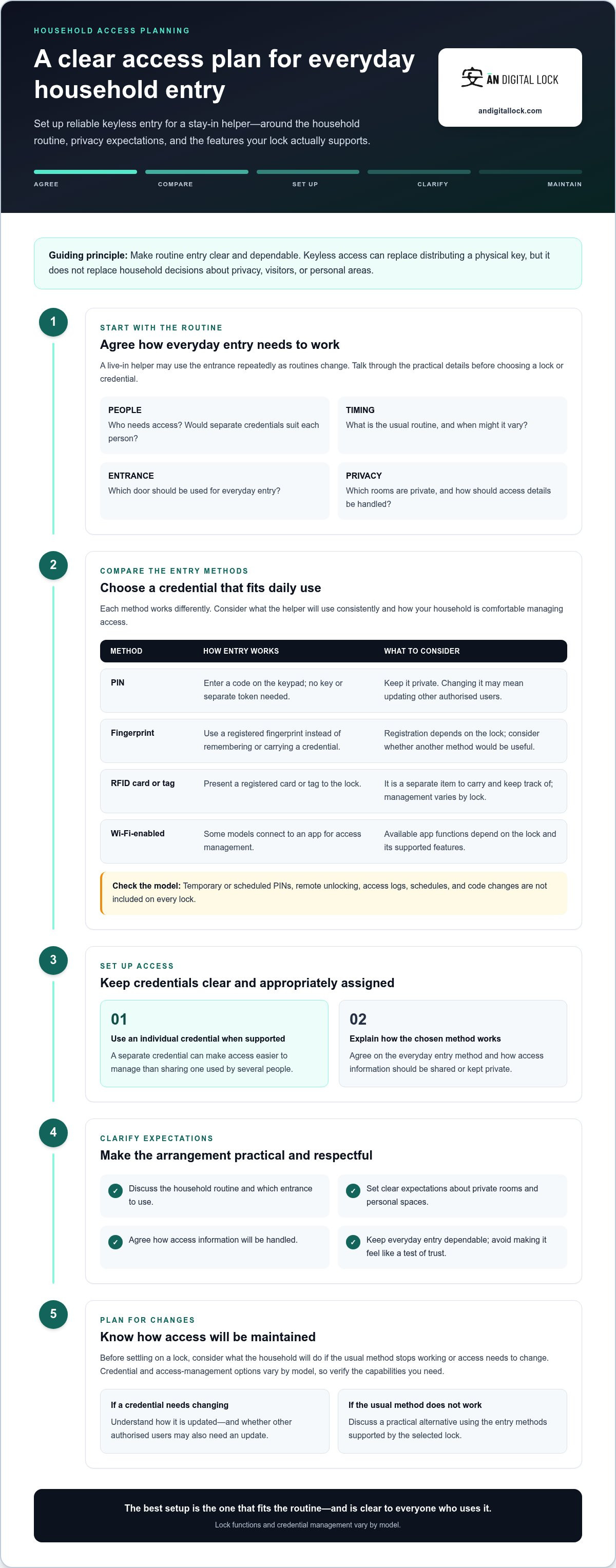
Set up helper access with a clear, respectful household checklist
A good setup makes entry predictable for your helper and manageable for the household. Treat it as a shared practical arrangement, not a test of trust. Follow a simple sequence, then explain what to do if the lock behaves unexpectedly.
- Choose the access method. Match the credential to the helper’s everyday routine and the lock’s supported functions. Consider whether a PIN, fingerprint, or RFID credential is easiest to use consistently.
- Assign an individual credential where supported. A separate PIN, fingerprint profile, or RFID credential can make it clearer whose access is being managed. Avoid sharing one credential more widely than necessary.
- Set up and test entry together. Demonstrate the normal steps at the usual entrance. Let the helper try them herself and confirm she can operate the lock without rushing.
- Agree on a backup response. Decide whom she should contact if entry doesn’t work and what the household’s normal response will be. Explain any lock alerts only if the selected model provides them, including what action the household expects to take.
- Review changes calmly. Revisit access when routines or authorised users change. If a PIN or credential needs updating, explain the change and make sure the helper knows how to use the new arrangement.
How should a household introduce the access method?
Explain the entry method in plain language, then demonstrate it together at the door. Cover what the helper should do if the keypad doesn’t respond, a fingerprint isn’t recognised, or an RFID credential isn’t available. Agree on a practical next step, such as contacting a named household member. Keep the conversation focused on smooth entry and shared expectations, not suspicion.
When should access details be reviewed or changed?
Review the setup when household routines shift or the list of authorised users changes. If a credential needs to be replaced or removed, follow the lock’s instructions and tell the helper what to expect. Keep each review proportionate and transparent. If the lock supports alerts or access-management functions, explain which features the household uses and why, rather than leaving their purpose unclear.
Keep the lock’s instructions accessible to the household and make sure everyone involved understands the agreed process. Features such as temporary PINs, schedules, alerts, or remote changes depend on the model, so base your steps on the selected lock’s actual controls. This keeps managing access for a stay-in helper without giving her a key clear, practical, and respectful as everyday needs evolve.
Explore digital door locks with keyless access to find an option that supports your household’s routine.
Choose a digital door lock that fits your helper’s everyday access needs
Choose a lock around the entry method your helper can use reliably, not simply the longest feature list. Consider how she’ll enter during an ordinary day, how credentials can be managed, and which supported functions the household will actually use. The right fit makes managing access for a stay-in helper without giving her a key practical without adding unnecessary steps or controls.
Which digital-lock features matter most for helper access?
Start with the routine. A keypad PIN may suit someone who prefers not to carry an extra item; fingerprint entry may be convenient if the helper is comfortable using it; RFID means keeping a card or tag available. Individual credentials can make access easier to manage, but separate-user support depends on the lock. Treat app connectivity as useful only if its actual functions solve a household need.
- Entry method: Choose an option the helper can use confidently at the door she’ll normally enter.
- Daily ease: Consider whether remembering a code, presenting a tag, or using fingerprint entry fits her routine.
- Credential management: Look for the user controls you need, such as adding or removing access, where supported.
- Connected features: Check whether the model’s app functions are relevant to your household, rather than assuming Wi-Fi means every task can be managed remotely.
PIN, fingerprint, RFID, and Wi-Fi capabilities differ between digital-lock models. Temporary codes, scheduled entry, access logs, remote management, and individual user profiles are not universal features. Base your decision on the selected lock’s supported functions and instructions. A feature is valuable when it helps your household manage entry clearly, not just because it sounds advanced.
How can households make the change feel straightforward?
Introduce the chosen method as a practical change to the entry routine. Explain how to use it, practise normal entry together, and agree what to do if it doesn’t work. Keep instructions consistent for household members and make any credential changes transparent. The purpose is convenient access management, not unnecessary monitoring.
AN Digital Lock sells digital door locks with PIN, fingerprint, RFID, and Wi-Fi access options, giving households methods to compare against their everyday needs. Review the features that matter, then choose a lock whose supported access methods match the routine you’ve agreed on. A calm explanation and a simple practice run can help everyone use the new arrangement with confidence.
Explore digital door locks and compare keyless access options for your household.
Make your household’s next access step simple
Choose one clear next step: note what matters most at your entrance, then use that to narrow your lock options. Think about what would make everyday entry feel natural for your helper and manageable for the household. A setup can be adjusted as routines change, so focus on a practical fit rather than trying to anticipate every possible situation.
Keep the conversation open after the change. If something feels inconvenient, discuss it early and agree on a sensible adjustment together. That way, managing access for a stay-in helper without giving her a key remains a shared household arrangement built around ease, clarity, and respect.
Ready to explore an option for your home? Explore digital door locks for convenient, keyless household access and take the next step.
Frequently Asked Questions
Can a live-in helper use a digital lock without a physical key?
Yes, a live-in helper can use a digital lock without carrying a physical key if the lock supports a suitable keyless entry method. For example, she could enter with a PIN, registered fingerprint, or RFID credential. Practise the normal entry process and agree on what she should do if the credential fails. This makes managing access for a stay-in helper without giving her a key workable in everyday household routines.
Is it better to give a stay-in helper a PIN or fingerprint access?
Neither option is automatically better. Choose the one she can use reliably and comfortably. A PIN doesn’t require carrying a credential, but it must be kept private and remembered. Fingerprint access avoids remembering a code, but the lock must support registering and managing her fingerprint. If the household chooses fingerprint entry, consider what other supported method she can use if recognition doesn’t work.
What happens if the helper forgets her PIN or cannot unlock the door?
Agree on a backup plan before the first time it happens. For example, the helper can call a designated household member rather than repeatedly trying codes or waiting without knowing what to do. An authorised user may be able to reset a forgotten PIN, depending on the lock. Keep the relevant instructions accessible to the household and explain how to report a malfunction.
Can a digital lock PIN be changed without replacing the lock?
Often, yes. Many digital locks allow an authorised user to change or remove a PIN through the lock’s setup process, but the exact steps depend on the model. Check the product instructions before changing a code, then confirm the new PIN works at the door. If other household members use that code, let them know about the change through a private, agreed channel.
Is a digital door lock usable during a power outage?
It depends on the lock’s power design. A battery-operated lock may continue working during a household mains outage, while connected functions could be affected if the home’s Wi-Fi equipment loses power. Check the lock’s instructions for its power source, low-battery warnings, and backup entry procedure. Make sure household members know the model-specific steps before an outage occurs, rather than trying to work them out at the door.
Should I remove a helper’s access when she is away from home?
Usually, routine time away doesn’t require removing access if she remains an authorised household member and needs to return. Changing access for every short absence can create confusion or prevent convenient entry. Review credentials when the household arrangement or authorised users change, or if there’s a specific access concern. Explain any change directly and make sure the helper knows how she can enter when she returns.
Can a digital lock keep a record of when someone enters?
Some digital locks offer access records, but this feature isn’t available on every model, and the information shown can vary. If a lock has a log, explain its purpose and how the household uses it. Treat entry records as access information, not as a substitute for respectful communication or an excuse to monitor someone unnecessarily. Check the lock’s instructions for how records are accessed and managed.