


Can you give your cleaner access to only certain areas of your home? A door lock controls entry through the door, not access to individual rooms inside. When setting up guest access for my cleaner’s specific work hours, define the entry window and secure private rooms separately if needed.
Keep access limited to the time and spaces needed for the cleaning visit. Agree on the schedule, explain how to enter, and arrange any condominium registration or approval before the cleaner arrives. Clear instructions help prevent delays and keep the arrangement straightforward.
This guide explains how to set the days and hours for access, decide which areas should remain private, and arrange entry approval in advance. You’ll also learn what instructions to share, how to handle a failed entry, and how digital door locks can support a more controlled home-entry setup. The aim is to give your cleaner clear access for the job without making entry confusing or exposing sensitive details.
Key Takeaways
- Separate door entry from room privacy: plan how to keep areas outside the cleaning task private.
- Prepare keys, visitor registration, or building approval before the appointment to reduce entry delays.
- Set access for the cleaner’s agreed days and time window, and decide whether the arrangement needs an expiry date.
- Give clear entry, contact, and priority-task instructions while keeping sensitive codes and keys secure.
- Compare scheduled guest access options with your cleaning routine, and choose a lock setup that suits your door and access needs.
Arranging keys, registration, or approval in advance
- Agree on the entry method before the cleaner travels to your Singapore home. Decide whether they’ll use a key, building registration, or an access approval process. Send the instructions directly and explain where to go on arrival. A message such as “use the main lobby entrance and call me if reception can’t verify your visit” gives a clear first action. Don’t leave a key somewhere obvious or share sensitive details in an unsecured note. If the entry arrangement changes, replace the old instructions and tell the cleaner immediately.
- Contact condominium management ahead of the appointment if visitor registration or approval is needed. Ask what information the cleaner must provide, where registration happens, and whether lift access or visitor parking needs separate arrangements. Some multi-tenant buildings may require a security-list form 24 or 48 hours in advance. That means a last-minute message may not be enough. Submit the required details within the building’s stated timeframe, then share the entry point and any instructions for reaching your unit.
- Plan around building restrictions, not just the cleaning slot. In a Singapore condominium, service hours, lift access, and visitor parking can affect when and how the cleaner enters. For example, a booking may start at 10 a.m., but a restricted service window could require an earlier arrival for registration. Clarify whether the booked cleaning time starts before or after entry procedures. This helps you distinguish time spent gaining access from time spent cleaning, rather than losing several minutes to an unexpected queue or approval step.
- Keep recurring access consistent and prepare a simple backup plan. For weekly visits, use the same approval process whenever it works reliably, rather than changing it each week. Note the cleaner’s name, visit day, entry route, and contact person in case access fails. If the security desk can’t locate an approval, the cleaner should know whether to call you or another authorised contact. For a one-off visit, include the appointment date so a temporary arrangement doesn’t remain active beyond its purpose. Confirm the instructions before the cleaner sets off.
Cleaner availability hours
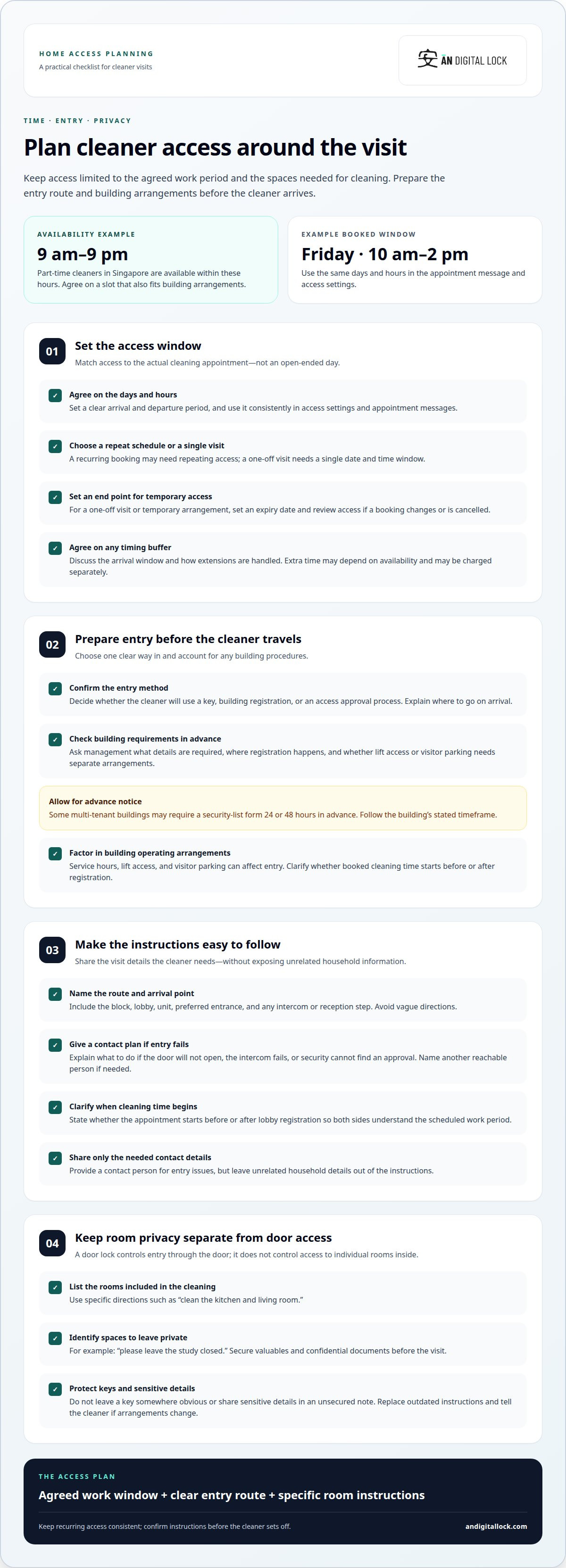
- Set the access window around the agreed cleaning appointment, not an open-ended day. For example, a recurring visit every Friday from 10 a.m. to 2 p.m. gives the cleaner a defined arrival and departure period. Use the same days and hours in your access settings and appointment messages. When setting up guest access for my cleaner's specific work hours, make sure the schedule reflects the actual booking. That way, an early arrival or delayed departure doesn’t silently become a wider access window. Match the access period to the appointment, then revise it if the visit changes.
- Choose hours that fit both the cleaner’s schedule and your building’s operating arrangements. Part-time cleaners in Singapore are available from 9 am-9 pm, so agree on a slot within those hours. A midday appointment may suit a household that needs quiet mornings, while an afternoon slot could work better around school pickups. Add each detail to the cleaning services booking, including the planned start and finish. Don’t assume the cleaner’s available hours automatically match your preferred entry time or the building’s permitted access hours.
- Decide whether access should repeat weekly or end after a specific visit. A recurring Friday booking may need a repeating schedule, while a one-off spring clean needs a single date and time window. For a temporary arrangement, set an expiry date so access doesn’t continue after the final appointment. For example, if a cleaner is coming only during a renovation, end access after the last scheduled visit. Review the access details whenever a booking is cancelled, moved, or no longer required.
- Build an agreed buffer into the appointment rather than granting access for the whole day. If the cleaner needs time to travel between jobs, agree on a practical arrival window and explain when cleaning should finish. Ask how extensions are handled before the appointment, since extra time may depend on availability and may be charged separately. A simple rule for setting up guest access for my cleaner's specific work hours is to match the access window to the agreed work period. Record schedule changes in the booking or service agreement, then update access accordingly.
Giving cleaners clear access instructions
- Send a short arrival guide that starts at the correct entrance. Name the block, lobby, unit, and any intercom or reception step the cleaner needs. For example: “Use the side entrance, tell reception you’re here to clean, then call me if your name isn’t on the visitor list.” Include a contact person who can respond if entry fails or building security needs clarification. Make the route easy to follow, and avoid vague directions such as “come around the back.” If the household has more than one entrance, identify the preferred one clearly.
- State whether booked cleaning time starts before or after entry procedures. If the cleaner must register at the lobby, explain whether that time is part of the appointment. This helps both sides understand the scheduled work period. Describe how to contact you if the door won’t open, the intercom fails, or the cleaner reaches the wrong entrance. If you may be unavailable, name another reachable person and explain their role. Share only the contact information needed for the visit, not unrelated household details.
- Explain which rooms are included and which should remain private. Use specific instructions such as “clean the kitchen and living room” or “please leave the study closed.” If you’re away, secure valuables and confidential documents before the visit. Clear loose items where practical so the cleaner can reach the surfaces you want cleaned. Say where to find approved supplies, or prepare the products and equipment you want used. Don’t leave sensitive access codes or a spare key unsecured with the cleaning instructions.
- Give the cleaner a task order and a clear way to handle priorities. For an hourly visit, list essential jobs first, such as vacuuming the bedrooms before wiping the kitchen surfaces. Add preferred products, delicate items, or areas that need special care. If time runs short, the cleaner can follow the order instead of guessing what matters most. Share changes before the appointment, then keep the same task list for recurring visits unless your needs change. Whether you stay home depends on your comfort and access arrangements; if you leave, make the entry and contact steps explicit.
Personal PINs and digital keys
If a cleaner is locked out or a temporary code fails, ask them to stop trying and contact you or the agreed backup person. Confirm the correct entry method and access window before sharing a replacement credential.
- Choose one credential method for the cleaner’s visit. A digital key shared through an app and a personal PIN work differently, so match the option to the lock’s access settings. For app access, send the invitation to the cleaner’s phone number. For a PIN, communicate it directly to the cleaner. Share entrance instructions separately so the credential isn’t mistaken for directions.
- Send credentials through a private channel and identify which visit they’re for. A message can say, “This access is for Friday’s cleaning appointment. Use the main entrance, then follow the lobby instructions.” Keep the PIN out of public notes and don’t leave a written code outside the home. For an app invitation, confirm the cleaner’s phone number before sending it. This simple check reduces the risk of sharing access with the wrong person.
- Set the access period to match the agreed work schedule wherever the lock supports scheduled guest access. Specify the cleaning day and time window, and add an expiry date for a one-off visit if that setting is available. For recurring visits, review the schedule if the appointment changes or ends. A credential that remains active after the cleaning arrangement ends creates access you no longer need. Make sure the cleaner knows when to use the digital key or PIN.
- Give the cleaner a straightforward recovery plan before the first visit. If a PIN fails, ask them to confirm they’re using the correct keypad and entering the code exactly as shared. If an app key doesn’t appear, confirm the invitation went to the cleaner’s phone number and ask them to reopen the app. They should then contact you or the named backup. Don’t ask them to search for a key outside or try repeated guesses.
- Review who still has access when the cleaning arrangement changes. Remove an app share or change a PIN if it should no longer be used, following the lock’s instructions. Tell the cleaner which method remains active, especially if you replace one credential with another. Keep a private record of the cleaner’s name, access type, and intended visit period. This makes it easier to confirm which credential is current and avoid sending outdated details.
Which smart locks support scheduled guest access in Singapore
- Choose a digital lock only after confirming that its guest-access controls suit your cleaning routine. Look for settings that let you create a guest PIN or share app access, then set the days and time window. A lock that offers only a permanent household code won’t provide the same scheduled arrangement. Check the functions of the exact lock model, not just general descriptions of smart access. A cleaner who visits on recurring weekdays needs a different schedule from someone attending a one-off appointment.
- Check which credential methods the lock supports and how each one is shared. App access can be shared using the cleaner’s phone number, while a PIN can be communicated directly. Choose the method that suits the cleaner and the way you manage household access. Keep instructions separate from the credential, and explain which entrance to use. If the cleaner changes phones or the visit arrangement changes, review the existing share or PIN before the next appointment.
- Match the lock to the entrance in your Singapore home. A door lock and a gate lock may be separate access points, so consider whether the cleaner must pass through one or both. For an HDB flat with a metal gate, for example, work out which entry point needs the scheduled credential. In a condominium, the unit lock doesn’t replace visitor registration or building entry procedures. Write down every step the cleaner must complete, then ensure the access method addresses the door they’ll actually reach.
- Test the planned access before relying on it for a cleaning appointment. Create the guest credential, set its intended schedule, and try the steps yourself. Confirm the cleaner can use the correct entrance during the permitted window, and explain what to do if the keypad or app doesn’t work. Check what happens after the schedule ends, and remove or revise access when it’s no longer needed. These steps help you assess the complete setup, not just the lock’s headline feature.
For help choosing a lock around your entry setup, explore available access options.
Scheduling should also reflect the work happening around the visit. In a same-day turnover example, guests check out at 11 a.m., cleaners work from 11 a.m. to 3 p.m., and the next guests arrive at 4 p.m. A scheduled credential can be set for the cleaner’s working period, with enough time to complete the handover before the next arrival. For a Singapore office, a two-hour cleaning window identified with the property manager may be the most workable option, so align lock access with the agreed shift rather than leaving it open-ended.
For a Singapore home appointment requiring registration, keys, or approval, arrange access before the appointment so cleaning time is not spent on administration. Also account for where equipment can be left: the SCDF Fire Code governs fire-lift usage, egress and stairwell obstruction, which can affect where cleaning equipment may be parked in Singapore buildings. For recurring home cleaning, use the simplest secure access process that works reliably instead of changing the arrangement every week. If the service includes after-hours work, review the cleaning schedule three months after the contract starts and adjust the access window if needed. Keep any revised arrangements consistent with the cleaner’s actual visit and the property’s access requirements.
AN Digital Lock
AN Digital Lock sells digital door locks, wooden doors, and metal gates for homeowners. If your current entrance makes cleaner access difficult to manage, consider whether the door or gate hardware suits your household’s needs. Scheduled guest access depends on the functions of the lock you choose, so focus on the access method and timing you need rather than assuming every digital lock works the same way. A door or gate upgrade may also be relevant if you’re planning a broader entrance update. Contact AN Digital Lock to discuss your home-entry needs.
Make your home entry work for your routine
If setting up guest access for my cleaner's specific work hours has you reconsidering your entrance, look beyond the access schedule. The setup should suit the door or gate, your household’s privacy needs, and the way your cleaner enters. AN Digital Lock sells digital door locks, wooden doors, and metal gates to help you consider the right options for your home entrance.
Choose an access arrangement that’s clear for your cleaner and comfortable for your household. If you’re planning an entry update or want to discuss suitable options, contact AN Digital Lock today. A considered setup can make each cleaning visit easier to coordinate and help you feel more at ease at home.
Frequently Asked Questions
Does my cleaning crew need to install an app?
Not always; it depends on the access method. If you share access through an app, follow the lock’s process for sending and using the digital key. If you use a PIN, communicate the code directly instead. Before the appointment, agree on the method and make sure the cleaner understands how to enter. Keep a separate backup contact available in case the chosen method fails.
How do I set up temporary guest access for a cleaner during specific hours?
Use the lock’s guest-access settings, if available, to create access for the appointment rather than sharing your household’s regular credential. Select the visit day and agreed time window, then add an expiry date if the lock supports it. A one-off afternoon clean, for example, shouldn’t require an ongoing weekly schedule. Share entry steps separately, and remove or update guest access when the visit is over.
How do I create time-limited access codes for a smart lock?
Use the lock’s access-management settings to create a guest PIN, if that model supports PIN access and scheduling. Set the intended date and hours, then follow the lock’s instructions to save the code. Test the entry method before relying on it for the cleaner’s visit. Avoid using a household member’s personal PIN instead, since a separate guest code is easier to manage when the cleaning arrangement changes.
How do I set recurring access hours for a cleaner?
If the lock supports recurring schedules, select the regular visit days and set an access window that matches the appointment. Keep the cleaner’s schedule and the lock schedule aligned when a visit moves or is cancelled. If a weekly booking shifts to another day, for example, update the access settings before the next arrival. End or revise recurring access when the regular cleaning arrangement stops.
How do I share temporary digital keys through a smart lock app?
Use the app’s sharing function and enter the cleaner’s phone number, which is the sharing method described for app access. Confirm the recipient details before sending, then tell the cleaner which entrance and visit the digital key is for. Keep the access instructions distinct from the key invitation. If the cleaner changes phone numbers or the appointment arrangement ends, review the existing share and update access accordingly.
Can guest access be limited to certain days and hours?
Yes, if the specific lock supports scheduled guest access. Its settings may let you define days and a time window, with an expiry date for temporary arrangements. This controls when the cleaner can enter through that lock; it doesn’t automatically restrict movement between rooms once inside. For room privacy, secure areas outside the cleaning task separately and explain which rooms are included in the visit.