


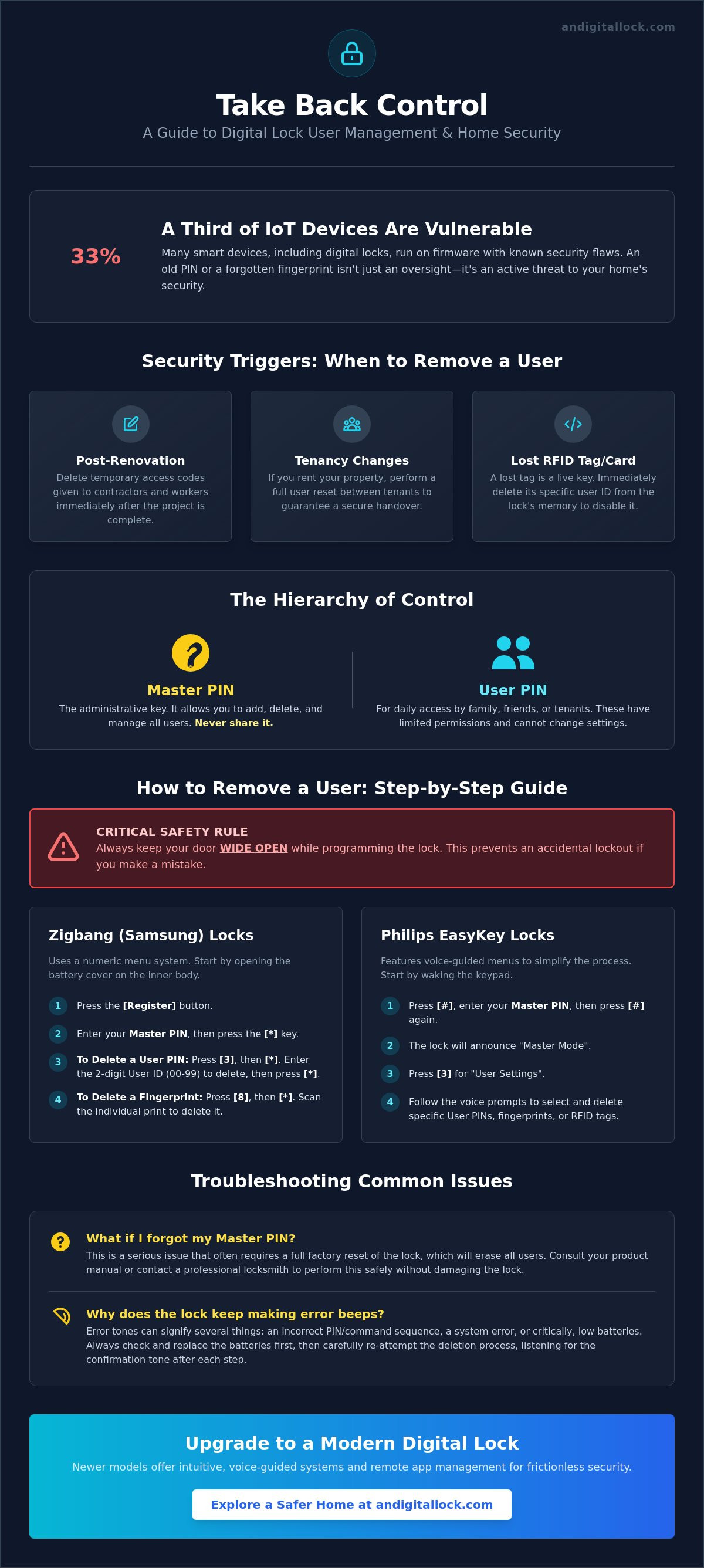
Did you know that 33% of Internet of Things devices currently run on firmware with known security flaws? When it comes to your home, an old PIN code or a forgotten fingerprint isn't just a minor oversight; it's a genuine vulnerability. You shouldn't have to live with the anxiety of unauthorized access just because you lost a physical manual or fear an accidental factory reset. It's time to take back master control. Learning how to remove user from digital lock systems is a critical security protocol that keeps your property safe without the hassle of a total system wipe.
We understand that complex menu systems can feel overwhelming, especially with the high stakes of home security. That's why we've simplified the process. This guide provides the exact steps to delete PINs, fingerprints, and RFID tags for all major digital door locks and metal gates in Singapore. You'll learn how to navigate the latest 2026 interfaces and stay compliant with modern standards like Aliro 1.0 and NIST cybersecurity guidelines. We'll show you how to confirm a code is gone for good, ensuring your digital door lock remains a fortress of safety and contemporary refinement.
Key Takeaways
- Maintain high security standards in your HDB or Condo by performing regular access audits for former tenants and service providers.
- Master the specific steps required to remove user from digital lock units to keep your home entrance secure and updated.
- Compare the convenience of remote app deletion with physical keypad methods to find the most secure fit for your lifestyle.
- Navigate common troubleshooting hurdles, including forgotten Master PINs and unexpected error beeps, with our expert solutions.
- Upgrade to modern digital door locks and metal gates that offer intuitive, voice-guided systems for frictionless user management.
The Importance of Regular User Access Audits for Home Security
Living in a high-density HDB or a modern condo in Singapore requires more than just a sturdy door. It demands proactive security hygiene. Many homeowners treat their digital locks as set and forget devices. This is a mistake. Your security is only as strong as your current access list. Over time, your lock accumulates ghost users. These are old PIN codes from former tenants, fingerprints from domestic helpers who have moved on, or tags from part-time cleaners. These inactive credentials represent a significant vulnerability. To maintain a safe home, you must periodically remove user from digital lock databases to ensure only authorized individuals can enter.
Understanding what a smart lock is helps clarify these risks. These devices rely on digital keys that can be shared, duplicated, or forgotten. Unlike a physical key that you physically take back, a digital credential stays active until you manually delete it. If you've recently upgraded your metal gates or wooden doors with the latest smart technology, managing these virtual keys is your first line of defense. Regular audits prevent unauthorized access and keep your family's safety a top priority.
When Should You Remove a User?
Access management should be a routine part of your home maintenance. Certain life events trigger an immediate need to update your system. For instance, post-renovation security is vital. Contractors often require temporary access to your BTO or resale unit. Once the project is finished, delete those codes immediately. Tenancy changes are another critical moment. If you rent out your property, a total user reset between tenants is essential. Finally, consider lost RFID tags. If a family member loses a tag, don't just hand them a new one. The lost tag is still a live key. You must remove user from digital lock memory to prevent anyone who finds the tag from simply walking into your home.
Master PIN vs. User PIN: Understanding the Hierarchy
Digital locks operate on a strict hierarchy designed for your protection. The Master PIN is your administrative key. It's the only code that allows you to add or delete other users. You should never share this code with guests, workers, or even close friends. User PINs are for daily access only and have limited permissions. When you need to delete a specific entry, you'll use your Master PIN to authorize the command. Most modern systems allow you to choose between deleting a single user ID or clearing the entire database. Individual deletion is better for targeted management, while a full database clear is ideal when you first move into a new home or if you suspect your Master PIN has been compromised.
Step-by-Step Instructions: Removing Users from Popular Digital Lock Brands
Before you begin any programming, ensure your door is wide open. This is the most critical rule of digital lock maintenance. If you make a mistake while the door is closed, you risk a permanent lockout. Most brands place the registration button inside the battery compartment on the inner body of the lock. You'll also need your Master PIN ready. If you've lost track of which user occupies which slot, it's often easier to perform a bulk deletion and re-register your current family members. This ensures no "ghost users" remain in the system memory. To successfully remove user from digital lock systems, follow these brand-specific sequences carefully.
Removing Users from Zigbang (Samsung) Digital Locks
Zigbang locks, including the popular SHP series found in many Singapore BTOs, use a numeric menu system. Open the battery cover and press the [Register] button. Enter your Master PIN followed by the [*] key. To delete a specific user PIN, press [3] followed by [*]. Enter the user ID (usually 00 to 99) you wish to erase and press [*] again. If you need to delete fingerprints, the sequence changes slightly. After entering Master Mode, press [8] followed by [*] to enter the fingerprint deletion menu. You can then delete individual prints by scanning them or delete the entire database by holding the [Register] button for five seconds. Always listen for the confirmation tone to ensure the command was accepted.
Philips EasyKey: Deleting PINs and RFID Tags
Philips EasyKey models like the 9300 or 7300 series feature helpful voice-guided menus that reduce the fear of accidental resets. To start, wake up the keypad and press [#] followed by your Master PIN and [#] again. The lock will announce it has entered Master Mode. Press [3] for user settings, then press [3] again to enter the deletion menu. From here, you can choose the type of credential to remove. Press [1] for PIN codes, [2] for RFID cards, or [3] for fingerprints. Enter the two-digit user ID and confirm with [#]. If you find these manual steps tedious, consider exploring BTO lock bundles that feature advanced app-based management for even simpler control.
Solity and Hafele: Quick Deletion Guide
Solity and Hafele locks often share similar internal logic. Locate the [R] or [S] button in the battery compartment. Press it once, then enter your Master PIN followed by [#]. For Solity locks, press [3] to manage users. You can then enter the specific slot number to delete. For gate locks that are synchronized with your door lock, remember that deleting a user on one device might not automatically update the other unless they are linked via a smart hub. Always test the deleted PIN or fingerprint while standing inside with the door open. If the lock fails to open, you have successfully secured your home. If it still grants access, restart the process from the beginning.
Mobile App vs. Physical Keypad: Which Deletion Method is More Secure?
Modern homeowners often choose between the tactile reliability of a keypad and the sophisticated control of a smartphone app. Using an app to remove user from digital lock systems offers a level of contemporary refinement that physical buttons cannot match. You can revoke access from anywhere in the world with a few taps. This remote capability is perfect for Singaporean families managing part-time help or short-term guests. It eliminates the need to be physically present at your HDB or condo unit to update your security settings.
Security is about more than just convenience; it's about confirmation. App-based management provides real-time notifications, giving you immediate peace of mind that a user has been successfully deleted. Leading brands like Philips and Igloohome utilize advanced cloud encryption to protect your user data. These systems align with the latest NIST IR 8259r1 cybersecurity guidelines for IoT products, ensuring your digital door locks remain resilient against hacking. In contrast, using a physical keypad carries the risk of "shoulder surfing." If someone observes you entering your Master PIN during a manual deletion, your entire system's integrity is compromised.
The 2026 landscape has seen a major shift toward interoperability. The introduction of the Aliro 1.0 standard allows for a more consistent experience across different manufacturers. This means managing your entrance security is becoming more streamlined, regardless of the brand you choose for your wooden doors or metal gates. While apps offer superior tracking, the physical interface remains a vital fallback for every homeowner.
Benefits of App-Based User Management
Managing users through a dedicated mobile app transforms a technical chore into a simple task. You can assign specific names to user IDs, making it easy to identify exactly whose access you are revoking. This is far more efficient than trying to remember if a part-time cleaner was assigned to slot 04 or 05. Additionally, apps allow you to set precise expiry dates for temporary PINs. Once the time limit is reached, the system will automatically remove user from digital lock memory. You can also view detailed access logs to verify exactly when a deletion was processed and by whom.
When the Physical Keypad is Necessary
Keypads remain an essential component of home security. They are your primary tool when the lock is offline or if your home Wi-Fi experiences a rare outage. In emergency situations where your mobile phone is lost or out of battery, the physical keypad is your only way to manage access. The physical [Register] button located behind the battery cover serves as the ultimate security override. It provides a direct, hardwired connection to the lock's processor that cannot be bypassed by software glitches. For many Singaporean users, this tactile backup is a reassuring safety net that ensures they always maintain master control over their home.
Troubleshooting: What to Do When a User Cannot Be Removed
Sometimes, even the most precise instructions don't yield the expected results. You follow the brand-specific sequence, but the old PIN still works or the fingerprint scanner still grants access. This can be incredibly frustrating when you're trying to secure your home. Most of the time, the inability to remove user from digital lock systems stems from a simple administrative error or a hardware limitation. Understanding these common obstacles allows you to resolve the issue without calling for professional help or resorting to a full system wipe immediately.
Hardware wear is a frequent culprit, especially for locks installed on metal gates exposed to the elements. Unresponsive buttons or "ghost touches" on a capacitive keypad can prevent the lock from registering your full Master PIN. If the keypad doesn't light up consistently or if certain numbers require multiple presses, the menu sequence will fail. Additionally, low battery levels are a hidden cause of software glitches. A lock might have enough power to operate the motor, but not enough to reliably update its internal memory database. Always replace your batteries with fresh, high-quality alkaline cells before attempting complex programming tasks.
Resetting Your Master PIN
The Master PIN is the gatekeeper of your lock's settings. If you've forgotten this code, you're effectively locked out of all administrative functions. Before you lose hope, check for common factory default PINs. Many major brands use "1234," "123456," or "0000" as the initial administrative code. If you never updated the Master PIN after installation, these defaults might still work. If you've changed the code and lost it, look for your physical override keys. These keys allow you to bypass the electronic system entirely. If all else fails, a factory reset is your last resort. Keep in mind that a factory reset is a "nuclear option." It will erase every single user, including your own access codes and fingerprints, requiring a complete reconfiguration of the device.
Resolving Common Error Codes
Digital locks communicate through a series of beeps and light patterns. An "Invalid Operation" beep usually sounds like a rapid triple-tone. This often means you've entered a user ID that doesn't exist or you've timed out between steps. Most locks give you only 5 to 10 seconds to enter each command. If you pause to check your notes, the system will reset. If your keypad is experiencing "ghost touches" due to moisture or dirt, wipe the surface with a dry microfibre cloth. Persistent errors might indicate a deeper software glitch that requires a power cycle. Remove the batteries for 60 seconds and then reinsert them to refresh the system logic. If your current device is consistently failing to manage users, it may be time to upgrade to a more reliable system. Explore our latest digital door locks to find a model with more intuitive menu systems and robust hardware.
Enhancing Your Entrance Security with AN Digital Lock
AN Digital Lock understands the unique needs of Singaporean households. We know that managing access for helpers, part-time cleaners, or former tenants shouldn't be a source of anxiety. Our curated selection features locks with intuitive voice-guided menus and high-definition displays. This technology removes the guesswork from your daily routine. You won't need to fumble with lost manuals or search for obscure codes to remove user from digital lock memory. Instead, the lock talks you through the process step-by-step. It's security made simple, providing the contemporary refinement and safety your family deserves.
When you choose one of our BTO lock bundles, you're investing in a cohesive security ecosystem. We pair high-quality wooden doors and metal gates with the industry's most reliable hardware. This ensures your entire entrance is protected by a single, manageable system that looks as good as it performs. By integrating the latest smart-home innovations, we help you maintain master control over your home without the friction of complex legacy systems.
Professional Support and Maintenance
DIY troubleshooting has its limits. If your keypad is physically damaged or the firmware is behaving erratically, it's time to call the experts. Our team provides dedicated technical assistance for global brands like Zigbang, Philips, and Solity. We don't just sell hardware; we ensure it works perfectly for years to come. Our helpful and supportive persona shines through in our long-term maintenance services. We help verify that your lock's firmware is up to date, protecting you from the security flaws found in many modern IoT devices. If you're struggling to remove user from digital lock slots due to a forgotten master code, our technicians can guide you through the recovery process safely.
Upgrade Your Home Security Today
Ready to level up your home protection? Visit our showrooms to experience the latest smart home innovations in person. Our experts are ready to help you identify the best digital lock Singapore has to offer for your specific residential category. Beyond door locks, we offer a full suite of security products, including safe boxes, digital doorbells, and digital door viewers. Follow our digital lock Singapore buying guide to find a solution that fits your lifestyle. Take the first step toward a frictionless user journey and a safer home today. Experience why thousands of Singaporeans trust us for their home security needs.
Take Full Control of Your Home Access Today
Maintaining a secure home entrance is an ongoing commitment to your family's safety. You've learned that regular audits prevent "ghost users" and that modern apps make it easier than ever to manage your digital keys. Whether you use a physical keypad or a mobile interface, the ability to remove user from digital lock systems is your most powerful tool for maintaining master control. Don't let outdated PINs or lost RFID tags compromise your peace of mind.
We specialize in providing contemporary refinement and ease of use for every HDB and condo dweller. As an authorized reseller for leading brands like Zigbang, Philips, and Solity, we offer the latest in smart home technology. Our Singapore-trained technicians bring over 10 years of experience to every installation, ensuring your wooden doors and metal gates are equipped with the most reliable hardware. We're here to support your journey from the initial inquiry to long-term maintenance.
Secure your home with the latest smart locks at AN Digital Lock and enjoy a frictionless, safer lifestyle today. Your home's protection is just a few clicks away. We look forward to helping you build a more secure future for your family.
Frequently Asked Questions
How do I delete a fingerprint from my Samsung/Zigbang digital lock?
To delete a fingerprint from a Zigbang lock, open the battery cover and press the [Register] button. Enter your current Master PIN followed by the [*] key to enter the administrative menu. Press [8] followed by [*] to access fingerprint management. You can then scan the specific finger you wish to remove or enter the user ID number to remove user from digital lock memory. Always listen for the confirmation tone to ensure the deletion was successful.
What happens if I forget my Master PIN and need to remove a user?
If you forget your Master PIN, you'll be unable to access the internal menu for user management. Your first step should be to check for physical override keys that bypass the electronic system. If those aren't available, you must perform a full factory reset using the reset button located in the battery compartment. This will wipe all data, allowing you to set a new Master PIN and re-register your family members from scratch.
Can I remove a user remotely if my digital lock is connected to Wi-Fi?
Yes, remote deletion is a standard feature for Wi-Fi enabled locks using updated software like the Yale Access app version 26.9.0 or the Schlage Home app version 7.1.0. You can manage access levels and revoke permissions instantly from your smartphone regardless of your location. This method is highly secure because it provides a digital audit trail and sends real-time notifications to your phone once the user is successfully removed.
Do I need to delete the user from the gate lock and door lock separately?
You must remove user from digital lock databases on both your metal gate and wooden door individually unless they are part of a synchronized system. Most standalone locks operate on independent memory chips for security reasons. If you've purchased a BTO lock bundle with a synchronized hub, you might be able to manage both through a single app interface, but it's always best to test both units after performing a deletion.
Will a factory reset delete all the registered fingerprints and PIN codes?
A factory reset is a total system wipe that erases every registered credential, including all PIN codes, fingerprints, and RFID tags. This action restores the lock to its original out of the box state and resets the Master PIN to the factory default. It's an effective last resort for troubleshooting but requires you to spend time re-registering every authorized user. Always ensure you have your physical keys handy before initiating a reset.
Why is my digital lock not letting me enter the registration menu?
The most common reason for menu lockout is an improperly closed door or low battery voltage. Most digital locks require the door to be in the open position before the [Register] button will function. Additionally, if your batteries are below 20% capacity, the lock may disable administrative functions to save power for basic locking. Replace your batteries with fresh alkaline cells and ensure the Master PIN you're entering is correct before trying again.
How many users can I typically store (and delete) on a standard smart lock?
Modern smart locks in 2026 typically support between 100 and 200 unique user slots. This includes a combination of PIN codes, fingerprints, and RFID tags. While this high capacity is convenient for large households, it increases the importance of regular audits. Since 33% of IoT devices run on firmware with known flaws, keeping your user list lean and updated is a vital part of maintaining your home's digital security hygiene.
Is it possible to temporarily disable a user without deleting them entirely?
Many app-based systems now allow you to "pause" a user's access or set a specific schedule for when their code is active. This is ideal for part-time cleaners or recurring guests. If your lock is a keypad-only model, you may need to use a "Do Not Disturb" or "Privacy Mode" to block all outside access temporarily. However, for long-term security, permanently deleting the user remains the most reliable way to ensure your home remains protected.