


Could those greasy fingerprint patterns on your door be an open invitation to intruders? In 2026, security experts warn that visible oil buildup on a keypad can expose your PIN to anyone watching. Beyond the security risk, Singapore's high humidity and salt air often leave a stubborn haze that makes touchscreens unresponsive. Learning how to clean a digital lock keypad the right way is essential for maintaining both your home's safety and the lock's sensitive electronics.
You probably worry about using the wrong liquid and accidentally short-circuiting your hardware or voiding your warranty. It's frustrating when buttons get sticky or the sensor fails to recognize your touch. This guide provides the professional method to sanitize your smart lock while restoring its original sensitivity. You'll discover the specific cleaning agents approved for major brands like Zigbang and Philips, along with a simple routine to extend your lock's lifespan in our tropical climate. We will walk you through the safe, effective steps to keep your entrance looking premium and functioning perfectly.
Key Takeaways
- Eliminate security risks by learning how "fingerprint ghosting" can reveal your PIN code and why regular cleaning is a vital privacy protocol.
- Identify the professional toolkit for how to clean a digital lock keypad, focusing on microfiber materials and safe sanitizers that won't damage sensitive circuits.
- Protect your hardware against Singapore's high humidity and salt air with specialized maintenance steps that prevent corrosion and sticky button residue.
- Access brand-specific care instructions for Zigbang, Philips, and Solity to maintain their premium high-gloss and tempered glass finishes without voiding your warranty.
- Follow a safe, multi-step sanitization process to restore original touch sensitivity and extend the overall lifespan of your digital door lock.
Why Regular Keypad Maintenance is Critical for Home Security
Maintaining your smart home technology isn't just about keeping it shiny. It's a fundamental security protocol. Every time you enter your home, your fingers leave behind natural oils and sweat. Over time, these deposits develop into "fingerprint ghosting." This phenomenon creates a visible trail on the glass or plastic surface, essentially highlighting the numbers used in your secret PIN code. A savvy intruder doesn't need to guess your code; they only need to look at the wear patterns and smudge marks on your keypad. Learning how to clean a digital lock keypad effectively removes this roadmap, keeping your home's entry point truly private.
An Electronic lock relies on precise capacitive touch technology to function. Dirt, grime, and even fine dust from the haze season act as insulators. This interference causes the keypad to become unresponsive or "sticky." You might find yourself pressing the same button multiple times just to get a response. This lag isn't just annoying; it puts unnecessary strain on the internal sensors. Regular maintenance also ensures that high-tech features like "fake PIN" or "scramble codes" work as intended. These security features require you to tap random digits before or after your real code. If the screen is covered in thick smudge marks, you might accidentally mistype, potentially triggering a security lockout or an alarm.
Long-term neglect also leads to corrosion. In Singapore's humid climate, moisture can mix with the salt and oils on the keypad. This mixture can eventually seep into the edges of the screen, damaging the electronic contact points inside. Consistent cleaning prevents this buildup from becoming a permanent problem that requires expensive repairs.
The Hygiene Factor: Bacteria on High-Touch Surfaces
Your door handle is one of the most frequently touched surfaces in any home. For multi-generational HDB households, this means dozens of interactions every day from different family members. Research often shows that high-touch surfaces like a digital keypad can harbor significant bacteria levels, similar to remote controls or smartphones. Sanitization is vital for family health, especially for vulnerable groups like children and the elderly. We recommend a quick wipe-down at least once a week to keep the surface hygienic and safe for every person entering your home.
Preserving Your Warranty and Lock Lifespan
Many homeowners make the mistake of using generic glass cleaners or harsh industrial chemicals. Modern locks from premium brands like Zigbang and Philips feature delicate anti-fingerprint coatings. Using the wrong cleaning agent can strip these layers, leading to permanent clouding and a voided manufacturer warranty. A simple five-minute maintenance routine is a small investment compared to the cost of a full lock replacement. Proper care ensures your hardware maintains its contemporary refinement and functionality for its entire intended lifespan.
The Digital Lock Cleaning Toolkit: What to Use (and Avoid)
Using the correct tools is the difference between a pristine lock and a non-functional device. A high-quality microfiber cloth is your most important asset. These cloths are designed to trap dust and oils without scratching the sensitive surface of your keypad. Avoid paper towels at all costs. They might seem soft, but they contain tiny wood fibers that act like sandpaper on polished glass or plastic finishes. Over time, this leads to a cloudy appearance that ruins the contemporary refinement of your entrance.
For sanitization, 70% isopropyl alcohol is the gold standard, but you must apply it with caution. Never spray any liquid directly onto the device. Instead, dampen your microfiber cloth first. If your lock features physical, mechanical buttons, keep a can of compressed air nearby. This is the most effective way to remove grit from the narrow gaps where fingers can't reach, ensuring the buttons don't jam. If you want to keep your digital door locks looking brand new, having this dedicated kit ready will save you from accidental damage.
Learning how to clean a digital lock keypad requires a minimalist approach to moisture. Excess liquid is the primary cause of internal electronic failure. Follow these specific guidelines for safe agents and forbidden chemicals to protect your investment.
Safe Cleaning Agents for Smart Electronics
A diluted solution of mild dish soap is the safest choice for daily maintenance. Mix approximately one drop of soap into 250ml of distilled water. This low concentration prevents a sticky residue from forming, which would otherwise attract more dirt and bacteria. If you prefer convenience, use pre-moistened electronic wipes. Ensure they're specifically labeled as "screen-safe" and don't contain high concentrations of harsh solvents that could degrade the plastic components.
The "Never Use" List: Chemicals That Kill Locks
- Bleach and Ammonia: These chemicals are too aggressive. They'll strip the oleophobic (oil-repellent) coatings from touchscreens, making them smudge-prone and dull.
- Abrasive Powders: Scouring agents will cause permanent micro-scratches. These scratches trap more dirt and make the numbers harder to read over time.
- WD-40 and Industrial Oils: While these are great for metal gate hinges, they should never touch the keypad. Oils can seep into the touch sensors, causing them to fail or register "ghost" touches.
- Vinegar: The acidity in vinegar can react with the metallic finishes on some premium lock models, leading to discoloration or pitting.
Sticking to these approved materials ensures your lock remains responsive and secure. Proper maintenance prevents the need for early hardware replacement and keeps your warranty fully intact.
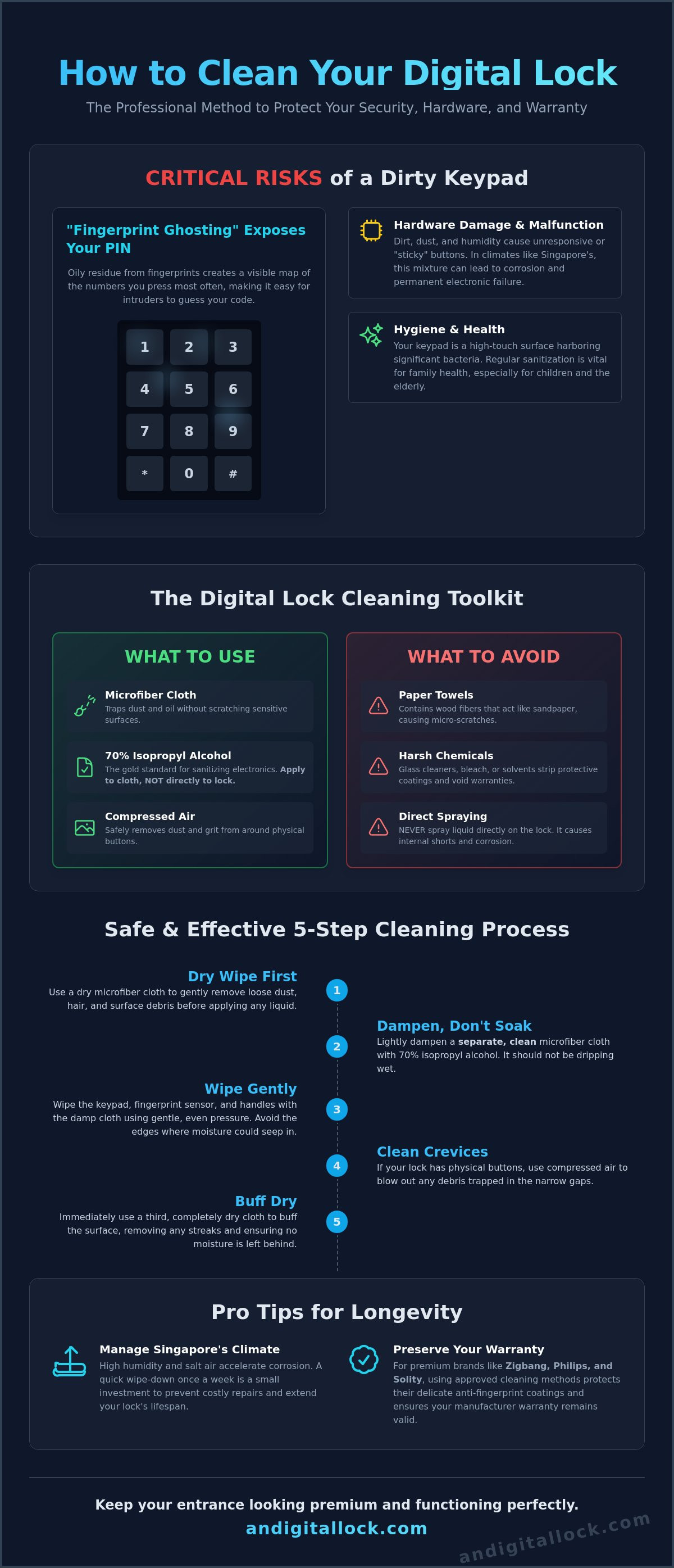
Step-by-Step: How to Clean Your Digital Lock Keypad Safely
Executing a proper maintenance routine ensures your security hardware remains in peak condition. You don't need professional tools, but you must follow a disciplined approach to avoid damaging the sensitive sensors. This guide explains how to clean a digital lock keypad without triggering unwanted alarms or causing electrical shorts. Follow these three essential steps for a safe, thorough clean.
Step 1: Preparing the Lock for Cleaning
Start by disabling the touch interface. Many 2026 smart locks, such as the AI-powered Zigbang Haven, include a "Clean Mode" within their mobile app. This feature temporarily deactivates the sensors so you can wipe the surface without entering random digits. If your model lacks this, use the physical "Privacy Mode" or internal lockout switch. This prevents the lock from interpreting your cleaning as a tampering attempt. Open the battery compartment and use a soft brush or compressed air to remove loose dust. Avoid touching the battery contact points with wet hands or damp cloths. Checking for physical obstructions in mechanical buttons now prevents them from jamming later.
Step 2: The Wiping and Sanitizing Technique
Safety starts with the "damp, not dripping" rule. Never apply any liquid directly to the lock body. Instead, spray your chosen cleaning agent onto a clean microfiber cloth. Wipe the keypad using gentle, circular motions to lift stubborn smudges and fingerprint oils. This technique is more effective than scrubbing, as it traps the grime within the cloth fibers. Pay close attention to the seams where the keypad meets the main housing. Dirt often accumulates in these tiny gaps, leading to unresponsive buttons over time. If your lock has a dedicated fingerprint scanner, use a dry portion of the cloth to buff the sensor glass. Excessive pressure can damage delicate coatings, so keep your touch light and steady.
Step 3: Post-Cleaning Functional Check
Once you finish wiping, dry the surface completely with a fresh microfiber cloth. Moisture ingress is a leading cause of electronic failure in Singapore's humid climate. After the unit is dry, re-enable the lock and perform a comprehensive test. Enter your PIN code to verify every digit is responsive. If you use "fake PIN" or scramble code features, test those as well to ensure the capacitive touch is calibrated correctly. Finally, place your finger on the scanner. It should recognize your print instantly without requiring multiple attempts. If the lock feels sluggish, restart the device or check the app for sensitivity adjustments. This final verification gives you the peace of mind that your home remains secure and easy to access.
Managing Singapore’s Climate: Humidity, Haze, and Salt
Singapore's tropical environment demands a more proactive maintenance schedule than cooler, drier climates. High humidity levels, often exceeding 80%, cause skin oils to emulsify and bond more tightly to the keypad surface. This creates a persistent, sticky residue that traps dust and pollutants. During the haze season, fine particulate matter settles into every crevice, potentially interfering with the sensor's accuracy. Understanding these local environmental impacts is essential when learning how to clean a digital lock keypad to ensure long-term reliability.
Coastal residents in areas like East Coast or Sentosa face the added challenge of salt-air oxidation. Microscopic salt crystals can settle on the lock, attracting moisture and accelerating the corrosion of exposed metallic components. During the monsoon season, high-velocity rain can lead to moisture ingress if the lock's seals aren't kept clear of debris. Regular wiping prevents these environmental factors from compromising your home's security and the contemporary refinement of your hardware.
Dealing with Sticky Buttons and Residue
When buttons become unresponsive due to buildup, a standard wipe might not be enough. Use a Q-tip lightly dampened with 70% isopropyl alcohol to reach the tight crevices around the edges of the keys. Humidity acts as a catalyst, making organic oils from your hands more stubborn and prone to harboring bacteria. Maintaining a clean interface is directly linked to the longevity of your digital lock singapore. Consistent care ensures the capacitive sensors remain sensitive and the aesthetic remains pristine for years to come.
Protecting External Gate Locks
Your digital gate lock faces significantly more environmental stress than your main door lock. It's exposed to corridor dust, varying temperatures, and potential wind-blown rain. We recommend cleaning gate locks twice as often as interior-facing hardware to maintain peak performance.
- Use Weather Shields: Install a high-quality protective cover to deflect direct rain and reduce dust accumulation on the keypad.
- Corridor Dust Management: If your unit is near a lift lobby or construction site, perform a dry wipe every three days to prevent grit from entering the housing.
- Inspect Seals: Check that the rubber gaskets are supple and free from cracks caused by heat exposure, as these are your first line of defense against moisture.
If you're looking to upgrade your home security with hardware built to withstand these harsh conditions, explore our latest BTO lock bundles designed specifically for the Singaporean market.
Expert Maintenance for Premium Brands: Zigbang, Philips, and Solity
Every premium lock manufacturer uses different materials to achieve their signature look and feel. While the basic steps for how to clean a digital lock keypad remain consistent, understanding brand-specific nuances protects your warranty. Zigbang (formerly Samsung) models often feature high-gloss polycarbonate finishes that are prone to micro-scratches if wiped with anything other than a clean microfiber cloth. Their official guidelines specifically warn against using benzene or strong alcohols, which can cloud the high-shine surface and ruin the contemporary refinement of the unit.
Philips smart locks, such as the 2026 BDA Product Design Award winner DDL801-5HBS, typically utilize tempered glass touchscreens. These are more resilient to chemicals but can develop a stubborn haze from mineral deposits in Singapore's humid air. For these models, a soft cloth dampened with a very mild soap solution is the most effective way to restore the crystal-clear look. Solity and Hafele often mix metallic frames with plastic keypads. You must be careful not to let cleaning agents pool in the seams where these different materials meet, as this can lead to internal corrosion over time.
Brand-Specific Surface Coatings
Modern hardware often includes specialized layers that require careful handling. Many models featured in our guide to the best digital lock singapore now come with anti-bacterial or oleophobic (oil-repellent) coatings. These layers are designed to reduce "fingerprint ghosting" and keep the surface hygienic. Using harsh industrial cleaners will strip these coatings within months, making your lock harder to clean in the future. We recommend a dry wipe every three days for Zigbang Haven models to keep the AI-powered facial recognition sensors clear of smudges without needing liquids.
When to Contact AN Digital Lock for Support
Cleaning is an effective first step, but it can't fix internal hardware issues. If you've followed the steps for how to clean a digital lock keypad and the buttons still feel sluggish, the problem might be electronic. Watch for these warning signs that indicate a need for professional assistance:
- Ghost Touches: The keypad registers numbers even when no one is touching it.
- Persistent Lag: There's a delay of more than two seconds between a touch and the lock's response.
- Sensor Clouding: The fingerprint scanner glass appears milky or opaque from the inside.
- Intermittent Power: The keypad flickers or resets during the cleaning process.
If your lock is more than five years old and shows consistent unresponsiveness, it may be time to consider an upgrade. Newer 2026 models offer enhanced Wi-Fi 7 connectivity and more durable 3D facial recognition sensors that require less frequent maintenance. Contact our team to book a professional maintenance check-up or to explore our latest BTO lock bundles for your home.
Secure Your Home with Proactive Keypad Care
Maintaining a pristine entrance is a vital part of your home security strategy. By removing the fingerprint oils that lead to "ghosting," you protect your private PIN from prying eyes. Remember to use only microfiber cloths and 70% isopropyl alcohol to avoid damaging the sensitive anti-fingerprint coatings found on premium brands like Zigbang and Philips. Knowing how to clean a digital lock keypad correctly ensures your hardware remains responsive and your manufacturer warranty stays fully intact despite Singapore's challenging humidity.
Since 2013, we've provided expert installation and maintenance support to thousands of homeowners across the island. As an authorized dealer for Zigbang, Philips, and Luxus, we combine technical expertise with dedicated after-sales service to keep your smart home running smoothly. If your current lock is showing signs of wear or electronic fatigue, it might be time for a professional upgrade. Browse our latest durable digital locks for HDB & Condos to find a solution that offers contemporary refinement and long-lasting protection. Take the first step toward a more secure, hassle-free entry today.
Frequently Asked Questions
Can I use hand sanitizer to clean my digital lock keypad?
No, you should avoid using hand sanitizer on your keypad. Most sanitizers contain additives like glycerin or aloe vera that leave a film on the surface. This residue attracts dust and makes the screen feel tacky over time. Use 70% isopropyl alcohol applied to a microfiber cloth instead for a clean, streak-free finish that won't compromise the touch sensors.
How often should I clean my smart door lock in Singapore?
We recommend a thorough cleaning once every week for the best results. Singapore's high average humidity means skin oils and environmental dust bond to surfaces faster than in drier climates. Residents in coastal areas or near construction sites should consider a quick dry wipe every three days to prevent salt and grit from causing long-term damage to the finish.
What should I do if my digital lock buttons are sticky?
Use a Q-tip lightly dampened with 70% isopropyl alcohol to reach into the crevices around the buttons. This allows you to dissolve the gunk without risking liquid damage to the internal circuits. If the buttons remain unresponsive after a deep clean, it could be a sign of mechanical wear or internal debris that needs an expert's eyes to resolve safely.
Is it safe to use a wet wipe on my touchscreen lock?
You should only use wipes specifically designed for electronics. Household wet wipes often contain oils or fragrances that leave a cloudy residue on tempered glass. If you must use a wipe, ensure it's "screen-safe" and squeeze out any excess liquid before touching the keypad. Excessive moisture is the leading cause of smart lock failure in tropical environments.
Will cleaning the keypad delete my registered fingerprints or PINs?
No, cleaning the surface will never delete your stored data. Your PINs and fingerprints are saved in the lock's non-volatile memory. Learning how to clean a digital lock keypad actually makes the system more reliable. It removes the oil smudges that often lead to recognition errors, ensuring a frictionless entry for your family every time you arrive home.
How do I clean a fingerprint sensor without damaging it?
Buff the sensor glass gently with a dry microfiber cloth to remove smudges. For stubborn grime, use a cloth slightly dampened with distilled water. Never use your fingernails or abrasive sponges to scrape the sensor. These can cause micro-scratches that permanently degrade the scanner's ability to read your unique fingerprint patterns accurately, leading to frequent access denials.
What happens if water gets inside my digital lock during cleaning?
Water ingress can lead to short circuits or "ghost" button presses. If liquid enters the housing, remove the batteries immediately to prevent electrical damage. Allow the lock to air dry completely for at least 24 hours before reinserting the batteries. Avoid using high-heat blow dryers, as they can warp plastic components or damage the delicate anti-fingerprint coatings on the keypad.
Can I use a screen protector on my digital lock keypad?
Most manufacturers advise against using third-party screen protectors. These locks rely on capacitive touch technology that detects the electrical charge from your fingertips. Adding a layer of plastic or glass can interfere with this sensitivity, making the buttons feel sluggish or unresponsive. It's better to rely on regular cleaning to maintain the screen's clarity and responsiveness throughout its lifespan.