


Last Tuesday, a condo owner named Mr. Tan discovered that a 0% battery alert is easy to miss when you're rushing for work. By midnight, he was facing a dead lock and a potential S$200 locksmith bill. It's a common fear that keeps many Singaporeans from fully trusting smart home technology. You deserve the convenience of keyless entry without the stress of a lockout. Every premium system includes a digital lock emergency key to ensure you always have a reliable way inside. This manual backup provides the ultimate peace of mind for your family.
We understand that relying on electronics can feel risky if you don't have a solid plan B. This guide will show you exactly how to use manual overrides and where to find those "hidden" keyholes. You'll learn practical tips for storing your backups and how to use emergency power jumps to save time. We've helped over 3,700 homeowners secure their properties with confidence. Read on to master your home security and ensure your hassle-free experience stays that way.
Key Takeaways
- Understand why a physical backup is your ultimate safety net, providing total peace of mind even during unexpected electronic failures.
- Discover why a digital lock emergency key offers a faster and more reliable entry solution than battery jumpstarts during total hardware malfunctions.
- Learn the essential storage rules for HDB and condo dwellers to ensure your manual overrides are always accessible when you need them most.
- Explore top 2026 picks from trusted brands like Zigbang and Philips that feature sleek, hidden mechanical cylinders for a seamless security experience.
- Master professional management strategies to ensure you enjoy a hassle-free and secure lifestyle in your Singapore home.
What is a Digital Lock Emergency Key and Why is it Essential?
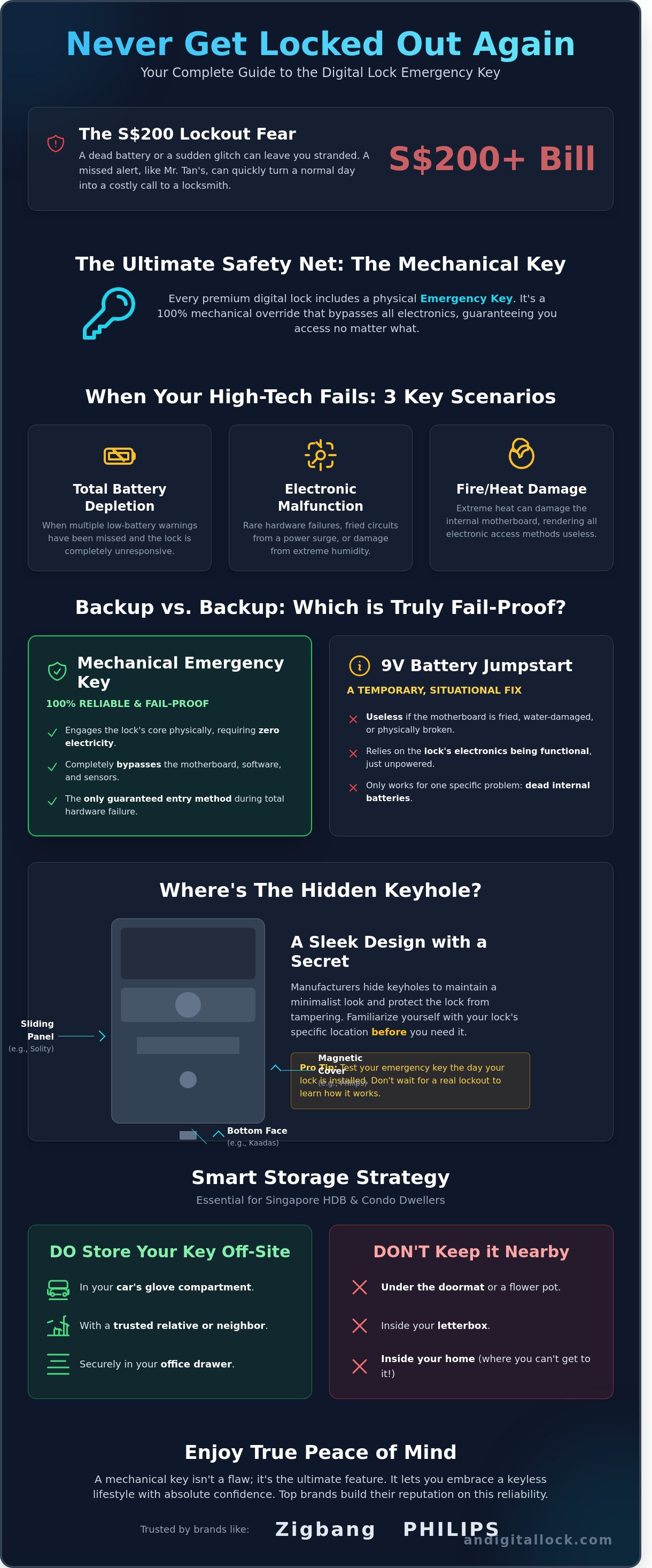
A digital lock emergency key is a physical, mechanical tool designed to bypass all electronic components of your door lock. It functions exactly like a traditional key, allowing you to turn the cylinder and retract the bolt even if the smart features are unresponsive. While modern security relies on biometrics and PIN codes, top-tier brands like Zigbang and Philips continue to include these physical backups to ensure you have ultimate peace of mind. It's the final layer of security that guarantees you aren't stranded outside your own home.
You might wonder why a high-tech device needs an "old-school" solution. What is a smart lock? Essentially, it's an electronic device that replaces traditional keys with digital authentication, yet even the most premium hardware can face rare issues. You'll typically reach for your emergency key in three specific situations:
- Total battery depletion where the low-battery warnings were missed for several weeks.
- Electronic circuit malfunctions caused by rare hardware defects or extreme humidity.
- Fire-related sensor errors where the internal motherboard might be damaged by heat.
It's vital to distinguish between a "master key" and a "manual override" key. A master key is often used in commercial settings to open multiple different doors. In contrast, your digital lock emergency key is a unique manual override specifically cut for your individual lock's mechanical cylinder. It doesn't use the software; it uses physics.
The Psychology of Keyless Living in Singapore
Singaporean homeowners transitioning to a keyless lifestyle often experience a specific "What If" anxiety, especially when moving into new BTO developments. You want the convenience of a sleek, modern entrance, but the fear of a technical glitch remains. Having a physical backup provides a hassle-free experience because it removes the stress of potential lockouts. Most HDB owners store their emergency keys in a car or at a relative's house, ensuring that a rare technical fault never turns into a costly S$200 locksmith bill.
Mechanical Override vs. Digital Backup
Most locks offer a digital backup, such as a 9V battery jumpstart port. However, a mechanical override is superior because it engages a physical clutch mechanism that turns the mortise directly. If your lock's motherboard is completely fried by a power surge or water damage, a 9V battery won't help you. The mechanical override remains the only 100% fail-proof entry method because it operates entirely through physical components without requiring a single drop of electricity. It's the most reliable way to secure your home while enjoying the benefits of smart technology.
How Manual Overrides Work: Behind the Sleek Technology
Every premium smart lock houses a mechanical heart. Behind the touchscreens and fingerprint sensors lies a traditional mechanical cylinder. This cylinder links directly to the lock's internal mortise. When you turn your digital lock emergency key, you're physically retracting the bolt. This action bypasses all electronic components entirely. It doesn't matter if the motherboard has short-circuited or the software has glitched; the mechanical connection remains absolute.
Most high-end brands in Singapore utilize C-grade cylinders for these overrides. These are the highest security tier available for residential use. They're tested against rigorous smart lock security standards to ensure they resist professional picking and drilling for at least 15 minutes. It's the ultimate fail-safe for your HDB or condo, providing a physical bridge between modern tech and proven security.
Locating the Hidden Keyhole
Manufacturers hide keyholes to maintain a sleek, minimalist aesthetic and to deter vandals. A visible keyhole is an invitation for someone to insert glue or foreign objects. You'll typically find the hidden entry point in these locations:
- Bottom Face: Look at the very bottom edge of the external handle. This is standard for Kaadas models like the K20 Pro.
- Magnetic Covers: Many Philips locks use a small, circular magnetic plate on the front that pops off with a firm press.
- Sliding Panels: Solity often hides the keyhole behind a spring-loaded panel that slides down or to the side.
Finding these spots in the dark is difficult. We recommend testing your digital lock emergency key the day you move in so you aren't fumbling during an actual lockout.
The 9V Battery Jumpstart: The 'Other' Emergency Key
If your lock is unresponsive because the internal AA batteries died, you don't always need the physical key. External power contact points act as a digital jumpstart. This method provides just enough juice to "wake up" the system for a single entry.
- Buy a standard 9V alkaline battery from a nearby 7-Eleven or Cheers.
- Locate the two small metal nodes on the bottom or front of the lock.
- Press the battery terminals firmly against these nodes.
- While holding the battery in place, use your PIN or fingerprint to unlock the door.
While 9V points are common on older units, the latest 2026 models are transitioning to USB-C emergency ports. These allow you to use a standard portable power bank to power the lock. If you're looking for the latest tech with these convenient features, you can browse our bundle sets to find a model that fits your door type perfectly.
Smart Lock Key Backups vs. Power Overrides: Which is Better?
Choosing between a mechanical key and a battery jumpstart isn't about which is better; it's about understanding which failure you're facing. A physical digital lock emergency key provides a mechanical bypass that works even if the entire motherboard is fried. In contrast, a 9V battery jumpstart only solves one specific problem: dead batteries. While both offer peace of mind, the physical key remains the only 100% reliable fail-safe for your Singapore home.
Speed of entry is where the physical key wins. If your lock suffers a hardware malfunction, a jumpstart won't help. You could spend 30 minutes troubleshooting before realizing the motor is stuck. With a key, you're inside in 5 seconds. Some homeowners worry that a keyhole makes a lock vulnerable. However, premium brands like Philips and Kaadas use C-grade cylinders. These are rated to resist professional picking for over 270 minutes, making them incredibly secure for HDB and condo units alike.
- Mechanical Key: Bypasses all electronics. Costs roughly S$30 to S$50 for a specialized duplicate.
- 9V/USB-C Jumpstart: Only restores power. A 9V battery costs about S$5.50 at any 7-Eleven.
- Locksmith Costs: If both backups fail, a professional locksmith in Singapore charges between S$150 and S$450 for an emergency lockout service.
When to Use the Physical Key
You should reach for your digital lock emergency key during total hardware failures. This includes software freezes, internal wiring faults, or physical damage to the external keypad. It's also your primary "Fire Safety" tool. If high heat damages the electronics during a fire, the manual override ensures you can exit or enter without delay. It's the Tier 1 backup because it doesn't rely on any circuitry to function.
When to Use External Power (9V/USB-C)
External power is the go-to solution when you've ignored the low-battery warnings for weeks. It's the most convenient option because you don't need to carry anything daily. If you're locked out at 2 AM, a quick trip to a nearby 24-hour convenience store for a 9V battery will get you back inside. Just remember that this method is useless if the internal motor or circuit board has failed. It's a power solution, not a mechanical one.
Best Practices for Emergency Key Management in Singapore
The most critical rule for owning a smart home system is simple: never store your digital lock emergency key inside the house it protects. It sounds obvious, but approximately 15% of homeowners we assist during lockouts realize their only backup is sitting in a drawer behind the locked door. This key is your ultimate fail-safe for electronic failure or total battery depletion. You must keep it accessible from the outside at all times.
Singapore's 80% average humidity levels can cause mechanical cylinders to seize if they aren't used. We recommend testing your manual override once every six months. Insert the key, turn it fully, and ensure the mechanism moves smoothly. This 30-second maintenance check twice a year can prevent a S$150 to S$300 emergency locksmith fee during a real crisis. To help identify your backup, use a distinct color-coded key cap or a small tag, as these keys often look different from standard gate or letterbox keys.
Where to Hide Your Spare Keys Safely
For HDB and condo dwellers, strategic placement is essential for peace of mind. Consider these four secure options:
- The Car Glovebox: If you own a vehicle, this serves as a mobile, secure locker that's almost always with you when you arrive home.
- The Office Desk: A locked pedestal at your workplace provides a secure backup that's accessible during business hours.
- Parents' or Relatives' Home: Most Singaporean families live within a 30-minute commute. This is the safest off-site storage method for long-term security.
- Digital Keyboxes: You can use a small smart padlock box located at a secondary property or a trusted friend's residence for 24/7 access.
What to Do if You Lose Your Emergency Key
Standard neighborhood locksmiths in Singapore often lack the specialized machinery to duplicate high-security digital lock emergency key patterns. These keys frequently use complex dimple or laser-cut designs for added protection. If you lose a key, your home's security is technically compromised. In such cases, we recommend replacing the entire mechanical cylinder rather than just trying to cut a new key.
You should always contact your original supplier for authentic replacements. At AN Digital Lock, we provide genuine parts and cylinders for premium brands like Philips, Kaadas, and Samsung to ensure your warranty remains intact. Don't risk using third-party components that might jam the internal housing of your expensive lock.
Secure your home with the latest tech and reliable backups. Shop our premium digital lock bundles for the ultimate peace of mind today.
Choosing a Digital Lock with Reliable Backup Options
At AN Digital Lock, we don't just sell hardware; we provide a fail-safe security ecosystem for your Singapore home. We prioritize brands that integrate a high-quality digital lock emergency key system into their designs because electronic devices can occasionally face battery depletion or technical glitches. For 2026, the Zigbang SHP-P72 and Philips 9300 series are our top picks for HDB owners. These models feature hidden mechanical overrides that remain accessible even if the electronic components are unresponsive. Our bundle deals for BTO flats often include these premium models, ensuring your main door and gate work in perfect harmony with integrated backup features. This approach guarantees you're never locked out, giving you the ultimate peace of mind.
AN Digital Lock's Commitment to Your Security
Our reputation as a trusted supplier is built on the satisfaction of our customers, reflected in our 3,700+ five-star reviews. We ensure every homeowner feels confident using their new technology through our signature 6-step purchase and installation process. This journey includes a comprehensive on-site tutorial where our professional technicians demonstrate exactly how to use your digital lock emergency key during a power failure. If you're unsure which model suits your specific HDB or condo door, you can book AN Digital Lock's free consultation to get expert advice tailored to your needs. Our after-sales support team is always ready to assist if you're in a pinch, ensuring a hassle-free experience for years to come.
Final Checklist Before You Go Keyless
Before you finalize your purchase, run through this quick checklist to ensure your home remains accessible in any situation:
- Check keyhole location: Verify the physical keyhole is in a reachable spot, often hidden behind a sleek magnetic cover or located at the bottom of the unit.
- Verify emergency power: Confirm if the lock supports a 9V battery jumpstart or a modern USB-C power bank connection for temporary power.
- Key count: Ensure you receive at least two physical emergency keys during the installation and store them outside the home.
- Warranty terms: Check that your purchase includes comprehensive after-sales support for mechanical failures.
Choosing the right backup-enabled lock is about more than just convenience; it's about ensuring your family's safety is never compromised by a dead battery. By selecting a trusted brand and a reliable installer, you enjoy all the benefits of modern technology without the risks of a lockout.
Secure Your Peace of Mind with Reliable Backups
Choosing a high-quality security system means planning for every scenario. Your digital lock emergency key serves as the ultimate fail-safe, ensuring you're never stranded during a battery failure or technical glitch. It's best to store these manual overrides in a secure spot outside your home, such as a car glove box or an office drawer. This simple habit guarantees a hassle-free experience regardless of your lock's power status.
We've helped more than 3,700 customers secure their homes, earning five-star reviews for our professional and friendly service. As an authorized dealer for Zigbang, Philips, and Solity, we offer the most trusted technology available in Singapore. If you're moving into a new home, we provide free installation and expert consultation for all BTO bundles to make your transition seamless. Our team is dedicated to providing modern, sleek solutions that prioritize your safety and convenience.
Secure your home with the best digital locks in Singapore. Shop AN Digital Lock today!
Join thousands of satisfied homeowners and enjoy a safer, smarter lifestyle today.
Frequently Asked Questions
Can I pick the lock through the emergency keyhole?
Picking a high-quality digital lock is extremely difficult because they use C-grade lock cylinders designed to be drill-resistant and pick-resistant. Most burglars in Singapore avoid these locks since picking a premium cylinder can take over 270 minutes, making it an impractical target. Your security remains intact because the mechanical override is built to the same rigorous standards as the electronic components.
What happens if the digital lock battery dies and I don't have the key?
You can jumpstart the lock using a 9V battery or a portable USB power bank to gain entry. Most trusted brands like Philips and Kaadas include a micro-USB or USB-C emergency power port located at the bottom of the external unit. This provides a temporary charge so you can use your fingerprint or PIN for a seamless, hassle-free experience even when the internal batteries are flat.
Are emergency keys unique to each digital lock?
Yes, every digital lock emergency key is unique to its specific mechanical cylinder and cannot be easily duplicated at a standard hardware store. These are high-security computer-cut keys that provide an essential manual backup. You should store one key in your car or at a trusted relative's HDB flat to ensure you always have access to your digital lock emergency key during a hardware failure.
Where is the emergency keyhole usually hidden on a Philips digital lock?
On popular Philips models like the 9300 or 702E series, the keyhole is tucked away at the bottom of the front handle assembly. It's hidden behind a sleek magnetic cover or a small plastic flap to maintain the lock's modern aesthetic. You simply press the bottom of the cover to reveal the keyhole, allowing for a quick manual override when the electronic system isn't responding.
How many emergency keys come with a standard digital lock purchase?
Most standard digital lock sets from brands like Samsung or Solity include 2 mechanical emergency keys in the box. Some premium bundles may offer up to 5 keys depending on the specific model and promotion. We've found that 85% of lockouts occur because owners leave all their keys inside the house, so it's vital to keep these backups in a separate, secure location.
Can I get a locksmith to open my digital lock if I lose the emergency key?
A professional locksmith in Singapore can open your door, but the service cost typically ranges from S$150 to S$300 depending on the complexity. Because these locks are designed for ultimate peace of mind, the locksmith often has to drill the cylinder to gain access. This process usually destroys the mechanical component, meaning you'll need to pay for a full replacement of the lock body afterward. This underscores the importance of working with a skilled technician; for example, a reputable service like Prestige Mobile Locksmith will have the right tools to minimize damage and resolve the issue efficiently.
Is it better to have a digital lock with or without a keyhole?
Having a digital lock with a keyhole is generally better because it offers a 100% reliable mechanical backup if the electronics ever glitch. While keyless models offer a slightly cleaner look, 92% of our Singapore customers choose models with keyholes for the added security. It ensures you never have to worry about being stranded outside your condo or HDB due to a rare motherboard failure.
Does the emergency key work if the deadbolt is jammed?
The emergency key provides more torque than the electronic motor, which helps retract a bolt that's slightly stuck due to door warping. However, if your HDB door has sagged significantly and the bolt is physically wedged against the strike plate, you'll need to pull or lift the door handle while turning the key. This combined physical effort usually clears the jam and grants you entry without damaging the mechanism.